Explorer Mode
Enter Explorer mode to view and delete folders
and les loaded on your player.
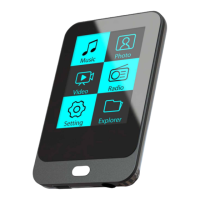
To enter Explorer mode, select and conrm EXPLORER
from the Main Menu.
If a compatible le is selected and conrmed, the le will
be played in its corresponding mode.
Music Mode: MP, WMA, OGG
Video Mode: AVI, WMV, FLV, RM, RMVB
Photo Mode: JPG, BMP, GIF
EBook Mode: TXT, LRC
Explorer Controls
When you choose EXPLORER mode from the Main menu,
you will see the File Explorer screen. You can nd and
delete les or folders from the player.
Press <UP> to move the selection up; press <DOWN>
to move the selection down.
Press <ENTER> to conrm a selection.
If a folder has been selected, the contents of the
folder will be displayed.
If a compatible le has been selected, the le
will be played in its corresponding mode.
Press <LEFT> to cancel a screen and return to the
previous folder.



 To Next Page