4
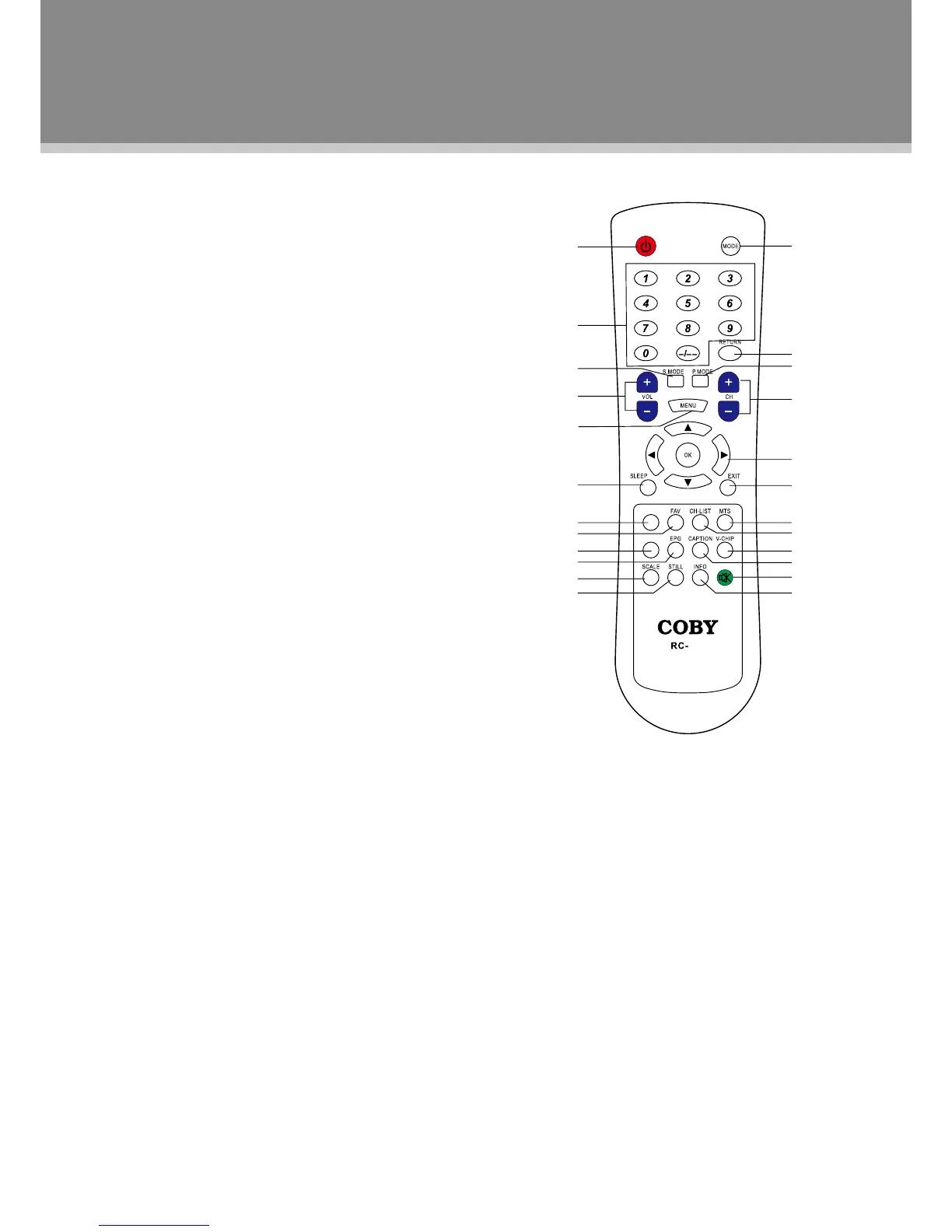
Remote Control Drawing
1.POWERbutton
Presstoturnthepoweron/off.
2.NumericKeypad
Presstoinputdata.
3.S.Mode
Presstoselecttheaudiomode.
4.VOLUME+/-button
Presstoadjustthesoundlevel.
5.MENUbutton
Presstoshowthesystemmenu.
6.Sleepbutton
Presstoaccessthesleeptimer.
7.FAV+button
Presstoskipthefavoritechannelsforward.
8.FAVbutton
Presstodisplaythefavoritechannellist.
9.FAV-button
Presstoskipthefavoritechannelsbackward.
10.EPGbutton
AccesstheElectronicProgramGuide.
11.SCALEbutton
Adjustthedisplayeffect.
12.STILLbutton
Presstofreezethepicture.
13.MODEbutton
Presstoselecttheworkingmode.
14.RETURNbutton
Presstoreturntothepreviouslyviewedchannel.
15.P.Mode
Selectthepicturemode.
16.CHANNEL+/-button
Presstoskipchannels.
17.Direction&OK
Whileworkingwiththesystemmenu,pressthedirectionbuttonsto
movethecursorandpressOKtoconrmsettings.
18.EXITbutton
Presstoexitthesystemmenu.
19.MTSbutton
SettheATVaudiomodeortheDTVaudiolanguage.
20.CH-LIST
Presstodisplaythechannellist.
21.V-CHIP
AccesstheLOCKmenu.
22.CAPTION
Selecttheclosedcaptionmode.(CCOff,CCOn,CCOnMute)
23.MUTEbutton
Presstomufe/releasesound.
24.INFO
Presstoshowthecurrentworkinginformation.
Remote Control
1
2
13
14
15
16
17
18
19
20
21
22
23
24
3
4
5
6
7
8
9
10
11
12
FAV+
FAV-
023



 To Next Page