13
Connections
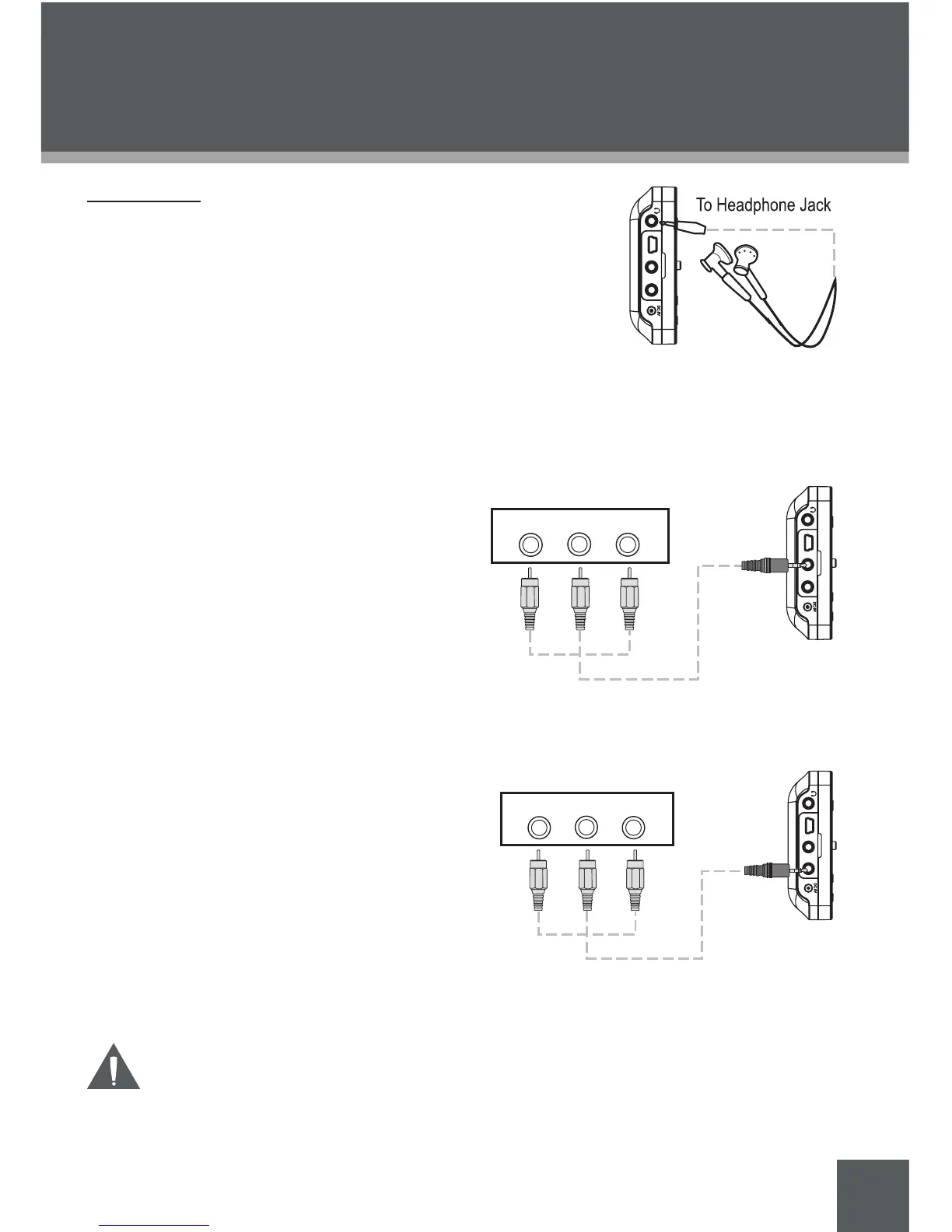
Connecting Headphones
Connect headphones/earphones to the Headphone Out jack for
private listening.
Lower the volume level before connecting headphones, then
gradually increase the volume for comfortable listening.
Hearing experts advise against the constant use of personal stereos played at high volume.
Constant high-volume use can lead to hearing loss. If you experience ringing in your
ears or hearing loss, discontinue use immediately and seek medical advice.
Connecting to a Television (AV Out)
Connect a television to the AV Out jack to play
video or photos on your home theater system.
Make the connections as shown in the
diagram.
Set the Hold/LCD/AV Out switch to the
“AV Out” position.
Set your television to the correct AV
mode. You will see the PMP4320 video
signal displayed on your TV screen.
Connecting to an AV Device (AV In)
Connect an external AV device (e.g., camcord-
er, DVD player, video game console) to the AV
In jack to use your PMP4320 as a recording
device.
Make the connections as shown in the
diagram.
Set the Hold/LCD/AV Out switch to the
“LCD” position.
Set your television to the correct AV mode.
You will see the PMP4320 video signal
displayed on your TV screen.
Be sure to set the “Setup > System > TV Standard” setting of your
PMP4320 to match the video signal (NTSC or PAL).
1.
2.
3.
1.
2.
3.
GETTING STARTED



 To Next Page