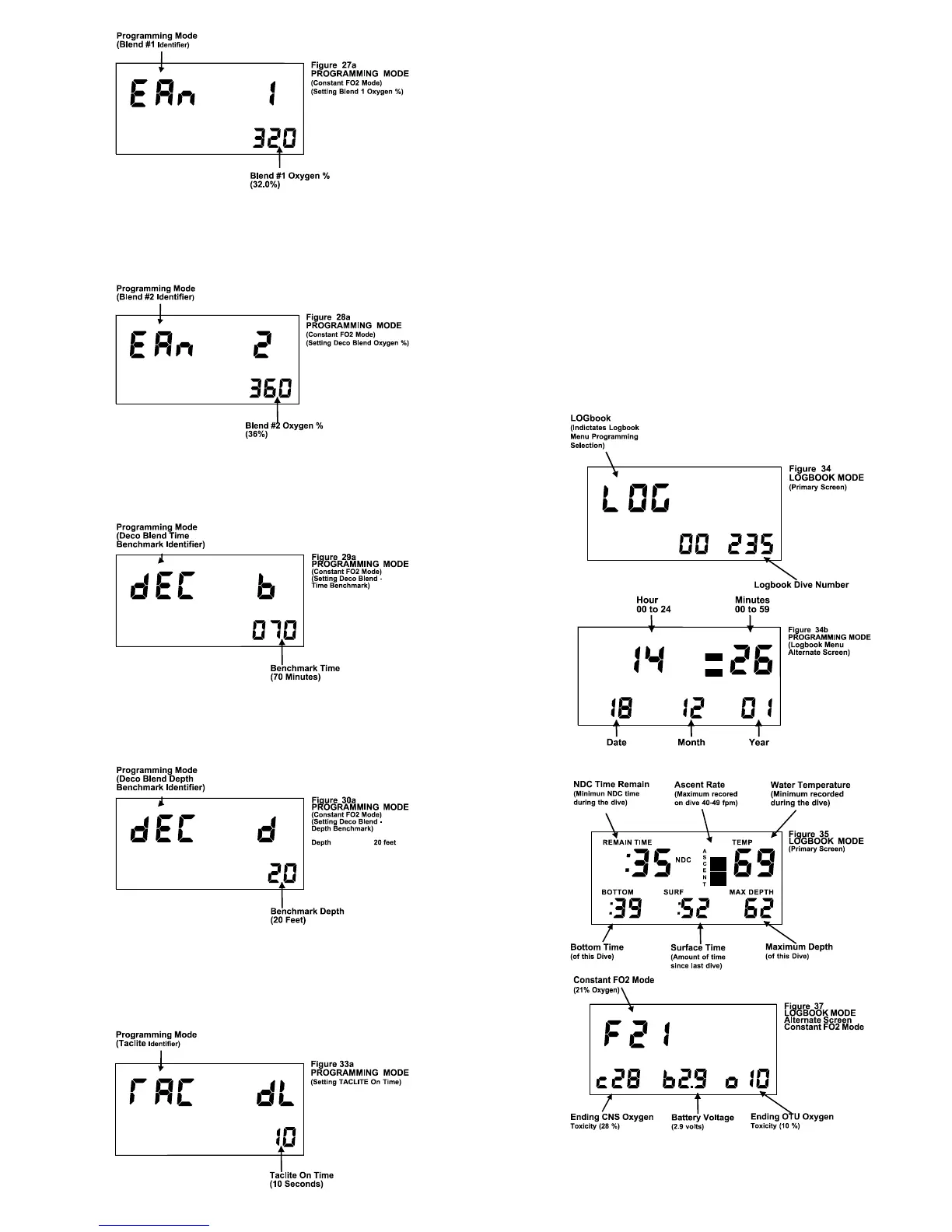
TOUCH PROGRAMMING - BLEND #2: The oxygen percentage of Blend
#2 can be programmed from 21.0% to 99.9%. Once programmed the
oxygen percentage will remain at the value programmed until changed by
the user.
TOUCH PROGRAMMING - BLEND #2 - TIME BENCHMARK: The Blend
#2 (Deco) Time Benchmark can be programmed from 10 to 999 minutes.
Once programmed the time benchmark setting will remain at the value
programmed until changed by the user.
TOUCH PROGRAMMING - BLEND #2 - DEPTH BENCHMARK: The
Blend #2 (Deco) Depth Benchmark can be programmed from 0 to 99 feet.
Once programmed the depth benchmark setting will remain at the value
programmed until changed by the user.
TOUCH PROGRAMMING - TACLITE™: The Taclite™ dwell (on) time
can be set so that when the face on the EMC-16 is tapped the Taclite™
will stay on from 1 to 98 seconds. If the dwell time is programmed to ‘0’
the Taclite™ will never come on, if programmed to 99 the Taclite™ will be
on whenever the EMC-16 is awake.
TOUCH PROGRAMMING - LOGBOOK MODE: The Logbook of the
EMC-16 has two screens, a Primary Screen and an Alternate Screen. To
switch to the Alternate Screen just tap firmly on the face of the unit. The
Logbook is accessed via the Touch Contact Programming (see page 4).
This enables the diver to view dive statistics; the EMC-16 has the ability to
provide diving data for the most recent 1024 dives. The most recent dive
will be displayed first. To view the next dive, touch the contacts 1 & 2 with
wetted finger after pausing for a few seconds. Do not use a metal object
such as a coin or knife-blade once in the Logbook since it will cause the
unit to exit the Logbook and return to the Surface Interval.
Information contained in the Logbook will include:
Overall Dive Number Minimum NDC Time
Fastest Rate of Ascent Minimum Water Temperature
Bottom Time Surface Interval Before Dive
Maximum Depth Ending Battery Voltage
Maximum DEC Time (Deco Dive) Maximum Ceiling (Deco Dive)
It is not necessary to exit the Logbook Mode prior to initiating a dive. Once
the diver has descended below five feet, the EMC-16 will immediately
enter the Dive Mode.
NOTE: The overall Dive Number that is displayed on the Logbook Menu
screen (Figure 34) permits the diver to identify the total number of dives
made with that EMC-16. If the logbook example shown is the most recent
dive made, it can be readily identified that 235 dives have been made with
this specific unit.
Figures 35 & 37 display the Logbook of a Normal Dive.
While Figures 36 & 38 display that of a Deco Dive
6


 To Next Page