17
After the X10 is powered ON, the below screen will show up in sequence.
① As soon as powered ON. ② 26 seconds after power ON. ③ 66 seconds after power ON
5. SETUP
Go into SETUP menu with remote controller.
5-1. Music DB
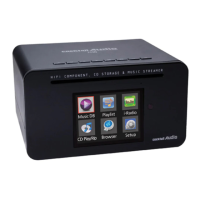
Music DB : Play loaded(ripped) music in DB folder of X10.
Playlist : Make Playlist and play it.
I-Service : Play internet radio or run Online Music Services on X10.
CD Play/Rip : Load(rip) CD and play it directly.
Browser : See all storages such as hard disk of X10, USB host and networked storages.
Setup : Change the settings.
You can select each item with the arrow key and confirm it
with the OK button.
Select the Display Mode and confirm with the OK button.


 To Next Page
 Loading...