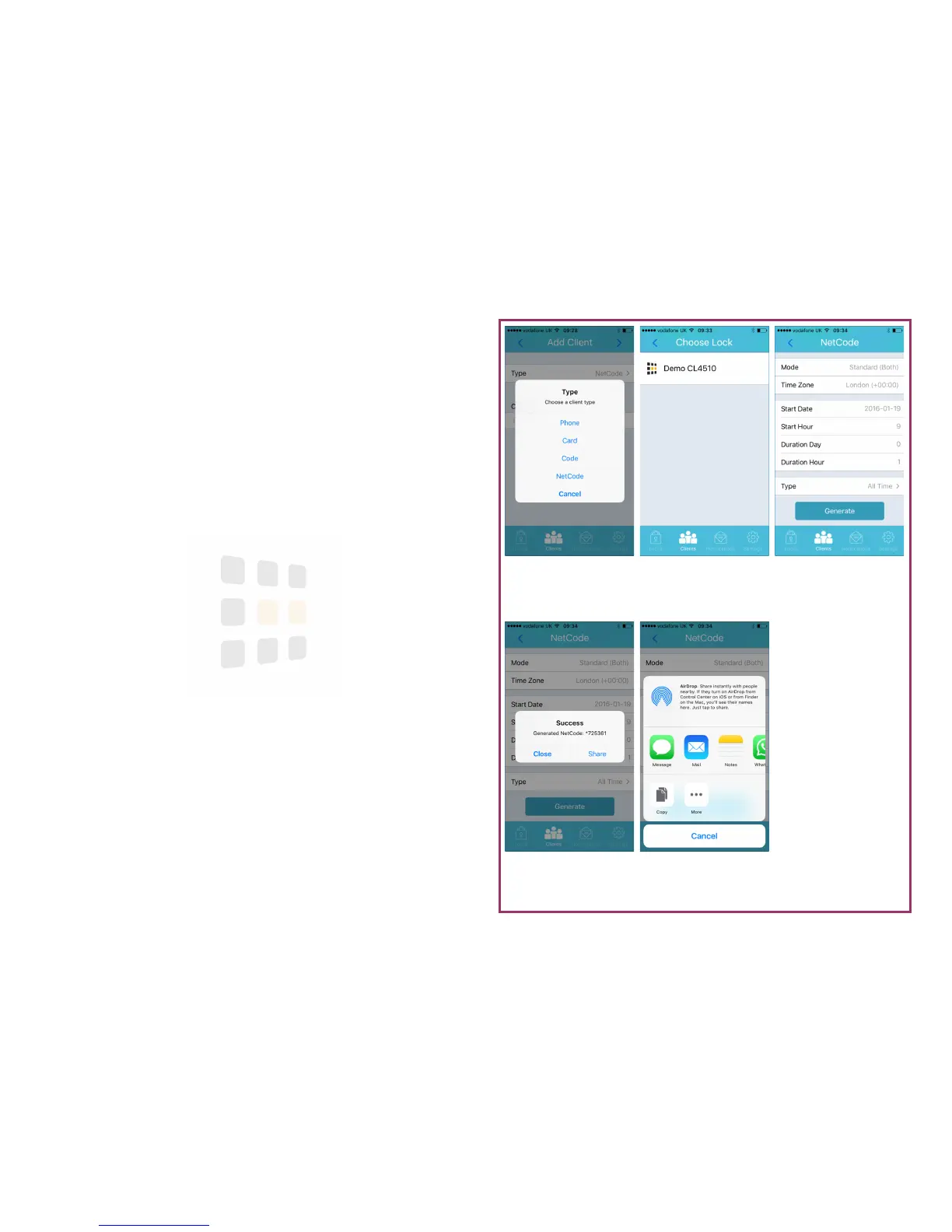
NetCode Displayed
Use Share to send the
NetCode to others
Details
Configure click Gener-
ate to continue
Choose Lock
Select the lock to create
the NetCode for
Select Type
Select NetCode as the
client type
Sharing
Send via Message or
Email
Page 13
NetCode Client
A NetCode client is code that only works from a specific date & time and for a
set duration. NetCode clients do not appear in the client list.
1. Follow the steps on page 9
2. Click the > (next) button (top-right of the screen)
3. Touch the lock to add the client to
4. Choose a start date and hour
5. Choose a duration (either days or hours). For example, for a 1 hour
NetCode, leave the Duration Day = 0 and set Duration Hour = 1
6. For type, select All Time (Multi-use) or One Time (Single-use)
7. Touch Generate to create the NetCode
8. The NetCode will be displayed - touch Close to dismiss the message or
Share to send the NetCode via email, message, etc.



 To Next Page