STEP 3
Fit the butterfly spindle to the inside,
non-code side.
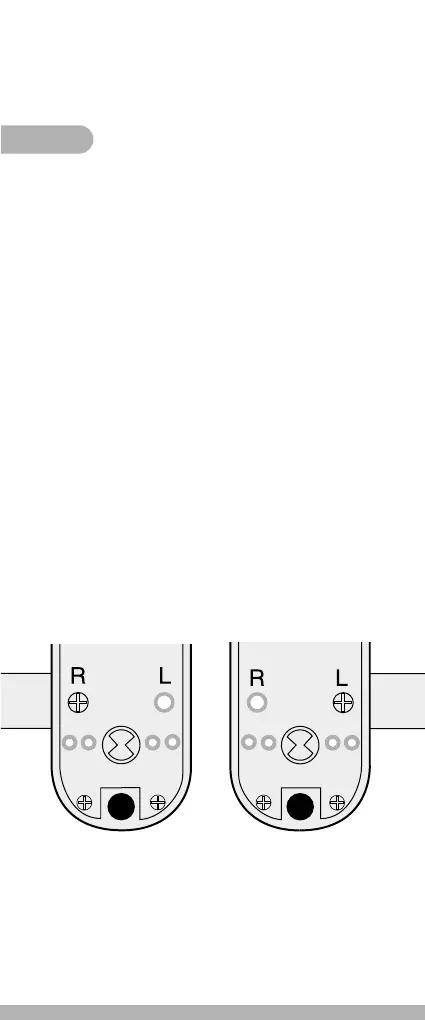
Note: Front plate supplied set up for Right
Hand doors, viewed from code side.
N/A for CL500 KEY models.
Check that the lever handles are correctly orientated
for the hand of door. To change the hand of a lever
handle proceed as follows:
1. Code Side Lever
• Remove blue handing screw from position ‘R’ (Fig 1).
• Back off the two silver colour screws at the bottom
of the lock one full turn each.
• Force handle through 180° to preferred orientation.
The clutch will pop through twice to achieve this.
• Secure the two silver colour screws back a full turn.
• Replace blue handing screw in position ‘L’ (Fig 2).
2. Back Plate Lever
• Turn handle to preferred orientation.
• Fit spindle drive assembly (number 15 in contents).
• Fit 2 fixing screws.
Lock is now set up for a door hung on left.
Fig 1
Set up for
Right Hand hung door
Fig 2
Set up for
Left Hand hung door


 To Next Page