5
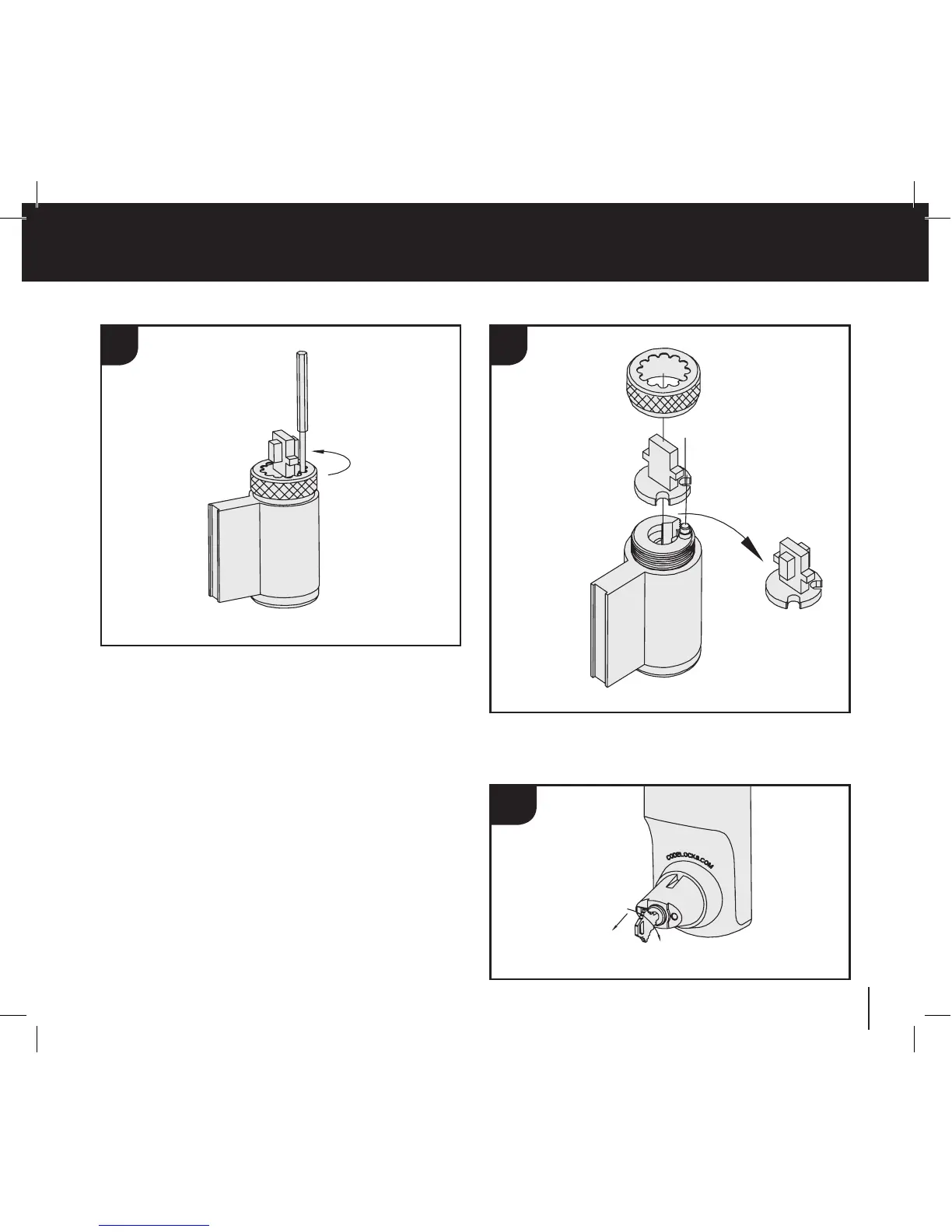
3. Removekeyfromcylinder.Holddownthecontrolpininthe
endofthecylinderandunscrewthecap.
4. Replacethetailpiece,holddownthecontrolpinandscrew
thecapfullyonwithouttightening.Ensurecontrolpin
projectstolockthecap.
5. Testthekeyoperation.Ifthekeyisdifficulttoinsertortight
whenturning,thenthecapmaybetootight.Loosenthecap
onenotchatatimeandtrythekeyagain.Ifthekeyinserts
andturnsOK,butisdifficulttoremove,thenthecapmaybe
tooloose.Tightenupthecaponenotchatatime.Adjustthe
capuntilthekeyinserts,turnsandremoveseasily.
6. Withkeyturned90ºclockwisereplacecylinder,cylinder
coverandhandle.
CAUTION! DO NOT INSERT THE KEY IN THE CYLINDER
ONCE YOU HAVE REMOVED THE SCREW-CAP
3 4
5-6


 To Next Page