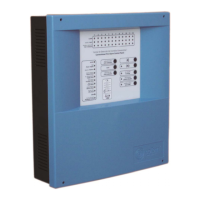
Digital fire detection control panel
COMPACT LYON
FIRE PRETECTION MANUFACTURER 41
Ctra. de Molins de Rei a Rubí, Km. 8,4 - 08191 RUBÍ (Barcelona) ESPAÑA.
Tlf.: +34 935 862 690 - Fax:+34 936 999 261 - cofem@cofem.com - www.cofem.com
3.2.1.2. Incident and anomaly display.
Incidents and anomalies appear on the screen following this order of priority:
Alarms
Relays on
Faults
Disabled zones and points
Supply faults
Alarms
If an alarm takes place, the control panel will illuminate the red ALARM LED, sound the buzzer and
show the following screen.
In order to be able to select from amongst the different alarms, we must move using the up and down
cursors. The first line of the alarm corresponds to the selected alarm, whereas the second field refers to the
last alarm received.
A
LARMS TYPE :
01>LABEL CALL POI NT
01
01
If the right cursor is pressed we will be able to see the rest of the alarm information.
Unit Loop Point
A
LARMS C:B:Pt:
01>Z:001 LABEL 01 01 006
<<01
02
Relays on
If the control panel actuates a relay, it will illuminate the amber RELAYS ON LED, sound the buzzer
and show the following message:
T
RIGGER RELAY:
01>LABEL ALARM RELAY
02 LABEL 006
>>01
02
If the right cursor is pressed we will be able to see the rest of the activation information.
Unit Loop Point
T
RIGGER C: B: Pt :
01> -------
02 01 01 006
>>01
02
Selected trigger Triggers


 To Next Page