11
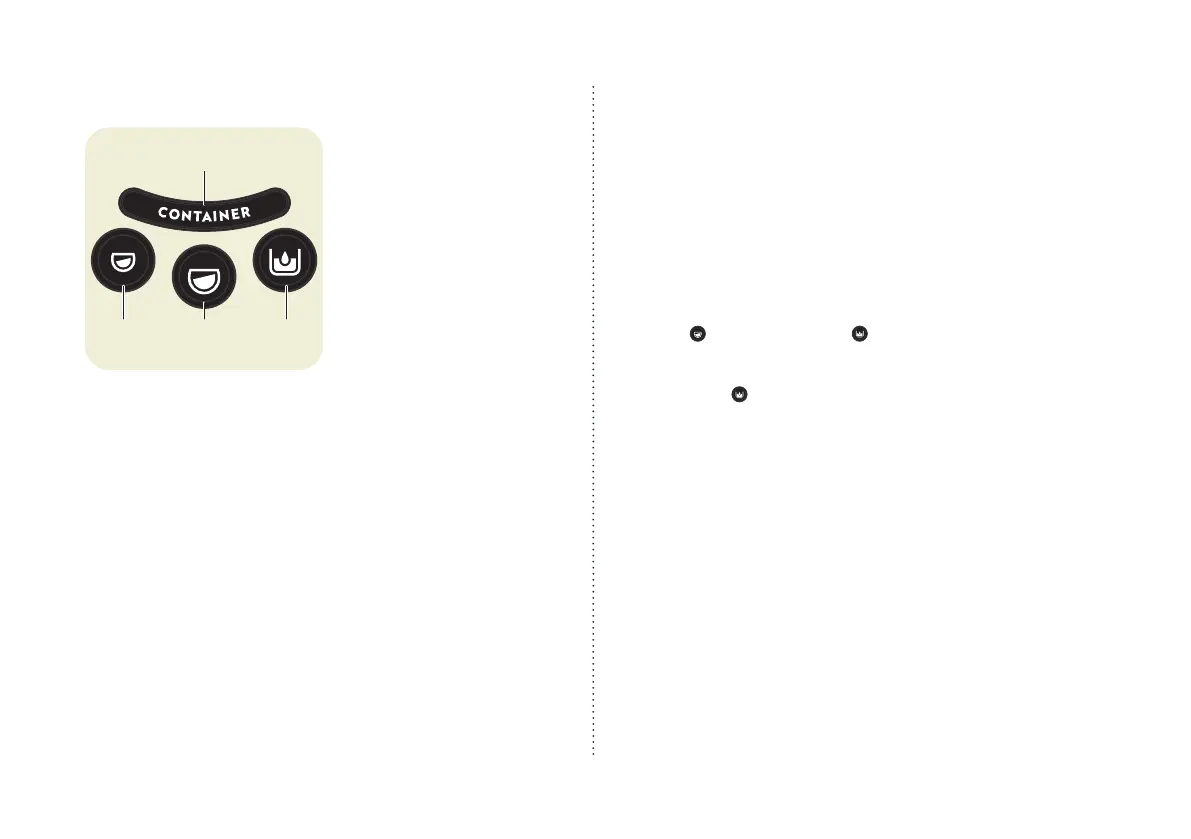
Display and operating keys
1 “CONTAINER” display
Indicates whether the cof-
fee ball collection container
and the residual water need
to be emptied.
Only goes out if the collec-
tion container has been
removed from the machine
for at least 8 seconds.
If the collection container is
pulled out during a running
process, the process stops
immediately.
The process continues when
the collection container is
properly reinserted.
2 Espresso key
Medium cup (40 ml), pro-
grammable
3 Lungo key
Large cup (110 ml), pro-
grammable
4 Cleaning key
Flushes out piping.
Key illumination
All keys
Light up: The machine is now ready for use.
Do not light up: The coffee machine is in energy-saving mode.
Press any key or gently close the operating lever.
Coffee key
Lights up: Brewing.
Flashing: Warm-up, programming of coffee quantity in progress.
Lungo key
and cleaning key ash: Steaming out in prog-
ress.
Cleaning key
Lights up blue: Lack of water.
Flashes red during preparation: Descale the machine.
Lights up red: Electronic or temperature error.
Flashes purple: Descaling in progress.
Lights up purple: Indicates water tank change during descaling.
Flashes purple/red: Descaling stopped due to power interrup-
tion. Flush machine.
“CONTAINER” display
Lights up orange: up to 9 coffee balls / approx. 0.4 l water in the
collection container Coffee ball and residual water.
X
Remove the collection container from the coffee machine
for at least 8 seconds, empty it and dispose of the coffee
balls.


 To Next Page