11
PRINTER MAINTENANCE
Cognitive printers need very little maintenance other than occasional
cleaning. Clean the printer body as required, using a soft cloth
moistened with a mild detergent cleaner.
We recommend cleaning the printhead when loading print media.
Printhead cleaning is easy and fast:
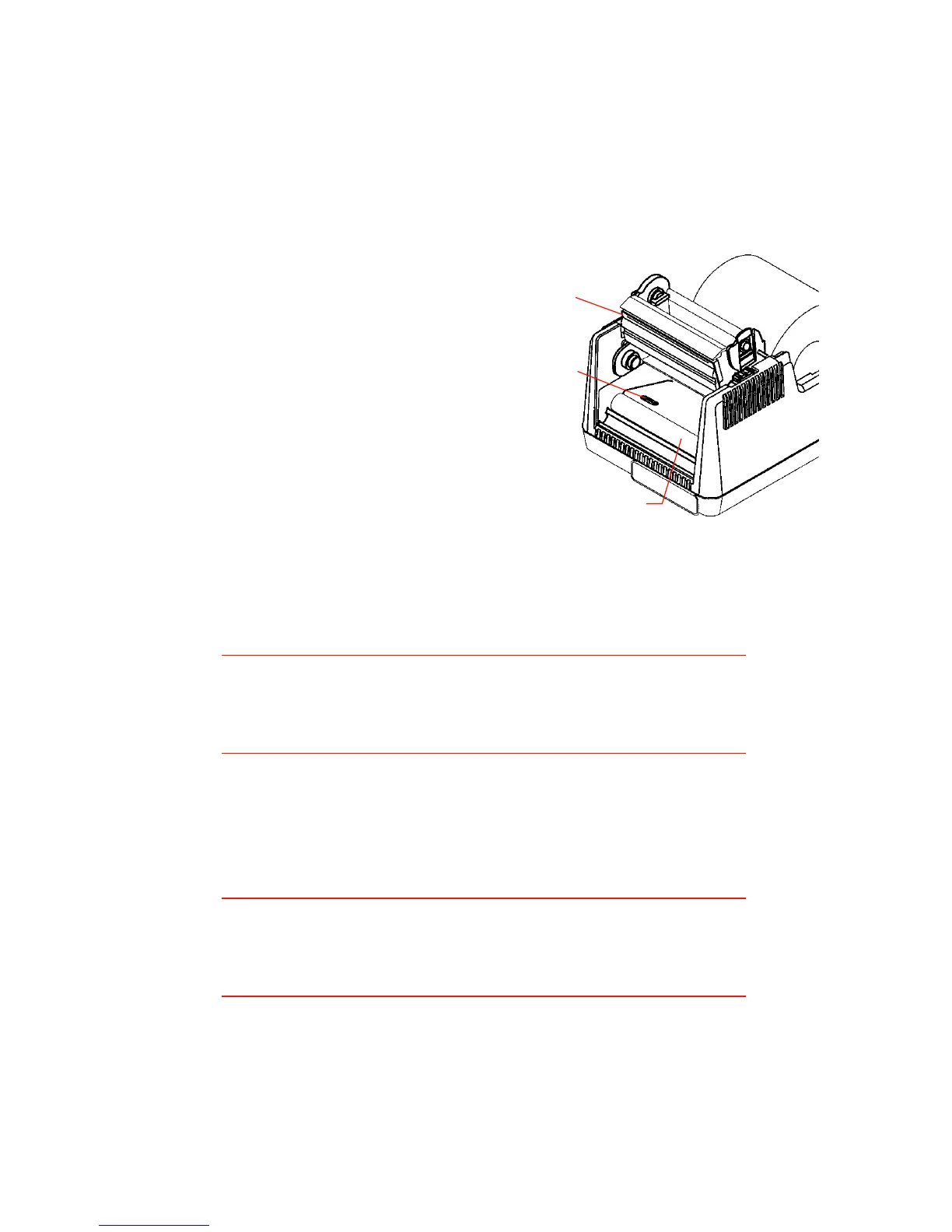
Figure 5. Printer opened for cleaning
1. Unlock and raise the print-
head if it is not already
raised.
2. If you are cleaning a thermal
transfer printer with a ribbon
installed, remove the ribbon
take-up core and lay it in
front of the printer.
3. Using a soft cloth moistened
with 98% or 99% pure
isopropyl or denatured
alcohol, clean all dirt and
label residue from the
printhead, paying particular attention to the “burn line” (this is
the thin black line near the front edge of the printhead).
Caution!
Do not clean the printhead or drive roller using abrasive or
metallic objects, or ammonia-based cleaners or other harsh
chemicals. These practices can cause serious damage.
4. If you removed the ribbon take-up core, reinstall it now.
5. Wipe the drive roller with the cleaning cloth. Confirm that the
printer is ON, then press the FEED button to rotate the drive roller ¼
turn. Repeat to reach all portions of the drive roller.
Caution!
Take care that the cleaning cloth does not become
entangled with the ribbon mechanism or drive roller during
this process.
6. Confirm that the index detector is unobstructed.
7. Resume the media loading procedure, or if there is already media
in the printer, lower and lock the printhead.
8. Confirm that the printer is ON and that the READY indicator is
glowing green, then resume normal operation.
Printhead
Drive roller
Index detector


 To Next Page