3
PRINTER COMMUNICATIONS
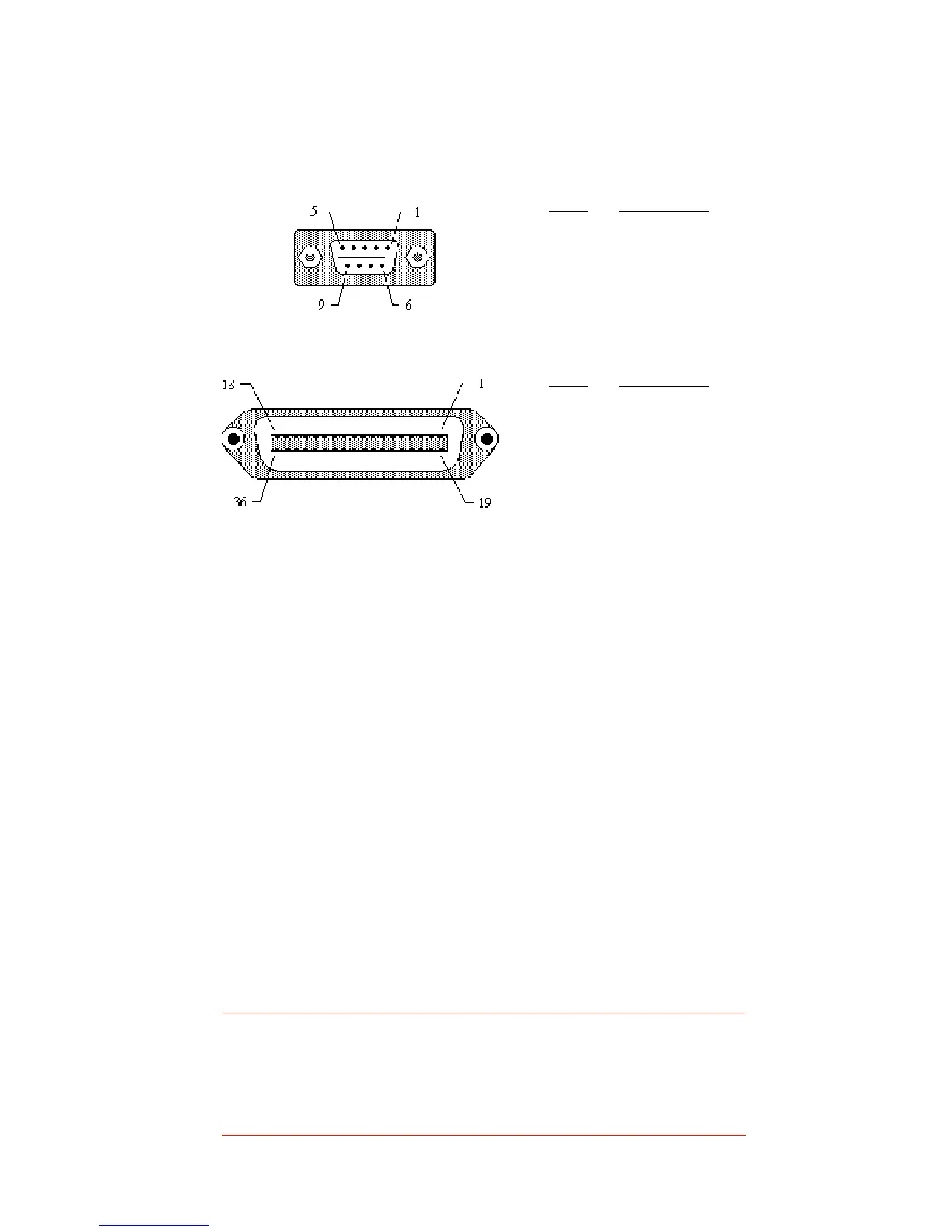
Advantage printers may be equipped with Centronics parallel, RS232
serial, and/or Ethernet communication ports, wired as shown below.
Serial input connector (DB9S)
Standard printer cables
The following standard cables available for Advantage printers:
Centronics parallel cable: Order CSI P/N 61-00-0002
RS-232 cable, DB9 to DB9: Order CSI P/N 90-88-0079
RS-232 cable, DB9 to DB25:Order CSI P/N 90-88-0078
Serial port communication parameters
Advantage printers are configured as DTE equipment, and use RTS/CTS
handshaking or XON/XOFF protocol (control characters are DC1 and DC3).
The serial port supports the following parameters:
Speed: 600, 1200, 2400, 4800, 9600, 19200
Parity: Odd, Even, or None
Word length: 7 or 8 bits
Stop bits: 1 or 2 bits
Default parameters: 9600 baud, no parity, 8 data bits, 1 stop bit
Note:
Advantage printers require a “null modem” when connected
to another DTE device (i.e., a personal computer). Our serial
cables are wired in a null modem configuration. Other cables
may require an external null modem adapter.
Pin # Description
1 Strobe
2 - 9 Data bits 0 - 7
10 Acknowledge
11 Busy
12 Out of paper
13 +5VDC
17 Chassis ground
31 Reset
32 +5VDC
16, 33, 19-30 Signal ground
Parallel input connector (Centronics 36 pin)
Pin # Description
2 RXD (printer data input)
3 TXD (printer data output)
5 Ground (-)
7 RTS (printer busy)
8 CTS


 To Next Page