EasyManua.ls Logo

colacam h11 - Getting Started with Your Camera; Indicator Light Modes; Charging the Device

colacam h11
8 pages
Print Icon
To Next Page IconTo Next Page
To Previous Page IconTo Previous Page
Loading...
1.The
blue indicator
light
is on, it
is the
camera hotspot
mode;
the red
indicator
light
is in the
camera network
mode.
you
can
cutoverthe
hotspot
mode and
network
mode by
long
pressing
the
power
button.
Click
twice the
M button to
restore
the factory
settings.
2.Long
press
and
hold the
M button,
the work i
ndicator will
turn
off, and longi press
and hold
again to
turn on the
work
indicator
3. Insert
SD card
inside
the device.
After the
device is
tu rned
cn, the
recording
will start
automatically.
Through the
App
setting,
you
can
select full-time
recording
(red
or blue
light
flashing)
in the recording
mode,
and alarm
mode
(slow
flash
red or
blue light),
when
the video is
not always
on),
the take
photo
mode
(red
or blue
indicator
lighl is
always on for
1 0
seconds).
4.
Charging:
The
charging
indicator
blue flashes
slowly.
When
it is full,
the indicator
light
blue is
always
on.
please
use the
regular
manufacturer's
5V1 A charger
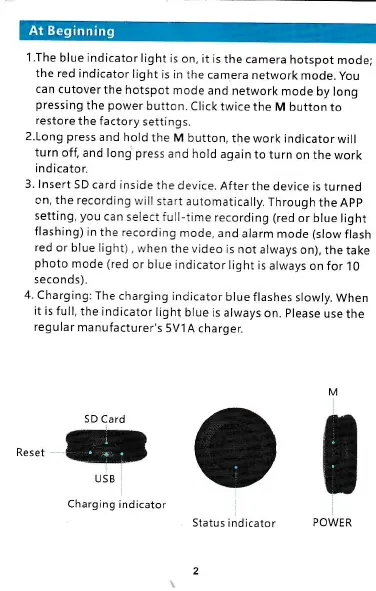
SD
Card
a
USB
Charging
indicator
M
t
:
Status
indicator
2