EasyManua.ls Logo

colacam h11 - Connecting to WiFi Network

colacam h11
8 pages
Print Icon
To Next Page IconTo Next Page
To Previous Page IconTo Previous Page
Loading...
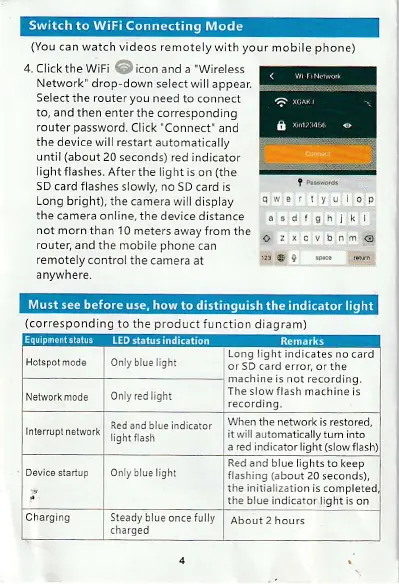
(You
can watch videos remotely
with
your
mobile
phone)
4. Click
the WiFi
i;.
icon
and a
"Wireless
Network'
drop-down select
will appear
Select
the router
you
need
to connect
to, and then
enter the corresponding
router
password.
Click
"Connect"
and
the
device will restart
automatically
until
(about
20 seconds)
red indicator
light flashes. After
the light is on
(the
SD
card flashes slowly, no
SD card is
Long bright),
the camera will display
the camera online. the
device distance
not morn
than 1 0 meters
away from the
router, and
the mobile
phone
can
remotely control
the camera at
a nywhere.
(corresponding
to
the
product
function
diaqram)
H0lspol
mode
Network mode
I
0nly red light
The slow flash machine is
Red and blue indicator
tnlelruplnetworI
lrqhtflash
When the
network is restored,
it will automatically
turn into
a red indi.ator light
(slow
Only
blue lighl
the initialization
is comple
the blue indicator
light is on
Only blue lighi
Long
light indicates no
card
or
5D card error, or the
machine
s not recordinq.
Red and
blue
lights
to keep
flashing
(about
20 seconds),
Charging Steady
blue once fully
About 2 hours