EasyManua.ls Logo

colacam h11 - Advanced Features

colacam h11
8 pages
Print Icon
To Next Page IconTo Next Page
To Previous Page IconTo Previous Page
Loading...
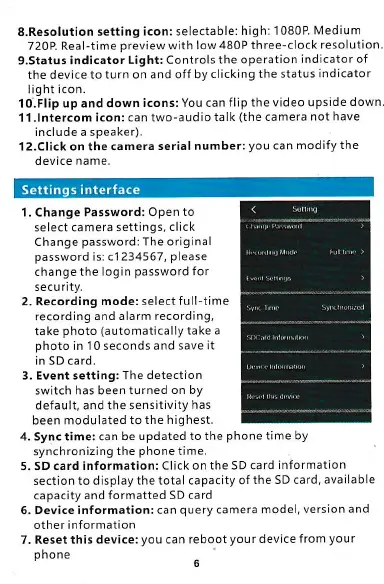
S.Resolution
setting
icon: selectable:
high: 1 080P
Medium
720P. Real-time
preview
with low
480P three-clock
resolution.
g.Status
indicator
Light: Controls
the operation
indicator of
the device to
turn on and off by
clicking the status
indicator
light icon.
1 O.Flip
up and down
icons: You can
flip the video upside
down.
1 l.lntercom icon:
can two-audio talk
(the
camera
not have
include a speaker).
1 2.Click on the camera
serial number:
you
ca n modify
the
device name.
:*m*l
ffi
4. Sync time: can be
updated to the
phone
time by
synchronizing
the
phone
time.
5- sD card information: Click on the SD card
information
section to display
the tota I capacity of
the S D card,
available
capacity and formatted
sD card
6.
Device information: can
query
camera model,
version and
other information
7. Reset this
device:
you
can reboot
your
device from
your
phone