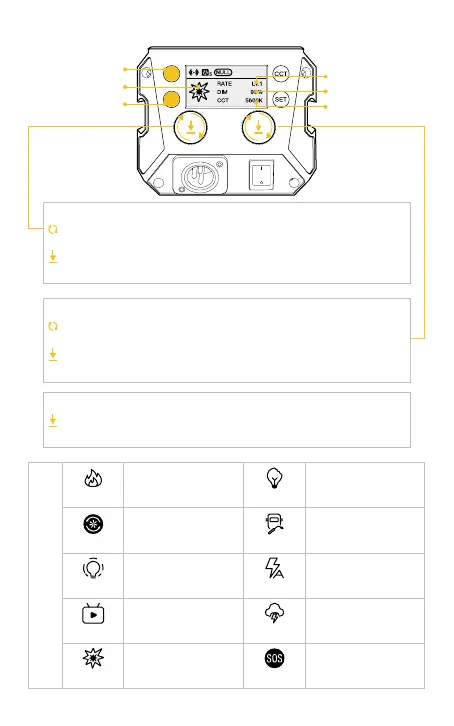
Turn the knob clockwise or anti-clockwise to adjust color
temperature (CCT) from 2700K~6500K
Press down the knob to quickly switch the preset color temperature
to 2700K, 3200K, 4000K, 5600K, and 6500K
Turn the knob clockwise or anti-clockwise to adjust brightness (DIM)
from 0%~100%
Press down the knob to quickly switch the preset brightness to 0%,
25%, 50%, 75%, and 100%
Press to switch light eect: Fire → CCT Chase → Pulsing → TV →
Explosion → Faulty Bulb → Welding → Strobe → Lightning → S.O.S
Color Temperature Control Knob
Brightness Control Knob
Light Eect Mode (EFF) Button
EFF Mode Button
Rate Option Button
Special Eect
Brightness
Rate
Color Temperature
RATE: Lv.1 - Lv.5
DIM: 0%-100%
CCT: 2700K-6500K
RATE: Lv.1 - Lv.5
DIM: 0%-100%
CCT: LOCK
RATE: Lv.1 - Lv.5
DIM: 0%-100%
CCT: 2700K-6500K
RATE: Lv.1 - Lv.5
DIM: 0%-100%
CCT: LOCK
RATE: Lv.1 - Lv.5
DIM: 0%-100%
CCT: 2700K-6500K
RATE: Lv.1 - Lv.5
DIM: 0%-100%
CCT: 2700K-6500K
RATE: Lv.1 - Lv.5
DIM: 0%-100%
CCT: 2700K-6500K
RATE: Lv.1 - Lv.5
DIM: 0%-100%
CCT: 2700K-6500K
RATE: Lv.1 - Lv.5
DIM: 0%-100%
CCT: 2700K-6500K
RATE: LOCK
DIM: 0%-100%
CCT: 2700K-6500K
Fire
CCT Chase
Pulsing
TV
Explosion
Faulty Bulb
Welding
Strobe
Lightning
S.O.S
EFF
3. EFF Mode (Short press EFF Mode Button to enter)



 To Next Page