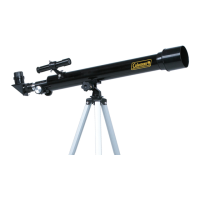
This document is an instruction and owner's manual for the Coleman CDB804AZ3 Telescope.
Function Description:
The Coleman CDB804AZ3 is a precision-crafted telescope designed for both beginner and advanced stargazers. It functions as an astronomical device, providing views of the moon, planets, dozens of galaxies, star clusters, and nebulae. Additionally, it serves as a terrestrial (land) telescope, bringing natural wonders closer, delivering superb scenic views, and allowing for observation of animals and landscapes from a distance. The telescope uses a refractor-type optical design, employing lenses to gather and focus light. The combination of the front objective lens and eyepiece gathers more light than the human eye can, focuses it, and presents a brighter, clearer, and magnified virtual image. Light enters the open end of the telescope tube, and the objective lens refracts or bends the light, causing parallel light rays to converge at a focal point, and non-parallel rays to converge upon a focal plane, resulting in an enlarged focused image for viewing through the eyepiece.
Important Technical Specifications:
- Objective Lens Diameter: 80mm (3.15”)
- Focal Length: 800mm K
- Maximum Magnification: 40x
- Eyepieces: K10, K25 (10mm, 25mm)
- Accessories: 45° Erecting Image Diagonal Prism, Red Dot Finder, Astronomy CD
- Mount Type: AZ3 Mount (Altitude-Azimuth mount)
- Power Source for Red Dot Finder: 3-volt lithium battery
Usage Features:
- Assembly: The manual provides detailed instructions for setting up the tripod, attaching the accessory tray, mounting the telescope main body, attaching the Red Dot Finder, and installing the diagonal, eyepiece, and control cables. It emphasizes not overtightening screws when attaching the main body.
- Red Dot Finder: This is a zero-magnification pointing tool that superimposes a small red dot onto the night sky. It features a variable brightness control, azimuth adjustment control, and altitude adjustment control. To use, one looks through the sight tube and moves the telescope until the red dot merges with the object, keeping both eyes open. Alignment involves removing a plastic spacer, sliding the ON/OFF switch to brightness level 1 or 2, inserting a low power eyepiece into the focuser, locating a bright object, and adjusting the altitude and azimuth controls until the red dot merges with the object.
- AZ3 Mount Operation: The AZ3 mount allows for movement in altitude (up-down) and azimuth (left-right). Coarse azimuth movement is controlled by a locking knob near the tripod head. Coarse altitude movement is controlled by a friction bolt. Micro-adjustment control cables are used for small, precise movements to center objects in view. It is recommended to center these controls on their threads before making coarse adjustments.
- Focusing: Focusing is achieved by slowly turning the focus knobs until the image in the eyepiece is sharp. Refocusing is often necessary over time due to temperature changes, flexures, or when changing eyepieces or adding/removing a Barlow lens.
- Pointing the Telescope: With the alt-az mount level, the telescope can be swiveled on a plane parallel to the horizon and then tilted up and down. Due to Earth's rotation, constant nudging in both azimuth and altitude is required to track celestial objects.
- Magnification Calculation: Magnification (Power) is calculated by dividing the telescope's focal length by the eyepiece's focal length. For example, an 800mm focal length telescope with a 10mm eyepiece yields 80x magnification. The usable magnification is approximately 2X per mm of aperture under good conditions.
- Field of View Calculation: The true (or actual) field of view is determined by dividing the eyepiece's apparent field of view (supplied by the manufacturer) by the magnification. Starting with lower magnification and a wider field of view is recommended for finding objects before increasing magnification.
- Exit Pupil Calculation: The exit pupil is the diameter (in mm) of the narrowest point of the cone of light leaving the telescope. It is calculated by dividing the diameter of the primary mirror (in mm) by the magnification. This value helps determine if the eye is receiving all available light, considering the average person's fully dilated pupil diameter of about 7mm.
- Observing Conditions:
- Sky Conditions: "Seeing" refers to the steadiness of the air, and "transparency" refers to light scattering due to water vapor and particulate matter. Good seeing means steady stars without twinkling; ideal transparency means an inky black, unpolluted sky.
- Observing Site Selection: Choose a site away from city lights and air pollution, preferably at a higher elevation to avoid ground fog and light pollution. A dark, unobstructed view of the horizon, especially the southern horizon in the Northern Hemisphere, is ideal. The darkest sky is usually at the "Zenith." Avoid observing near ground protrusions or on structures to prevent turbulence and vibrations. Observing through a window is not recommended due to image distortion and indoor air turbulence.
- Best Time to Observe: Still air and clear skies are optimal. Broken cloud conditions can sometimes provide excellent seeing. Avoid viewing immediately after sunset due to air turbulence from the cooling Earth. Early morning hours often offer better conditions. Objects are best observed when they cross the meridian (their highest point in the sky) to reduce atmospheric effects.
- Eye Adaptation: Avoid exposing eyes to anything but red light for 30 minutes before observing to allow pupils to expand and optical pigments to build up. Observe with both eyes open to avoid fatigue. Use averted vision for faint objects, looking slightly to the side, as the center of the eye is less sensitive to low light.
- Terrestrial Viewing: The telescope is equipped with a 45° Erecting Image Diagonal Prism (I) to correct the inverted image typically seen through standard telescopes when observing terrestrial objects. This accessory is inserted between the eyepiece and the telescope, ensuring objects appear in their proper orientation. Eyepieces must be used with this diagonal prism for terrestrial viewing.
- Astronomical Objects: The manual suggests starting with prominent objects like the Moon. For planets, it recommends using the included Astronomical Software CD, astronomy magazines, or the Internet for visibility information and locations. It describes views of Venus (phases), Mars (red planet, varying brightness), Jupiter (largest planet, visible moons, cloud belts), and Saturn (rings, pale yellow color, Cassini division). Uranus and Neptune are also mentioned as rewarding, though less spectacular. Beyond the solar system, galaxies, nebulae, and star clusters are abundant.
- Astronomy Software CD (TheSkyX First Light Edition): This software helps navigate the heavens, offering an intuitive user interface to explore celestial objects, learn names and coordinates, create observing lists, print finder charts, view close-ups of planets and moons, and watch animated astronomical tours. It includes a descriptive digital user guide with helpful tips and object descriptions.
- Troubleshooting (FAQ):
- Viewing Distance: The telescope is a light-gathering instrument that magnifies the view, revealing more detail and objects than the unaided eye.
- No Image: If only gray or black is seen, it's likely due to using an eyepiece that is too powerful. Always start with the lowest power eyepiece and only switch to higher power after locating an object.
- Darker Image with High Power: As magnification increases, brightness diminishes. For a brighter, clearer image, use a lower-powered eyepiece. Atmospheric conditions, air currents, and light/air pollution also affect viewing quality.
- Moving Objects: The Earth's constant rotation makes objects appear to move. Lower-power eyepieces reduce this effect, allowing longer observation times before readjustment.
Maintenance Features:
- Optical Cleaning: Optical components will get dirty over time. Dust or dirt on a lens should be removed with utmost care.
- Dust Caps: Keeping dust caps on during storage and transport reduces dust collection.
- Condensation: If condensation collects, remove dust caps and allow moisture to evaporate naturally, pointing the telescope downward to minimize airborne dust accumulation. Replace caps once dry.
- Compressed Air: Filtered, compressed air can be used to remove surface dust from lenses and mirrors. Point the can away from the lens, gently expel air, and spray with short bursts to remove particles. WARNING: Do not hold the trigger for extended periods, as propellant may escape and damage optical surfaces.
- Lens Paper: Clean eyepieces and optical surfaces only with special lens paper. Avoid touching optical surfaces.
- Professional Cleaning: If particles cannot be removed after several attempts, take the telescope to an optical professional.
- General Care: Minimal optical maintenance is usually required if dust caps are kept on and lenses/mirrors are not handled. Extensive cleaning is typically only necessary every few years.
- Temperature Adjustment: Allow the telescope to adjust to the outside temperature for up to 30 minutes to equalize temperatures of mirrors, eyepiece lenses, and air inside the tube, which improves performance.
- Temperature Changes: Avoid sudden temperature changes to prevent moisture condensation on mirrors and eyepiece lenses. If it occurs after bringing the telescope indoors, remove dust caps and allow natural evaporation, pointing the telescope downward.

 Need help?

 To Next Page
 General