Need help?
Do you have a question about the COLMI P28 Plus and is the answer not in the manual?
Keep clean, adjust tightness, avoid skincare products, and cease use if discomfort occurs.
Avoid hot baths; vapor ingress can damage internal smartwatch components.
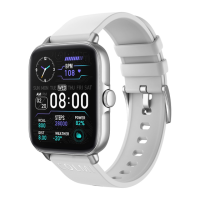
Identifies touchscreen, buttons, sensors, charging port, microphone, speaker, and strap.
Instructions for turning the device on/off and controlling the display using the button.
Guide to downloading the Da Fit app via QR code from app stores.
Steps for first use, including entering personal parameters.
Interface for selecting gender and entering birth date.
Interface for entering physical height and weight.
Steps to add the P28 Plus device within the Da Fit app.
Guide on how to find and select the P28 Plus device in the app.
Process of tapping and connecting to the P28 Plus from the app.
Finishing connection and managing devices in system Bluetooth list.
Steps to add the P28 Plus device using Da Fit on iOS.
Guide to finding the P28 Plus device within the Da Fit app on iOS.
Process of tapping and connecting to P28 Plus from Da Fit app on iOS.
Connecting P28 Plus_Phone through system Bluetooth settings for call connection.
Instructions on how to switch watch faces by long-pressing the dial.
Accessing shortcut functions by swiping left on the dial.
Overview of call records, keypad, contacts, and AI voice input.
Explanation of daily steps, target steps, and calorie consumption.
Details on hourly steps, 7-day trends, and data accuracy notes.
Explains total sleep time, levels, distribution, and monitoring period.
Details on current, max, min HR, and 24-hour HR diagram.
Information on HR data accuracy and usage recommendations.
Details on current, max, min blood oxygen and 7-day trends.
Notes on blood oxygen measurement accuracy and medical use restrictions.
Displays current day's weather and future forecasts with data source notes.
How to access the cellular menu by swiping right on the dial.
How to enter the shortcut settings by swiping down on the dial.
Icons for connection, battery, date, DND, brightness, power saving, Bluetooth, flashlight, and settings.
How to enter the main menu by scrolling up the dial interface.
Lists all available interfaces like messages, activity, health, training, and settings.
Overview of date, steps, distance, calories, sleep, heart rate, BP, and SpO2 data.
Details on outdoor running distance, data, and more training information.
Historical, daily, weekly, and monthly step data statistics.
Details on distance, calories, time, METs, and goal achievement.
Notes on potential deviations in step counting due to motion capture.
Historical sleep data, distribution, and legends.
Average and legend for heart rate during sleep.
Displays sleep trends over the last 7 days.
Legends comparing sleep time, awake time, and duration with other users.
Historical HR data, last measurement, and measurement initiation.
Notes on HR measurement accuracy and medical use restrictions.
Query and measurement of 24-hour heart rate data by day, week, month.
Details on detection duration, grade distribution, and accuracy notes.
Historical BP data query, current measurement, and last 7 times trends.
Notes on BP measurement accuracy and medical use restrictions.
Historical SpO2 data query, current measurement, and last 7 times trends.
Notes on SpO2 measurement accuracy and medical use restrictions.
Displays GPS distance, time, calories, pace, and steps during runs.
Options to exit/pause, view signal strength, and enter map mode.
Information on device name, status, MAC address, and battery level.
Settings for dial download, messages, alarms, camera, contacts, and software upgrade.
Covers other general settings for the device and app.
Selection and editing of built-in watch faces.
Accessing and downloading new watch faces with permission requirements.
Browsing the dial market and previewing edited watch faces.
Selecting pictures, time position, data, and text color for watch faces.
Setting permissions for Da Fit to read phone notifications.
Activating app notification switches and ensuring app permissions.
Setting alarm details like time, minute, and day of the week.
Adding, managing, and synchronizing favorite contacts to the watch.
Find device, time format, unit system, DND, sedentary reminders, HR detection.
Remote music control, power saving mode, and language settings.
Screen off time, factory reset, and gesture control settings.
Settings for drinking water, weather, temperature, city, and physiological cycle reminders.
Setting reminder times and viewing the physiological cycle calendar.
Setting personal info, goals, whitelist, and app details.
Warning against using the smartwatch for medical purposes.
 General
| Display Size | 1.69 inches |
|---|---|
| Resolution | 240 x 280 pixels |
| Battery Capacity | 235 mAh |
| Water Resistance | IP67 |
| Charging Time | About 2 hours |
| Operating Temperature | -10°C to 45°C |
| Heart Rate Monitor | Yes |
| Sleep Tracking | Yes |
| Step Counter | Yes |
| Calories Counter | Yes |
| Notifications | Yes |
| Compatibility | Android 4.4 and above, iOS 9.0 and above |
| Battery Life | 5-7 days (typical usage), 30 days (standby) |

 To Next Page