Installing Memory DIMMs
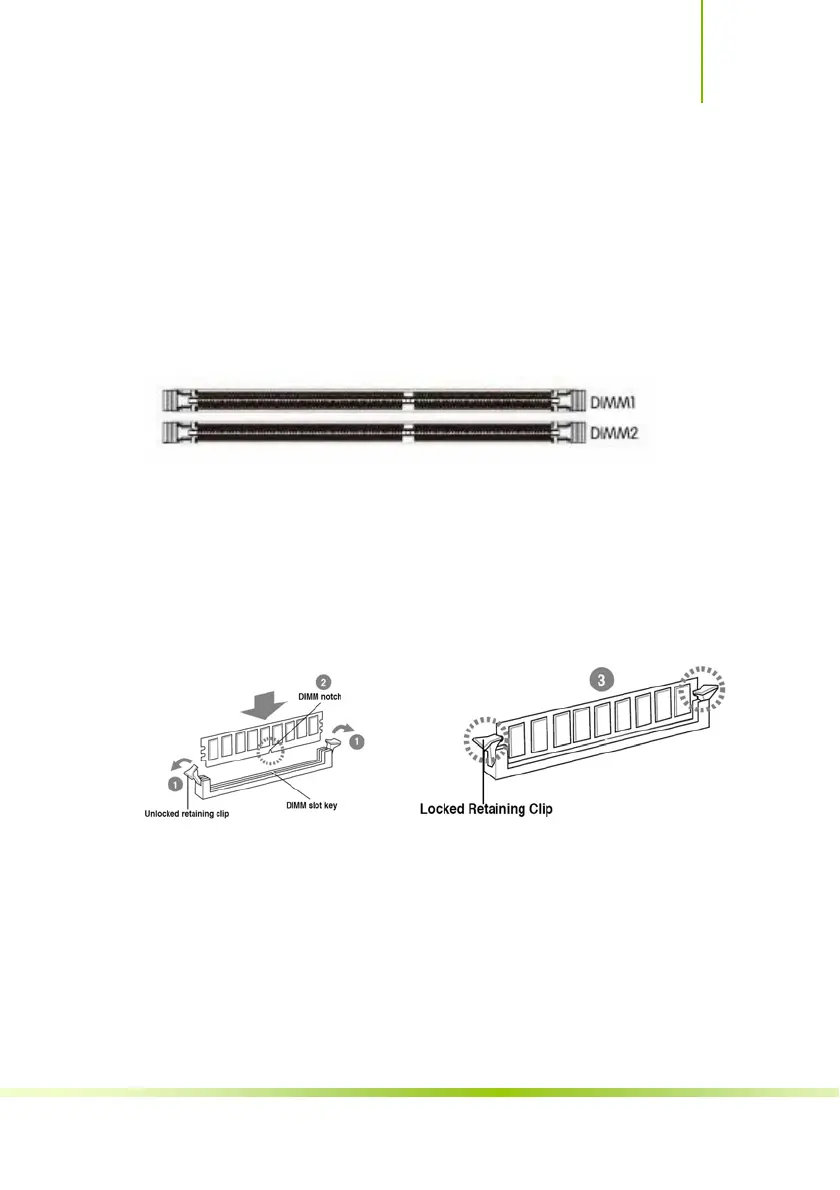
Your new motherboard has 2 slots for DDR4 memory. They support dual
channel DDR4 memory technology. There must be at least one memory bank
populated to ensure normal operation. Use the following the
recommendations for installing memory.
9 One DIMM: Install into DIMM1. You can install the DIMM into any slot,
however, slot 1 is preferred.
9 2 DIMMs: Install into DIMM1&DIMM2 slot,to build dual channel.
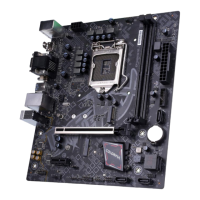
Use the following procedure to install memory DIMMs into the slots on the
motherboard. Note that there is only one gap near the center of the DIMM slot.
This slot matches the slot on the memory DIMM to ensure the component is
installed properly.
9 Unlock a DIMM slot by pressing the module clips outward.
9 Align the memory module to the DIMM slot, and insert the module
vertically into the DIMM slot. The plastic clips at both sides of the DIMM slot
automatically lock the DIMM into the connector.
6
Hardware Installation












 To Next Page