EasyManua.ls Logo

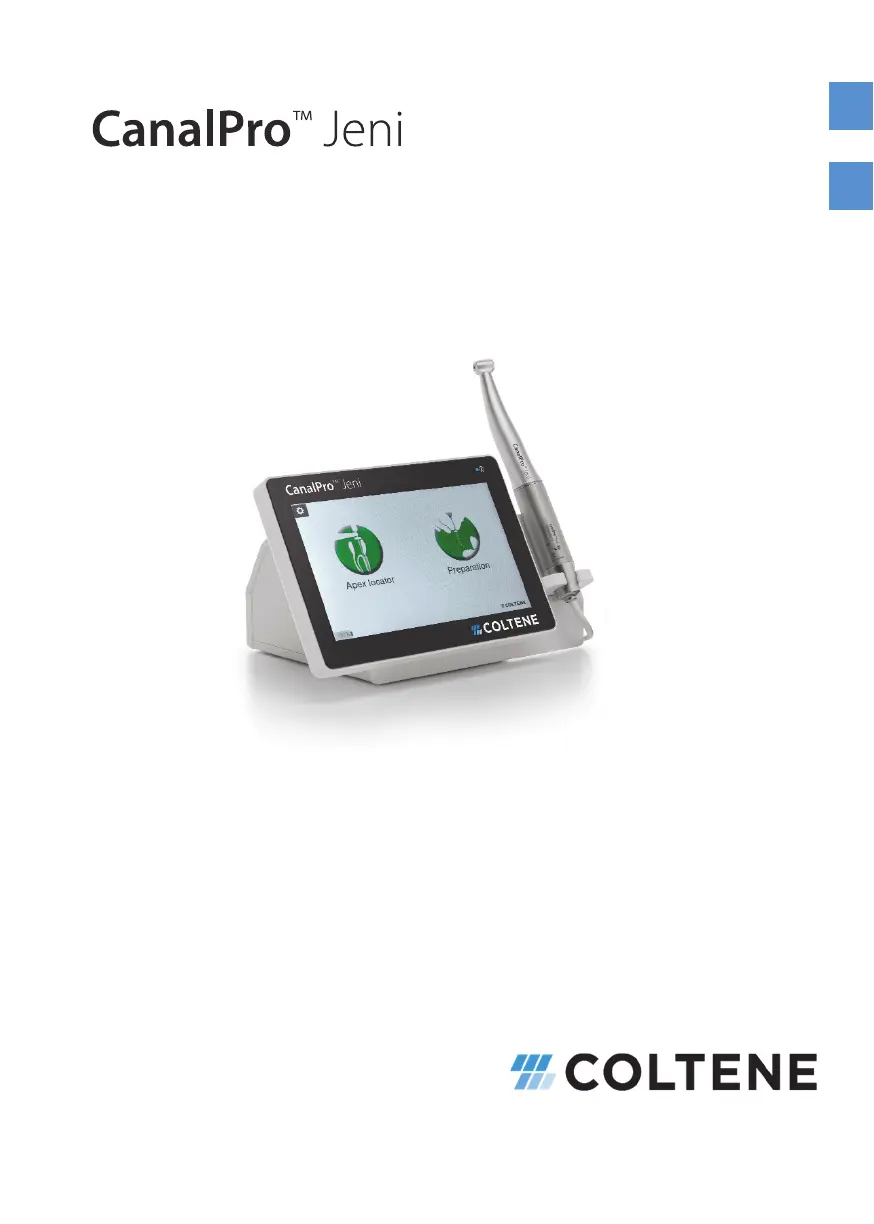
Coltene CanalPro Jeni - User Manual

Coltene CanalPro Jeni
68 pages
Go to English
Print Icon
To Next Page IconTo Next Page
Loading...
645 2101 v00 - 11.02.2020
Gebrauchsanweisung
Instructions for use
DE EN

Table of Contents

Other manuals for Coltene CanalPro Jeni

Questions and Answers

  • Y
    Yolanda BakerAug 17, 2025
    Why Coltene CanalPro Jeni instrument does not rotate?
    • M
      Michele LopezAug 17, 2025
      If the instrument on your Coltene Dental equipment isn't rotating, here are a few things to check: * **Calibration**: Make sure you've performed the calibration with the contra-angle. * **Motor**: Inspect the cable connection and plugs for any damage. Try running the motor without the contra-angle attached. * **Angle-Piece**: Check if the axis of the angle-piece can rotate freely.
  • B
    Brent DorseyAug 21, 2025
    What to do if Coltene Dental equipment touch display doesn't react?
    • E
      Erin ReevesAug 21, 2025
      If the touch display of your Coltene Dental equipment is unresponsive, and the device isn't reacting, it may be due to a damaged display. In this case, return the device to the manufacturer.
  • T
    thomasmaldonadoAug 25, 2025
    How to fix Coltene CanalPro Jeni Dental equipment that indicates apex too early?
    • S
      Samantha ReynoldsAug 25, 2025
      If your Coltene Dental equipment tends to indicate the apex too early, or the signal is at maximum, it might be due to secondary currents or high conductivity. Try removing moisture from the crown or cavity base. Also, check for any side canals and irrigate with saline solution if necessary.
  • J
    John HallAug 28, 2025
    How to restore function in Coltene CanalPro Jeni wireless foot switch?
    • W
      William LewisAug 28, 2025
      If your Coltene Dental equipment's wireless foot switch isn't working, there could be a few reasons. If the batteries are flat, open the battery compartment under the base plate and replace them, but do not use rechargeable batteries. If the switch is not detected, connect the switch to the device, referring to the Setup -> Service information section.
  • A
    Amber MoonSep 1, 2025
    Why Coltene CanalPro Jeni has no power?
    • L
      Leonard DavisSep 1, 2025
      If your Coltene Dental equipment shows no function and the display remains off, it could be due to no power supply or a battery that is not charged. Ensure the power supply unit is correctly plugged in and check that the LED on the power supply unit is lit.
  • B
    Brent JonesSep 5, 2025
    What to do if Coltene Dental equipment wireless foot switch is not working?
    • M
      Mark WoodsSep 5, 2025
      If the wireless foot switch on your Coltene Dental equipment isn't working, it might be because the signal is disrupted by strong electromagnetic radiation. Try switching off other devices, such as mobile phones, in the vicinity and check the environment. In particularly exposed areas, a cable switch can be used.
  • L
    laguilarSep 9, 2025
    How to switch on sound signals on Coltene Dental equipment?
    • J
      Jason TaylorSep 9, 2025
      If there are no sound signals from your Coltene Dental equipment, the sound may be switched off. To resolve this, simply switch the sound back on.
  • S
    sharon04Nov 12, 2025
    What to do if Coltene CanalPro Jeni Dental equipment measurement is not possible?
    • G
      george60Nov 12, 2025
      If measurement with your Coltene Dental equipment is not possible due to a missing, weak, or interrupted signal, consider these potential causes and solutions: * **Contact Problems**: Ensure the lip clip and measuring cable are properly connected. Verify that the lip clamp and file clamp are completely clean. Check for a short circuit by seeing if one is depicted on the display when the lip clip and file clamp, or the instrument in the contra-angle, touch each other. * **Lip Clip Placement**: Make sure the lip clip is inserted into the socket of the measuring cable, and not into the short cable for the file clamp. * **Incorrect Angle-Piece**: Confirm that the CanalPro Jeni contra-angle is attached and properly engaged. Connect the lip clip and NiTi file to check for a short circuit....

Summary

1. Notes

1.1. Symbols Used

Description of symbols used on the device and in documentation.

1.2. Proper Use

Guidelines for intended use in dentistry by medical professionals.

1.3. General Precautions

Ensures safety by detailed reading of instructions and team familiarity.

1.3.1. Contraindications

Device must not be used on patients with active implants like pacemakers.

1.3.2. Notes on Operation

Guidelines for certified professionals, sterile parts, device checks, and intended use.

Spatial Conditions and Components

Environmental requirements for safe operation and information on device parts.

2. First Steps

2.1. Setup

Comparing delivered components, checking display, and setting up the device.

2.2. Handpiece Holders and Connections

Secure support for handpieces and details on connecting components.

2.4. Touch Display and Foot Switch

Operating the touch display and functions of the wireless foot switch.

2.6. Charging and Operation Modes

Procedure for charging the device, switching it on/off, and entering sleep mode.

2.7. Root Canal Preparation Setup

Attaching and calibrating the contra-angle for root canal preparation.

3. Manual Apex Length Determination

3. & 4. Functions Start Menu

Overview of the start menu for Apex locator and Motor system functions.

3.1. Tips for Length Determination

Guidance on using the lip clip and file clamp for accurate length determination.

4. Motor System

4.1. Favourites and File System Selection

Selecting and saving preferred file systems for quick access in the Favourites menu.

4.3. Jeni Mode Preparation

Putting the endomotor into operation, selecting files, and using the touch display for preparation.

4.3.1. Jeni Mode Details

Explanation of Jeni mode's pre-programmed file systems and adaptive algorithms.

Jeni Mode Step-by-Step and Signals

Procedural guide for Jeni mode with irrigation and file change signals.

4.4. Doctors Choice Program

Program for free design, allowing individual setting and saving of file parameters.

4.4.1. Doctors Choice Notes and Cyclic Drive

Adapting movement parameters, practicing, and using the cyclic drive function.

4.5. Motor Setup and Apex Functions

Accessing motor settings, file data, and apex functions during operation.

4.5.1. File Data Configuration

File parameters for Jeni mode are fixed; adjust in Doctor's Choice mode.

4.5.3. Calibration Procedure

Calibrating the motor after sterilization to compensate for contra-angle friction.

5. Setup Functions

Settings Management

Manage software status, updates, brightness, volume, language, and auto-off time.

9. Service Information and Bluetooth

View device status, service data, and Bluetooth connection information.

10. Maintenance, Transport, and Disposal

10.1. Regular Checks

Annual inspection recommendations and test steps for operational safety.

10.2. Maintenance and Lubrication

Notes on reprocessing components, battery replacement, and contra-angle lubrication.

10.3. Transport Guidelines

Guidelines for safe transport, packaging, and regulatory compliance for the device.

10.4. Disposal Procedures

Proper disposal procedures for the device and accessories, adhering to EU and national regulations.

11. Troubleshooting

12. Error Messages

13. Warranty and Liability

14. Technical Data

15. EMC Manufacturers Declaration

Electromagnetic Emissions Guidelines

Guidelines for RF emissions, harmonics, and voltage fluctuations according to standards.

Electromagnetic Immunity Guidelines

Immunity levels for static discharge, transients, surges, and voltage variations.

16. Cleaning, Disinfection, and Sterilisation

Coltene CanalPro Jeni Specifications

General IconGeneral
BrandColtene
ModelCanalPro Jeni
CategoryDental equipment
LanguageEnglish

Related product manuals