· Gently remove the water bucket from the dehumidifier by gripping both top and bottom sides and
pulling outward;
· Open the drain outlet lid on the bucket cover and then empty the bucket;
· Replace the water bucket to the dehumidifier. The dehumidifier will auto eliminate the E7 error
and resume operation in 1-3 minutes after the water bucket been replaced properly.
2) Continuous Drain by Gravity
Water can be automatically be emptied into a floor drain by attaching the included drain hose.
NOTE: You can use any other hoses with inner diameter of 5/8 (0.63) inches instead.
To Achieve Continuous Drain by Gravity:
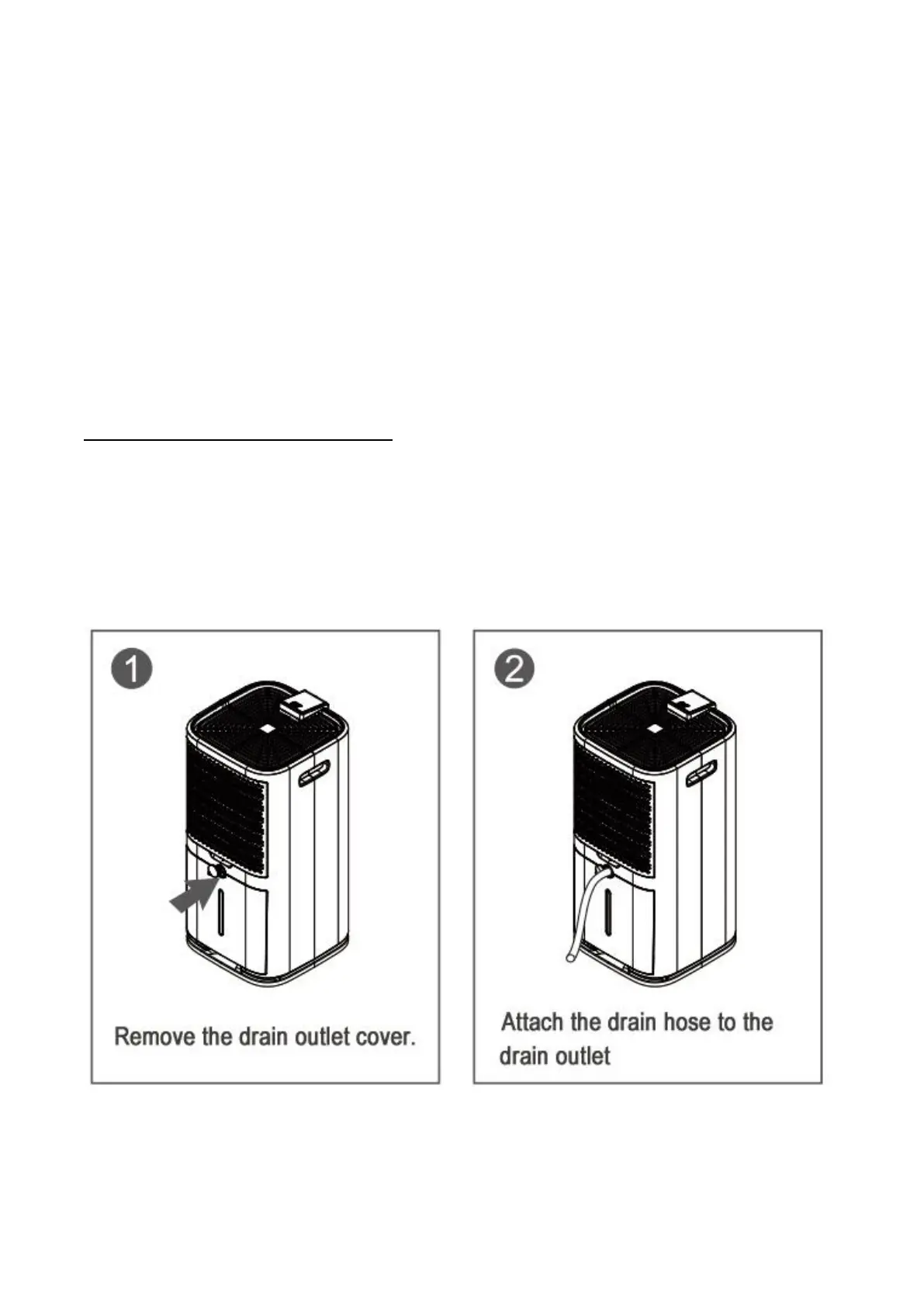
· Remove the plastic cover from the continuous drain outlet;
· Remove the water bucket;
· Attach the included drain hose to the drain outlet;
· Replace the water bucket to the dehumidifier properly;
· Direct the other end of the drain hose down to a suitable drainage facility, like a bigger external
bucket or floor drain. The drainage facility should be lower than the drain outlet of the dehumidifier.
Note:
- Make sure the connection is tight and there is no leaking.
If there is a small leak at the drain outlet, then try to connect the other end of the hose to the outlet,


 To Next Page