Comba Telecom. All Rights
568 Gibraltar Drive, Milpitas, CA 95035 | +1 408 526 0180 Ext 3 | www.combausa.com
7
Version 1.0.4
1.16.23
Software Configurations
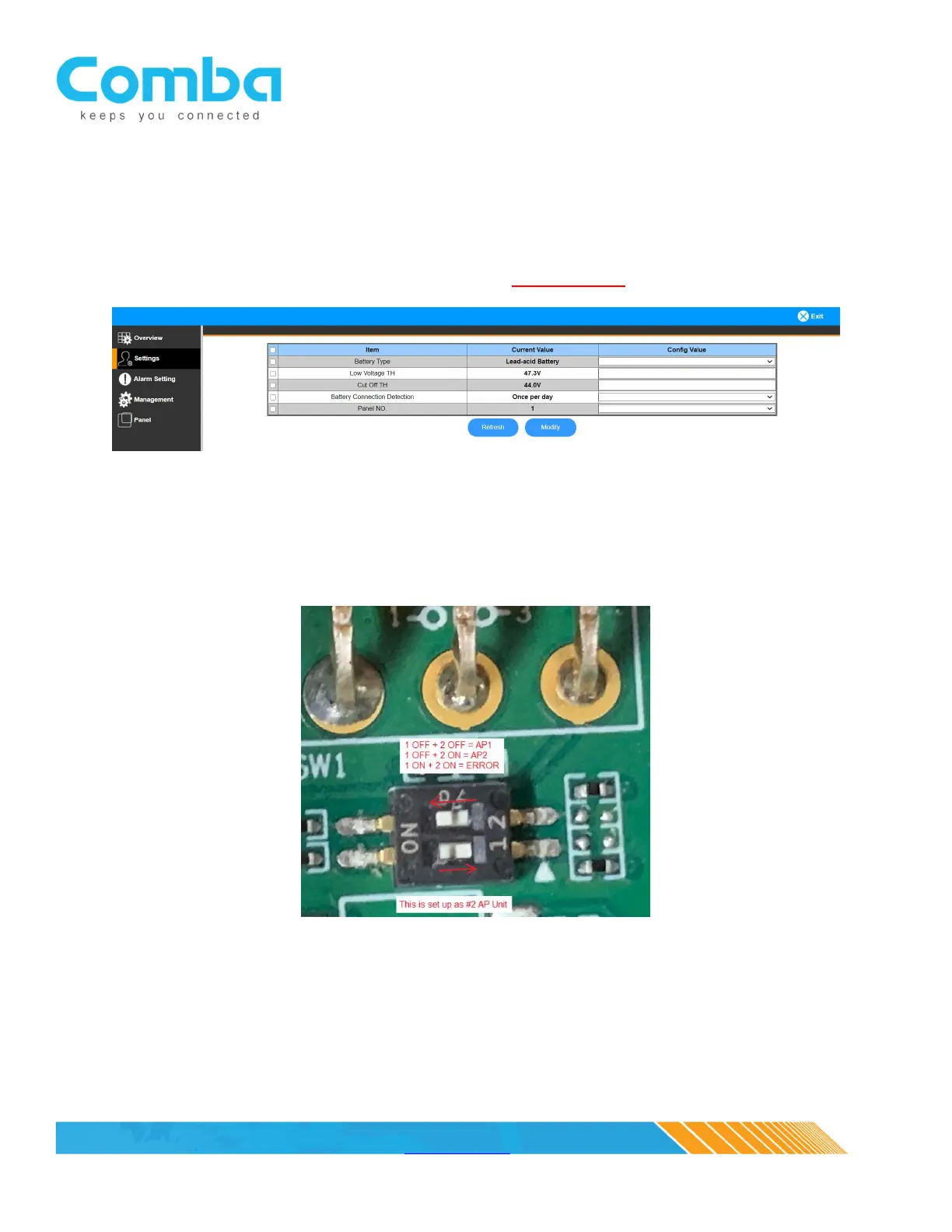
Log into the Battery Backup Unit (follow the BBU QIG for instructions) and activate the BBU to AP
communications. This is done in the “Settings” tab, “Panel NO.”, “Config Value” select “1”, then click on
“Modify”/ “Refresh” and verify “1” is now showing as “Current Value”. If two annunciator panels are
being used in parallel, repeat the process, and select “2”, see NOTE below.
NOTE: The RS-485 A/B/GND communications circuit MUST be wired in parallel when using two
annunciator panels. A DIP switch, located on the annunciator panel circuit board under the silence
switch, is used to determine the annunciator panel configuration. The annunciator panel is factory
defaulted as a primary unit (OFF+OFF) and must be manually configured as (OFF+ON) when used in
parallel as a secondary unit, see DIP switch example below.



 To Next Page