Comba Telecom. All Rights
568 Gibraltar Drive, Milpitas, CA 95035 | +1 408 526 0180 Ext 3 | www.combausa.com
6
Version 1.0.4
1.16.23
Alarms and Dry Contact Output
The annunciator panel dry contact alarms and visual annunciation will always be synchronized to the
Battery Backup Unit. The alarm configuration is done in BBU. (Refer to Battery Backup Unit user manual)
There is an audio buzzer equipped on the annunciator panel.
Silencing the audio
ON – Silence the audio.
The annunciator panel audio will be un-silenced every 24 hours. If you have a persistent alarm, silencing
will keep this quite for 24 hours. After 24 hours, to silence again, slide to the “OFF” position and back to
“ON”.
OFF – Audio is not silenced.
Dry Contact Output
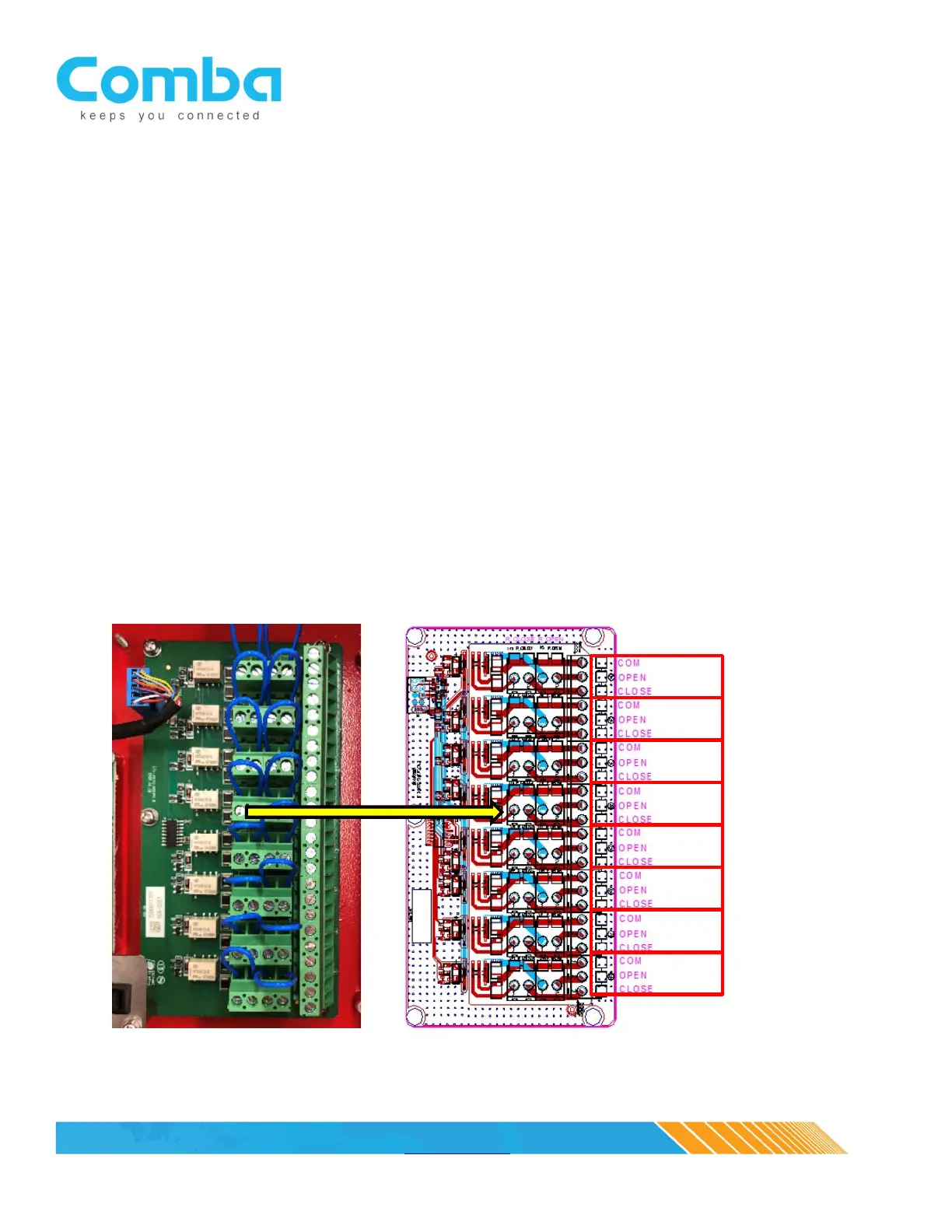
The annunciator panel supports a duplicate set of dry contact outputs for numbers 1 through 7 – these
are identical to the BBU dry contact outputs. An additional dry contact output (No.8) can be configured
as well – typically, this would be used to monitor the annunciator panel or cable integrity between the
BBU and the annunciator panel (as a communication fault alarm). This can also be set to trigger on an
over temperature alarm. This is software configurable via the BBU GUI.
DC 2
DC 3
DC 4
DC 5
DC 6
DC 7
DC 8



 To Next Page