Comba Telecom. All Rights
568 Gibraltar Drive, Milpitas, CA 95035 | +1 408 526 0180 Ext 3 | www.combausa.com
9
Version 1.0.4
1.16.23
Troubleshooting
If annunciator does not power on or does not appear in BBU GUI after wiring has been confirmed, use a multimeter to
check the following pins for resistance and voltage according to the below instructions.
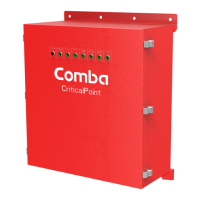
BBU Control Board Measurements (note BBU version when testing)
1. Turn on the BBU
2. Measure voltage from 1->3 and 2->3
1 to 3
~ 1.65 VDC
2 to 3
~ 1.65 VDC
1. Turn off the BBU
2. Unplug the three-wire jumper (V1 BBU) or disconnect the three data wire (V2 BBU) on the BBU control board
that feeds the annunciator panel
3. Measure the resistance from 1->3, 2->3, and 1->2
BBU V1
BBU V2
1 to 3 ~ 450 Ohms
1 to 3 ~ 2.2k Ohms
2 to 3 ~ 450 Ohms
2 to 3 ~ 2.2k Ohms
1 to 2 ~ 50 Ohms
1 to 2 ~ 130 Ohms



 To Next Page