6
Wi-Fi setup via the door entry monitor
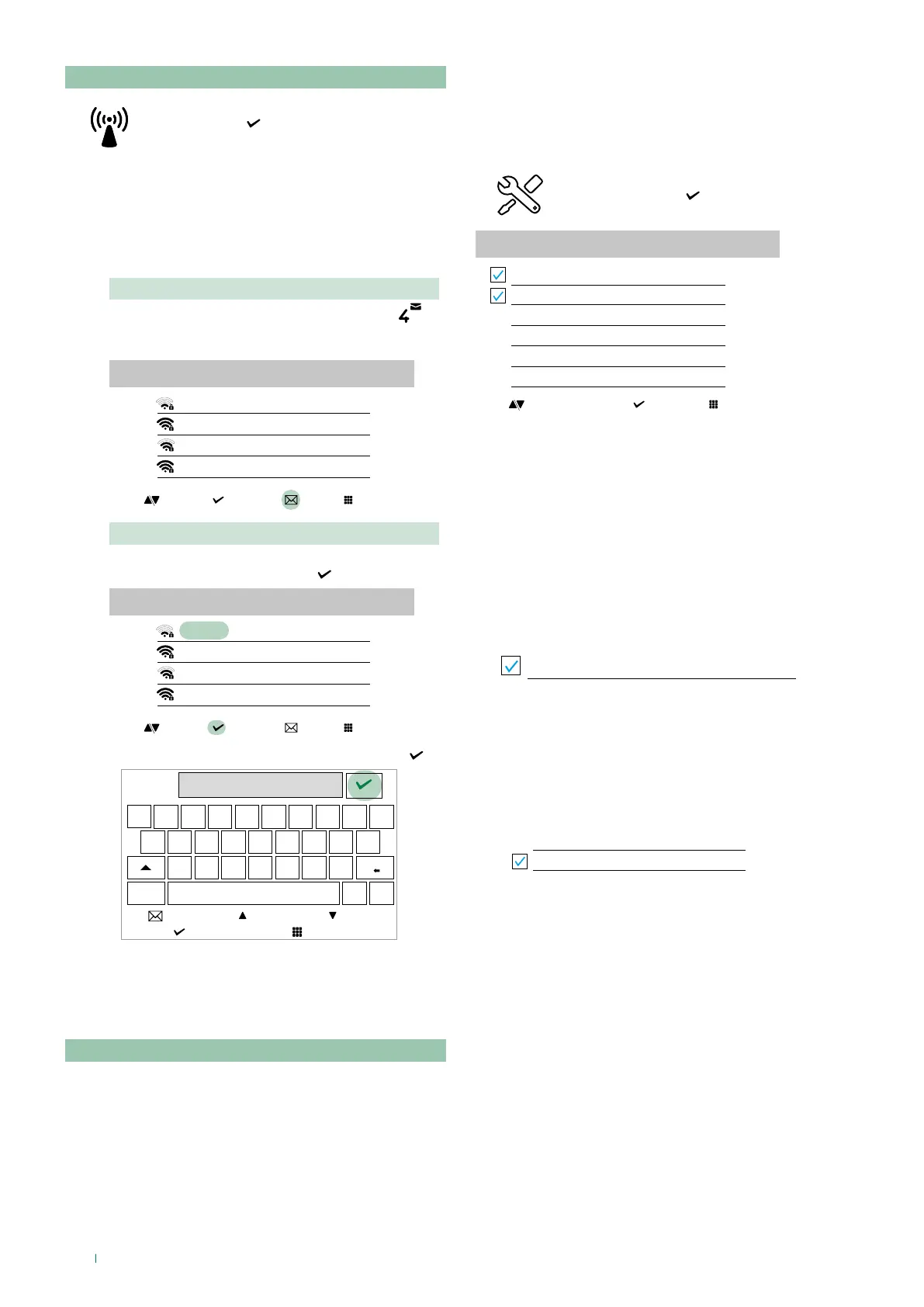
f Scroll through the menu to the Wi-Fi icon
and press to confirm and access the
Wi-Fi connection setup
» the monitor will scan available
networks
We recommend linking the monitor to your router by means
of the WPS button. If the router does not have a WPS button,
proceed manually.
Procedure via WPS
Once the networks have been scanned, press
for secure linking via WPS and follow the instructions
which appear on the display.
Wifi configuration
MY-Wifi
Other Wi-fi_1
Other Wi-fi_2
Other Wi-fi_3
select exitwpsscroll
Manual procedure
1. If the router does not have a WPS button, select your
network and confirm by pressing
MY-Wifi
Other Wi-fi_1
Other Wi-fi_2
Other Wi-fi_3
Wifi configuration
select exitwpsscroll
2. Enter the password manually and confirm using
password
q w e r t y u i o p
a s d f g h j k l
z x c v b n m
@ _
123
scroll
left right
Install the COMELIT application on your smartphone to
ensure you have all the device functions at your disposal.
Wi-Fi setup via the COMELIT app
Setup can also be carried out from your smartphone via the
app.
Setup
This section allows you to configure the device (language,
date and time...)
f Scroll through the menu to the Setup
icon and press to confirm and access
device setup
SETUP
Wi-Fi reporting unconnected
App registration
Face recognition
Voice Assistants
Date and time settings
Language
select exitscroll
Wi-Fi reporting unconnected
The door entry monitor provides pop-up
notification in the
event that there is no Wi-Fi connection
between the
door
entry monitor
and the router.
The lack of Wi-Fi connection will prevent calls from being
received on a smartphone (and, in some types of system, on
the
door entry monitor
too) and cancels all main functions
that can be controlled via the app.
f Select/deselect the function to enable/disable the pop-up
notification.
Wi-Fi reporting unconnected
App registration
Permits a new user register his/her own smartphone in order
to gain access to door entry monitor functions, or prohibits
him/her from doing so.
f Select/deselect the function to enable/disable app
registration
App registration



 To Next Page