8
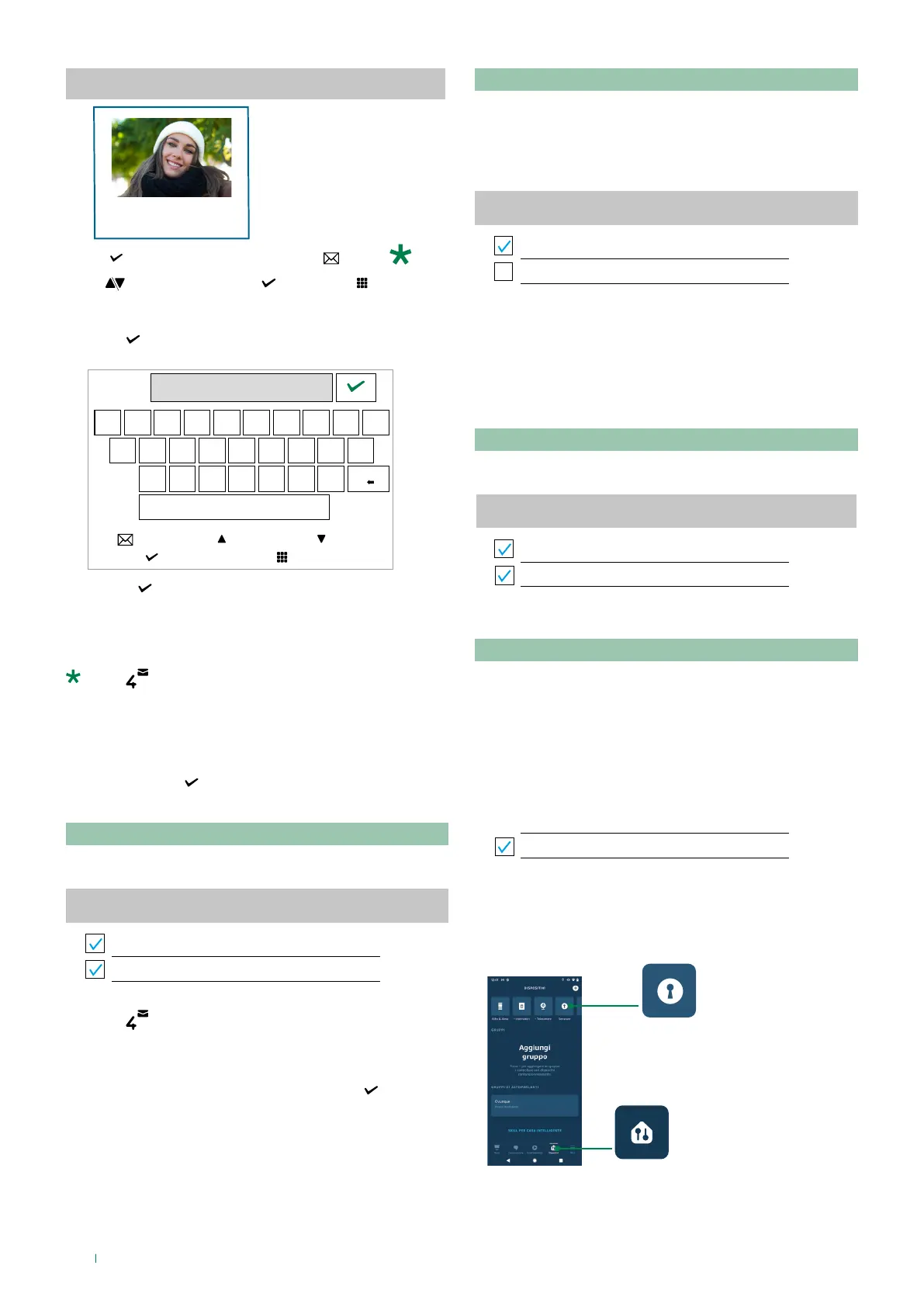
Faces detected
select exitscroll
Unknown
recalculate
long press to delete
5a. Press and enter the name of the recognised subject.
SARA
Q W E R T Y U I O P
A S D F G H J K L
Z X C V B N M
scroll
exit
select
left right
f Use to confirm and register the face and enable
face recognition.
There is no limit to the number of faces that can
be stored.
press (recalculate) to automatically recognise the
face of a registered subject and avoid having to enter the
name manually.
or:
5b. Press and hold
to delete the selected face.
User management
This function is used to delete/enable/disable a registered
user.
User management
SARA
JOHN
f press to delete the selected user.
or:
f Select/deselect the registered subject using
to
enable/disable the action command following “Face
Recognition”.
Manage Actions
This function is used to manage the actions to be carried out
following face recognition.
f The Lock-release function is enabled by default. Select/
deselect the Lock-release and/or Generic actuator
functions to enable/disable them.
Manage Actions
Lock-release
Generic actuator
Voice assistants
Integration with Alexa and Google Assistant allows
management of Comelit devices via voice assistants.
Voice Assistants
f Select/deselect “Voice Assistants” to enable/disable the
function
Voice Assistants
Voice Assistants
Unlock voice confirmation code
Unlock voice confirmation code
When “Voice confirmation code” is deselected, door opening
can be controlled via a simple voice command:
“Alexa, unlock the front door”
“OK, google! Unlock my front door”
The “Voice confirmation code” can be used to open the door
using a confirmation code (only available with Alexa)
1. Select “Unlock voice confirmation code”
Voice Assistants
Voice Assistants
Unlock voice confirmation code
2. Open the Alexa app (configured as indicated in the
guide: https://www.comelitgroup.com/en/comelitapp-
voiceassistants)
3. Select Devices (1) / Door Locks (2)
1
2



 To Next Page