EN
5
Lift mode
TheSK9001unitcanbeusedtocontroltheSK9071relayboxesin
order to control the lift floor commands.
ThefunctionmusthavebeenenabledintheSIMPLEKEYsoftware
and the tokens coded after selecting the authorised floors.
Itis possibleto connectup to12 SK9001boxestooneunit which
enables 120 floors to be controlled.
Network Mode
It is possible to network the various system units in order to take
advantage of the following functions from the management micro-
computer:
•Modifyingunitparameters
•Settingthedateandtime
•Retrievingevents
•Remoteopeningcommand
•Immediatedeletionofalosttoken
It is possible to network up to 254 units in one system. 3 types of
network are possible:
•AnRS485wirednetworkusingaUSBconverterref.SK9073(one
persystem)-amaximumof32units.
It is vital to record on the unit the same logical address as the one
recordedinthesoftware.TodothisusetheS1pushbuttongivingthe
pulse number corresponding to the address (between 1 and 254) then
validate it by holding the S1 push button down for 5 seconds.
•ATCP/IPEthernetnetworkbyaddingtheSK9072convertertoeach
unit-amaximumof254units.
Keep the default value of the logical unit address.
• Mixed network: TCP/IP Ethernet to several branches (with the
SK9072 converter) then wired RS485 cabling to each branch - a
maximumof32unitsperbranch,254unitsintotal.
Theunitsmustbeaddressedfrom1-254oneachbranch.
For detailed use of the functions please refer to the SIMPLEKEY
ADVANCED software instructions.
Normal working of the unit
WhentheunitisinnormalOperatingMode,2LEDsinsidetheunits
areflushingandtheRedLEDonthereaderisON.
If the unit is not working properly, these LEDs are giving different
indications.InthiscaseturnthepowerOFFandthenONagain.If
this does not work, please contact our after sales service department.
Technical characteristics
•Openingtimecanbeadjustedfrombetween1and99seconds
•Outputviadrycontactmax.5Aat250VAC
•Powerconsumption:70mAwhenidle,160mAwhenrelayactive
•Operatingtemperature:-30°C-+55°C
•Operatingvoltage:12-33Vdcor12-24Vac
•Dimensions(HXLXD):62x88x23mm
5. Complete reset
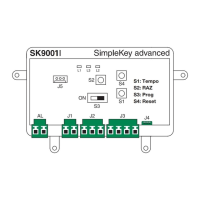
-TurnswitchS3 to “ON” (Programming)
-Toresettozerocompletely,pressS2for15seconds.TheL2LED
willgooutandafter15secondstheL3LEDwillcomeon.Theunithas
been totally reset to zero.
- Switching back to operating mode (a double beep tells you that the
unit has been reset).
Complete resetting enables the initialisation process:
- the password to access the switchboard is “0000”.
- deleting user tokens.
6. Setting the date and time
To work properly the SK9001 unit’s internal clock must be set
correctly.ThisissetinthefactorytoGMTtime(universaltime)and
will be adjusted automatically to the corresponding time zone in the
place it is being used when it is initialised (first key swiped).
If necessary, it is, however, possible to set the time and date manually
usingtheSK9093softwaresuppliedseparately.Todothisyoujust
have to connect to the unit using the cable supplied with the kit and
launch the program.
- Click on “Clock” and then follow the instructions to change the
setting.
-Otherfunctionsarepossible(changingthepassword,resettingthe
unitetc.).Refertothesoftwareinstructions.
ADVANCED FUNCTIONS
“Main SITE Door” mode
TheSK9001unitcanbeusedtocontroltheMainDoorwhichmaybe
openedbyallkeysonasite,notonlymanyBuildingsasMulti-Building
programming(e.g.Accesstoresidence,GatedCommunityetc.).
ToinitialiseaSK9001unitin“MainSITEDoor”mode,pressS2button
on the unit for 5 seconds, until you hear a beep. In this moment, all
tokens of the same site of the 1st swiped one will open the Main Site
door.
Itisalwayspossibletoswitchbacktonormalmode(BuildingorMulti-
BuildingDoor)bypressingS2buttonagainfor5seconds,untilyou
hear a double beep (which indicates that you are back to normal
operation mode).
Event management
TheSK9001unitstoresthelast1400eventsinitsmemory(access
authorised, access refused, cancelled token etc.).
It is possible to retrieve them using a transfer token (ref. SK9053)
supplied separately. After initialising it with the SIMPLEKEY
ADVANCED software, place the transfer token in front of the reader
untiltheredLEDstopsflashing.Oncesaved,youjusthavetoputit
in the encoder linked to the micro-computer and follow the software
instructions to transfer the events in the database.
Alarm
TheSK9001unithasalarmfunctionswhichmaybeusedtotrigger
an alarm device.
Thisishowtouseit.Whenthealarminputistriggeredbyacontact
opening,theoutputisactivated.Thisfunctionisdisabledfor1minute
eachtimeaccessbytokenoranexitpushbuttonisvalidated.
Thisallowsthealarmtobetriggeredimmediatelyifthedoorisforced
or after 1 minute if the door is still open after an authorised entry.
When Alarm Function it is used, JP1 jumper on the unit must be
removed.
NOTE: It is not necessary to wire the unit alarm inputs and outputs if
this function is not used.



 To Next Page
 Loading...