OPERATION INTRODUCTION
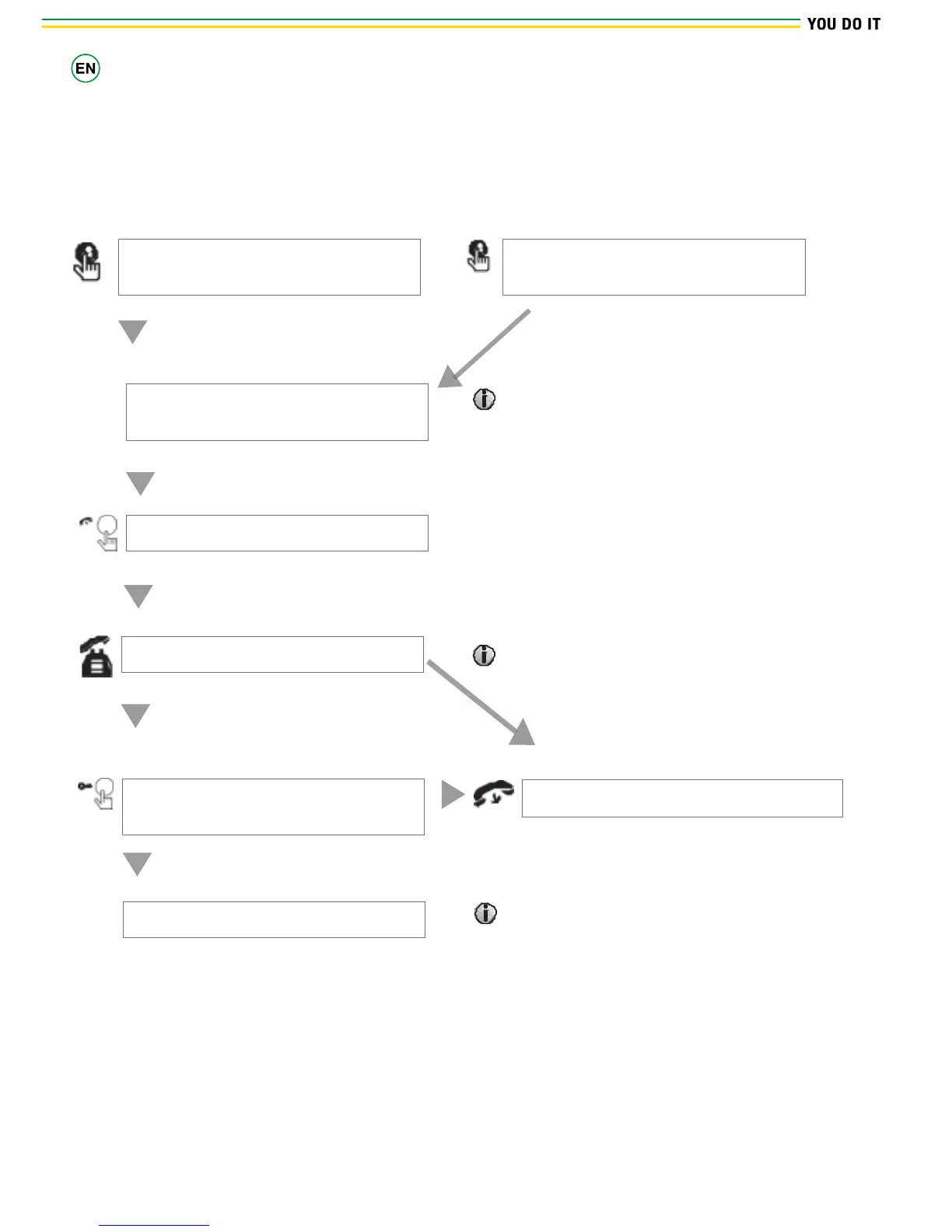
Visitor call
Stand-by mode
The Visitor presses the call button on
outdoor camera 1.
The Visitor presses the call button on
outdoor camera 2.
A 10s of continuous Ding Dong is heard
inside and outside
The visitor’s image automatically displayed
on the screen.
NOTICE
During the conversation between internal monitor and outdoor
doorbell1, if you press the button on outdoor doorbell2 there is no
advice.
Press the talking button on indoor monitor
Stop ringing
Start conversation with outdoor camera.
NOTICE
The indoor unit will automatically go into standby mode if you
are not at home or have not reached the indoor unit in 60s.
The conversation duration is
120s at a time
Press the unlock button on internal
monitor
Release the door lock
Press the hang up button on internal monitor
Hang up
End
NOTICE
When you press the unlock button, video and audio will end
after 10s.


 To Next Page