OPERATION INTRODUCTION
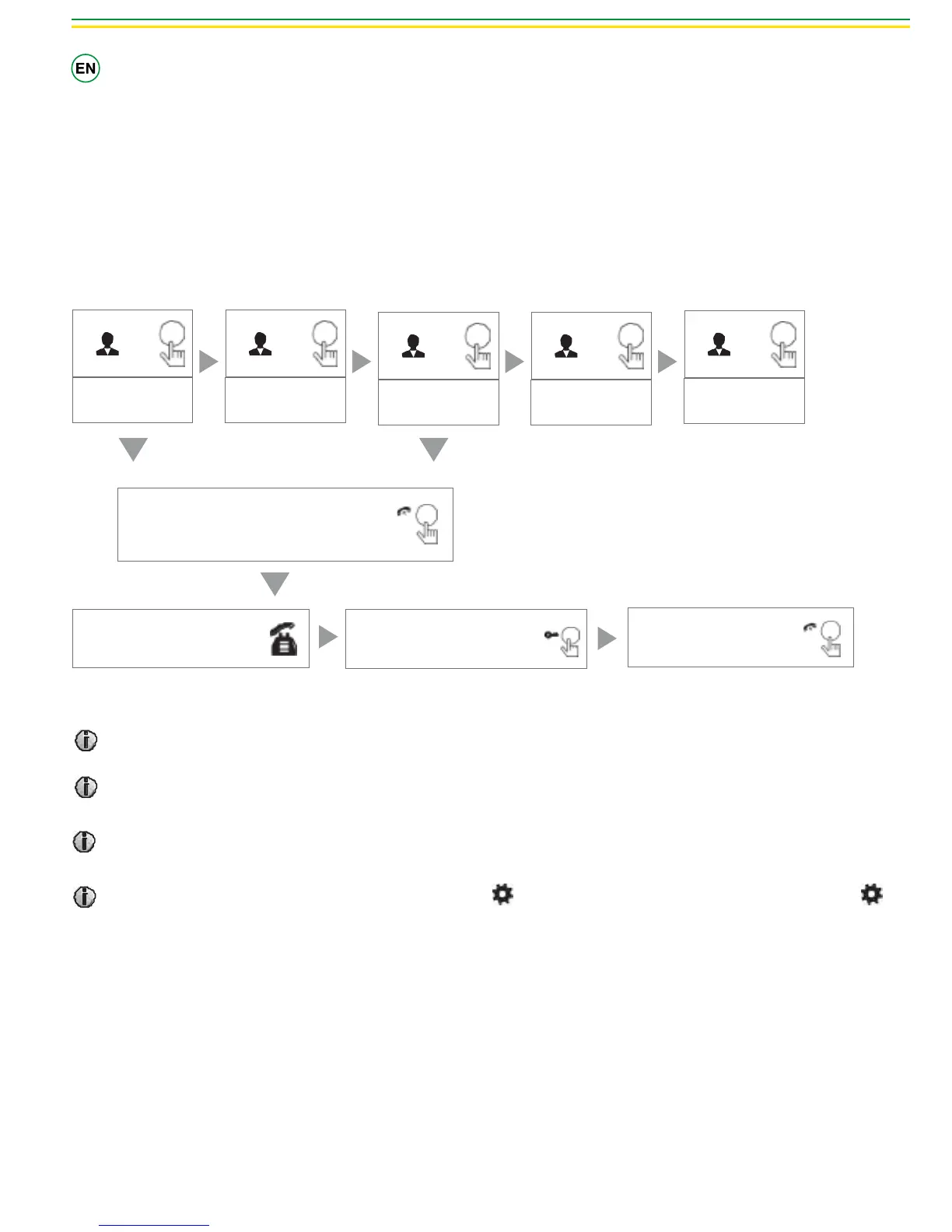
Monitoring
Stand-by mode
Option in the settings in the menu: CAM1; DOOR2; CAM2 operating mode.
Monitoring
DOOR 1
Show DOOR 1
image
Monitoring
CAM 1
Show CAM 1 image
Monitoring
DOOR 2
Show DOOR 2
image
Monitoring
CAM 2
Show CAM 2 image
Monitoring
Stand-by
Close LCD
Press the call button
Talk
Call outdoor
Press the unlock button on the
indoor, the electric lock will be
opened.
Press the hang up button to
end the call.
It’s possible to use self-ignition seeing only DOOR1 camera. To do this, please select in the menu OFF for DOOR2; CAM1; CAM2.
If you use 2 monitors, you can also simultaneously in other internal units starts monitoring mode, the same images are displayed on the
screen dierent internal unit.
If an external call is made to the outdoor doorbell while self-ignition is on, it’s possible to press Call button to talk with the visitor.
For the models with SD card, in monitoring mode, scroll the button upward to perform manual video / camera; scroll the button
downward can manually stop recording.


 To Next Page