OPERATION INTRODUCTION
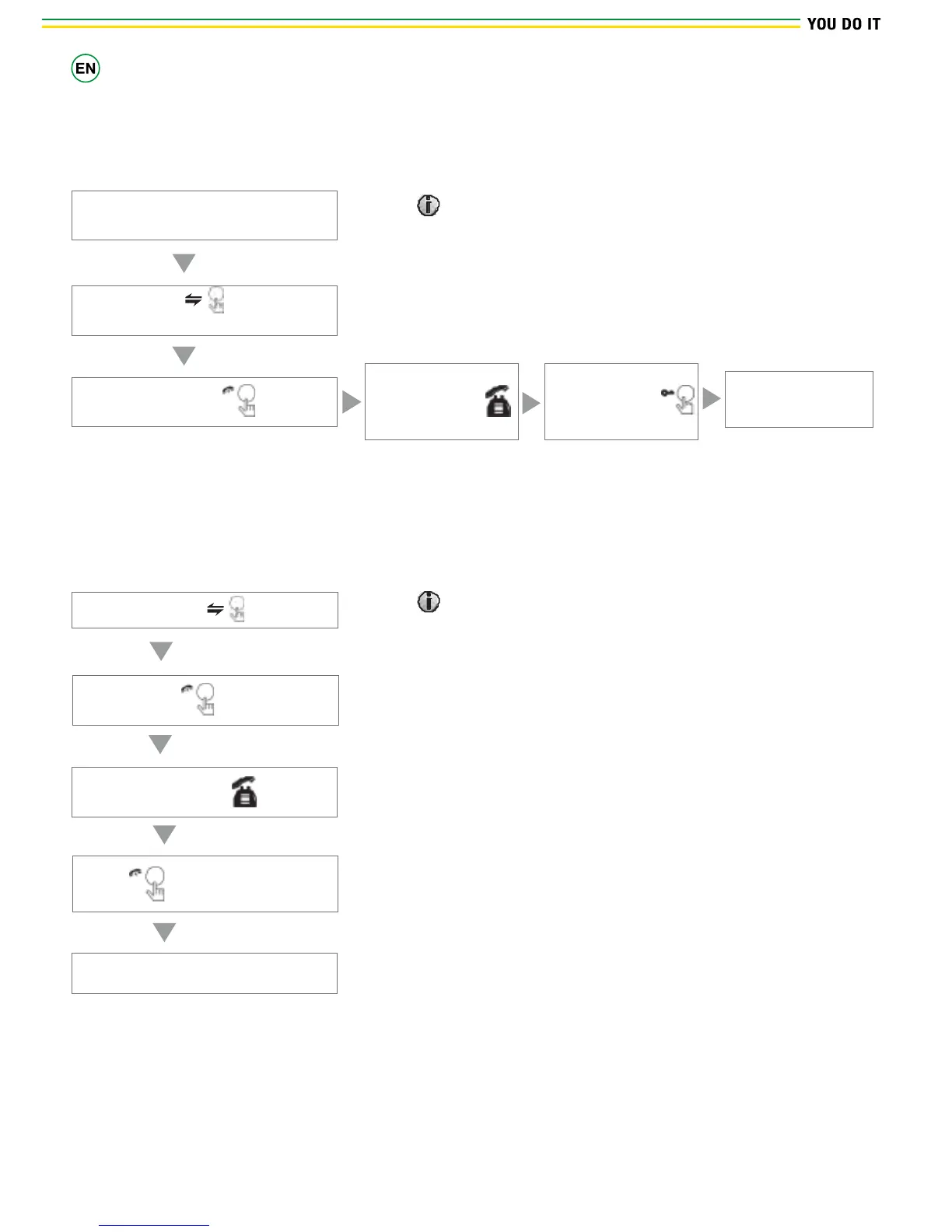
Transfer to other extensions
Outdoor camera call indoor monitor and
conversation is underway.
Internal communication function requires at least two indoor and one outdoor units to be connected.
Press this button to activate the
function of call transfer to other extension
A continuous Ding Dong tone is heard
Press the talking button on any of
indoor units
Talk
Talking with
visitor
The electric lock
can be opened
End the call and
return to stand-by
NOTICE
When you activate the call transfer to another internal monitor,
the first monitor receiving the call will switch o, while second
one will show the image from the outdoor doorbell.
Internal communication among internal Units
At least 2 internal units are required.
Press the button
A continuous Ding Dong tone is heard
Press the button of any of indoor
units
Talk
Start conversation among
indoor units
Press
Hang up
End
NOTICE
In internal communication mode, if a visitor press the call button
on either of outdoor unit, the internal communication mode will be
switched o. The just visitor’ s image will appear on its screen and
continuous ringing will be heard, you can press the talking button
to reactivate conversation with the visitor.


 To Next Page