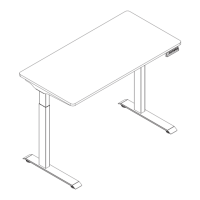
This document describes the Comfty Sit or Stand Height Adjustable Desk, model CFTYAT20. It is designed to provide a flexible workspace that can be adjusted for both sitting and standing positions.
Function Description
The Comfty Sit or Stand Height Adjustable Desk allows users to easily adjust the height of the desktop to their preferred sitting or standing position. It features a control panel with six buttons for height adjustment and memory functions. The desk is equipped with an anti-collision system to prevent damage and injury during movement.
Important Technical Specifications
- Max. Weight Capacity: 110 lbs (50 kg)
- Max. Speed: 25mm/s
- Input Voltage: 100-240V
- Min. Height: 28.7" (730 mm)
- Max. Height: 48.4" (1230 mm)
- Desktop Size: 48" (1200 mm) in width, 24" (600 mm) in depth
- Duty Cycle: Continuous operation for 2 minutes at most, followed by a pause for 18 minutes
- Working Temperature: 32°F - 104°F
- Power Supply: AC 100 - 240V, frequency 50/60HZ
- Service Environment: 32°F - 104°F
- DC Power Supply Function: Outputs 29V DC from a 2-pin connector at the back of the control box when the desk is not in reset state and has been running for 1 second. Stops power supply if error "E01" or "E02" is displayed.
Usage Features
The desk's control panel includes the following buttons:
- "▲" (Up Arrow): Adjusts the desk upwards. Press and hold to continuously raise the desk until it reaches the highest point ("top" displayed).
- "▼" (Down Arrow): Adjusts the desk downwards. Press and hold to continuously lower the desk until it reaches the lowest point ("bot" displayed).
- "1", "2", "3", "4": Memory position buttons. Each button can save a specific height position.
Height Adjustable Function:
- To raise the desk, press and hold the "▲" button.
- To lower the desk, press and hold the "▼" button.
Height Memory Function:
- To save a height: While the desktop is static, press and hold a memory button (e.g., "1") for three seconds. The buzzer will sound, and the display will show "S-1" (for button "1"), indicating successful saving.
- To recall a saved height: Click the corresponding memory button (e.g., "1") to move the desk to the saved height.
Reset Function:
- Standard Reset: If the desk height does not match the actual height, simultaneously press and hold the "3" and "4" buttons for three seconds to enter reset mode. The display will show "ASI". Then, press and hold the "▼" button to start the reset. The tabletop will rebound after reaching the lowest position, and the reset is complete when "bot" is displayed. Note: This operation clears original memory settings.
- Reset at Lowest Position: If the desk is already at its lowest position ("bot" displayed), press and hold the "▼" button to enter reset mode. The display will show "ASI". Then, press and hold the "▼" button again to start the reset. The tabletop will rebound after reaching the lowest position, and the reset is complete when "bot" is displayed. Note: This operation does not clear original memory settings.
Anti-collision Sensitivity Adjustment (Optional):
- Simultaneously press and hold the "▲" and "▼" buttons for three seconds to cycle through sensitivity levels: A-0 (closed), A-1 (high sensitivity), A-2 (medium sensitivity - factory default), A-3 (low sensitivity).
- The desk will rebound immediately if it encounters an obstacle during upward or downward movement to prevent collisions.
Code Processing (Troubleshooting):
- If "ASI" or "rSt" appears, press and hold the "▼" button to start the reset.
- If "E01" or "E02" appears, allow the desk to rest for more than 18 minutes before normal use.
- If other codes appear and holding the "▼" button yields no response, check cable connections, cut power for 10+ seconds, then restore power and perform a reset if "ASI" or "rSt" is displayed.
- If issues persist, contact customer service.
Maintenance Features
- Cleaning: Unplug the power plug before cleaning. Wipe the dust on the surface with a slightly wet dishcloth. Be careful not to let liquid drops enter internal parts or loosen connectors.
- Forbidden Materials: Corrosive or abrasive materials are forbidden for cleaning. Ensure any cleaner used does not pollute the environment.
- Disposal: The electric box contains electronic components, metals, plastics, wires, etc. Dispose of it in accordance with state environmental legislation, not as general household waste. This product should not be disposed of with other household waste. Recycle responsibly through return and collection systems or by contacting the retailer.
- Packaging: Keep the original packaging for future transportation if needed.
Important Safety Instructions
- Read all instructions before using.
- Do not place the unit in an area where it can fall into water or near flammable materials.
- Do not clean the unit with water or liquid.
- Power supply: AC 100 - 240V, frequency 50/60HZ.
- Service Environment: 32°F - 104°F.
- Assembly: Check carefully to ensure correct and complete assembly before use.
- Familiarize yourself with all functions and program settings before first use.
- Children: Children are forbidden to play on the product. Children aged 8 and above, and persons with reduced physical, sensory, or mental capabilities, or lack of experience and knowledge, can use the appliance if supervised and instructed on safe use and hazards. Children shall not play with the appliance. Cleaning and user maintenance should not be done by children without supervision.
- Noise: Slight noise from the V-ribbed belt or brake system is normal and does not affect equipment use.
- Supply Cord: If the supply cord is damaged, it must be replaced by the manufacturer, its service agent, or a similarly qualified person to avoid hazards.
- Operating Environment: Ensure no hazardous sources are in the operating environment. Handle packaging materials carefully (e.g., plastic bags can cause choking hazards).
- California Proposition 65 Warning: This product can expose you to certain chemicals known to the State of California to cause cancer or birth defects or other reproductive harm. For more information, visit www.P65Warnings.ca.gov.
- Electrical Safety: When using electrical appliances, always follow basic safety precautions to reduce the risk of fire, electric shock, and personal injury.
Limited Warranty
The Comfty brand is used under license. For repair, replacement, or warranty service, contact W Appliance Co. at 1 (855) 855-0294 (USA or Puerto Rico).
- Warranty Period: 1 year (12 months) for labor and 1 year (12 months) for parts (manufacturing defects only), carry-in service.
- Coverage: W Appliance Co. will, at its option, replace defective products with a new or remanufactured equivalent during the warranty period.
- Exclusions: The warranty does not cover:
- Damaged, defaced, altered, or modified appearance/exterior.
- Altered, removed, or undetermined serial numbers.
- Damage due to power line surge, user damage to power cord, or connection to improper voltage.
- Damage due to general misuse, accidents, or acts of God.
- Repairs by unauthorized service agents or use of non-genuine parts.
- Products transferred from the original owner.
- Products purchased as refurbished, like new, second-hand, "As-Is," or "Final Sale."
- Products used in a commercial or rental setting.
- Products used in settings other than ordinary household use or not in accordance with provided instructions.
- Damages from service calls for improper installations.
- Glass parts and other accessory items included with the toaster (note: this seems to be a copy-paste error from a toaster manual, as this product is a desk).
- Transportation and shipping costs for replacement.
- Food loss due to product failure or service delay (another apparent copy-paste error).
- Service calls to instruct on product use (another apparent copy-paste error).
- Service calls to repair/replace house fuse, reset circuit breaker, or correct house wiring (another apparent copy-paste error).
- Remedy: Repair or replacement is the exclusive remedy. W Appliance Co. is not liable for incidental or consequential damages, except as prohibited by law. Any implied warranty of merchantability or fitness for a particular purpose is limited to the duration of the warranty.
- Obtaining Service: Call 1 (855) 855-0294 to create a ticket for exchange/repair. Provide date of purchase, model number, and a brief description of the problem. Customer service will provide return instructions.
- Disclaimer: W Appliance Co. does not warrant proper operation in all environmental conditions and disclaims liability for inaccuracies or omissions in the manual. Information is subject to change without notice.


 To Next Page
 General