EasyManua.ls Logo

Comica CVM-WM100 PLUS - Device Operation Controls; Button Functions

Comica CVM-WM100 PLUS
47 pages
Print Icon
To Next Page IconTo Next Page
To Previous Page IconTo Previous Page
Loading...
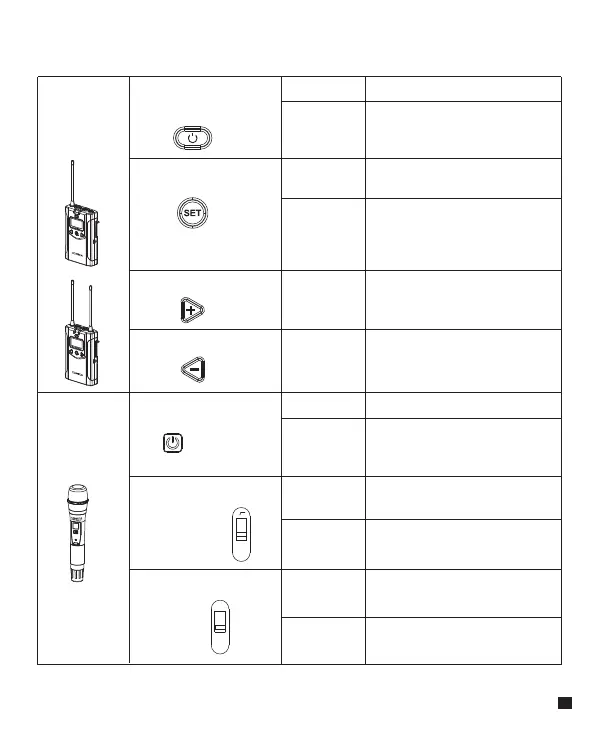
Lavalier
Transmitter
/ Receiver
Power / Muting Button
Long Press
Short Press
Power On / Off
Muting Mode
( It is available only when
light up the screen)
SET Function Menu
+ Button
- Button
Long Press
Enter the function
adjustment menu
Short Press
Short Press
Short Press
1.Confirm the selected
function
2.Exit the function
adjustment menu
Function Adjustment (+)
Function Adjustment (-)
Function Button Instruction
Hand-held
Transmitter
Power / Muting Button
“Low cut/ Normal”
Sound Switch
Signal Strength
“High/Low”
Switch
Long Press
Power On / Off
Short Press
Muting Mode
( It is available only when
light up the screen )
Push-up
Signal strength--high
Push-down
Signal strength--low
Push-up
Low cut
Push-down
Normal
LCF
-
RF
High
Low
7

Related product manuals