Technical Information
US customer support 1-888-622-2377 | www.commandaccess.com | CANADA customer support 1-855-823-3002
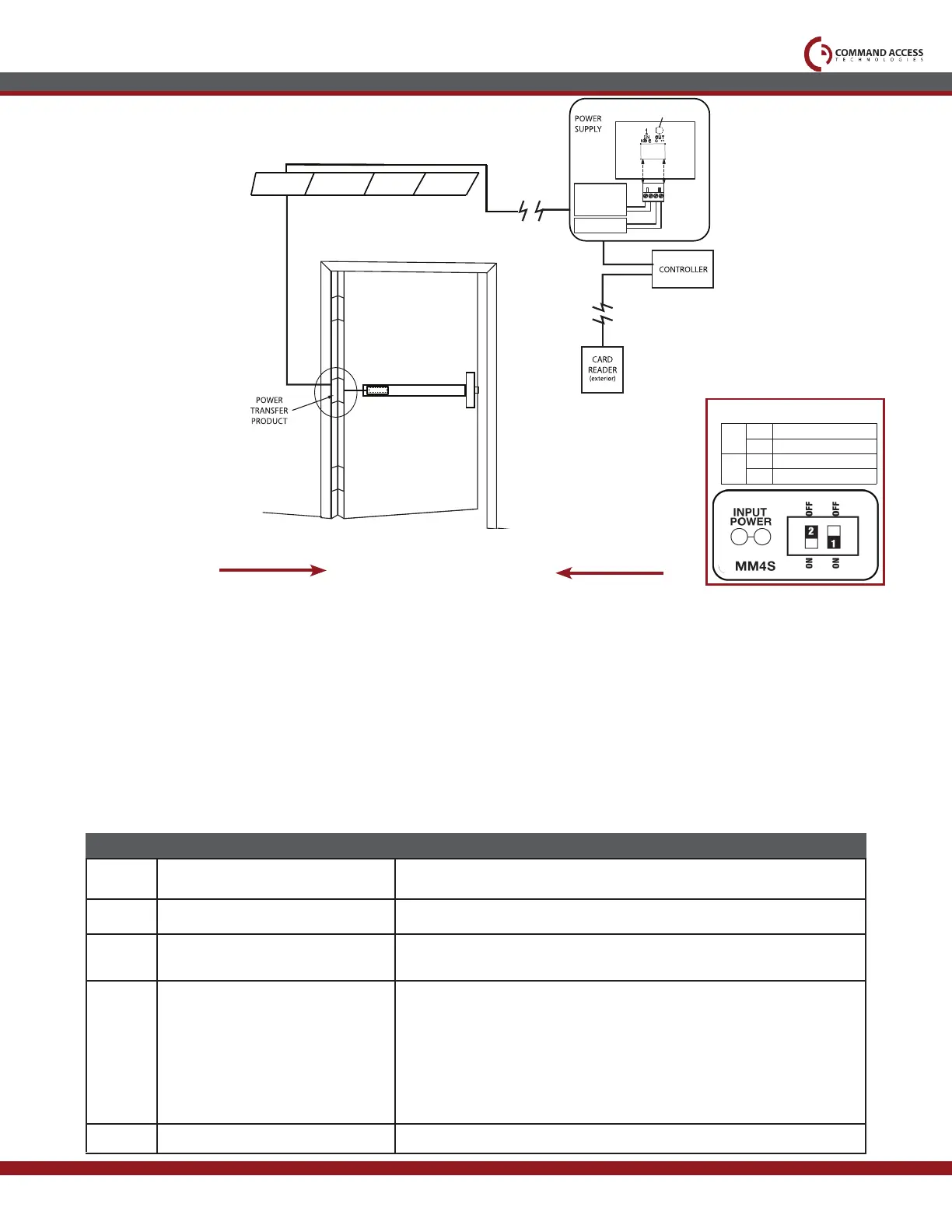
Ceiling Tile
Legend
Standard Placement
Optional Placement
Module
GREEN
CHANNEL 1
LED
NORMALLY OPEN
DRY CONTACT FROM
ACCESS CONTROL
SYSTEM
NO VOLTAGE
LOCKING
HARDWARE
+
-
CAT
MM4S SWITCHES
2
STANDARD TORQUE
HIGH TORQUE
PTS PROGRAMMING OFF
PTS PROGRAMMING ON
1
OFF
OFF
ON
ON
Troubleshooting & Diagnostics
Setting PTS
**Important Info**
Make sure to set PTS before finishing installation
Select your preferred torque mode (ships in standard torque) Press the device push pad to the desired
setting. (Recommend to fully depress and release 5%, giving the device room for changing door conditions.)
Step 2-
While depressing the push pad, apply power. (i.e. presenting the credential to the reader).
Step 3-
Continue to keep pad depressed, the device will beep 6 times. After the beeps have stopped, release the pad
and now the adjustment is complete. If not to your liking repeat the 3 steps.
Step 4-
Once you found the correct location, turn PTS switch to OFF position.
Step 1-
6 Beeps
Beeps
Explanation
Solution
PUSH TO SET
Device is recording it’s new position and power mode after the 6th beep.
2 Beeps
3 Beeps
5 Beeps
Over Voltage
Under Voltage
Retraction or dogging failure
> 30V unit will shut down. Check voltage & adjust to 24 V.
< 20V unit will shut down. Check voltage & adjust to 24 V.
After 1st fail: 5 beeps then immediately attempts to retract again.
After 2nd fail: 5 beeps with pause in-between for 30 seconds then device
attempts to retract again.
After 3rd fail: 5 beeps every 7 minutes, device will not attempt to retract.
To Reset: Depress bar for 5 seconds at any time.
4 Beeps Failed Sensor
Verify all 3 sensor wires are installed correctly. Replace sensor if
problem persists by contacting office.



 To Next Page