Installation Instructions
US customer support 1-888-622-2377 | www.commandaccess.com | CANADA customer support 1-855-823-3002
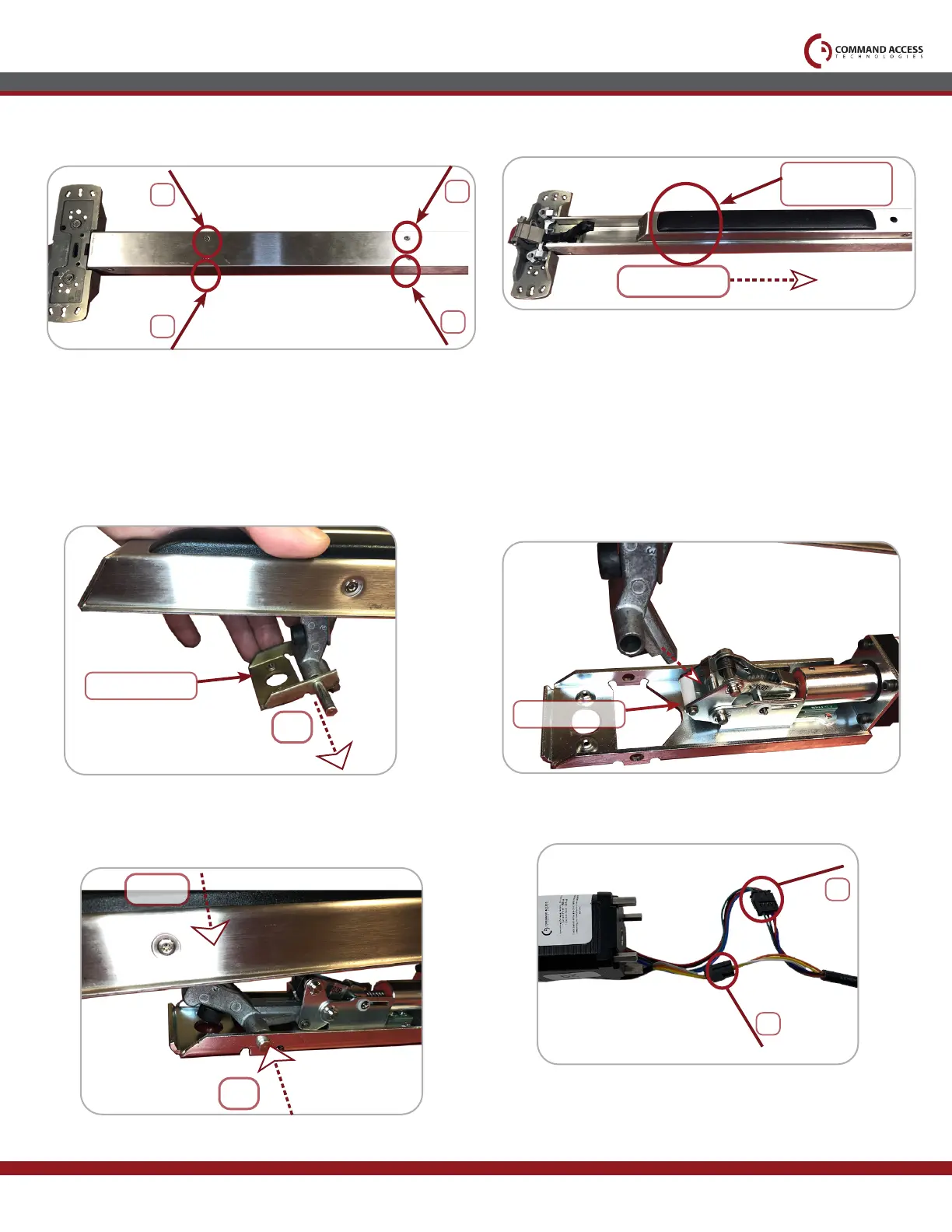
Locate the FRONT Activating Bracket.
Remove original mounting bracket by
pushing out PIN.
3.
Once the point is in the opening, depress the
push pad until the holes on the activating bracket
& motor mount line up. Re-install factory pin.
4.
Flip over device & remove (4) screws
securing push pad assembly to housing.
1.
Slide Push Pad off Exit Device Housing.
2.
5. 6.
PIN
Mounting bracket
Front activating
bracket
Install Point of Front Activating bracket
into opening of motor's attaching bracket.
It should rest on top of the nylon roller.
2
1
4
3
SLIDE
Nylon roller
PIN
Depress
Connect MM4S Cable to back of motor's (3) Pin
& (4) Pin connectors.
3
4



 To Next Page