EasyManua.ls Logo

Command access MLRK1 - User Manual

Command access MLRK1
7 pages
Print Icon
To Next Page IconTo Next Page
Loading...
A. B. C.
• CordlessDrillorPhillipsScrewdriver
• PowerSource
A.
B.
C.
D.
E.
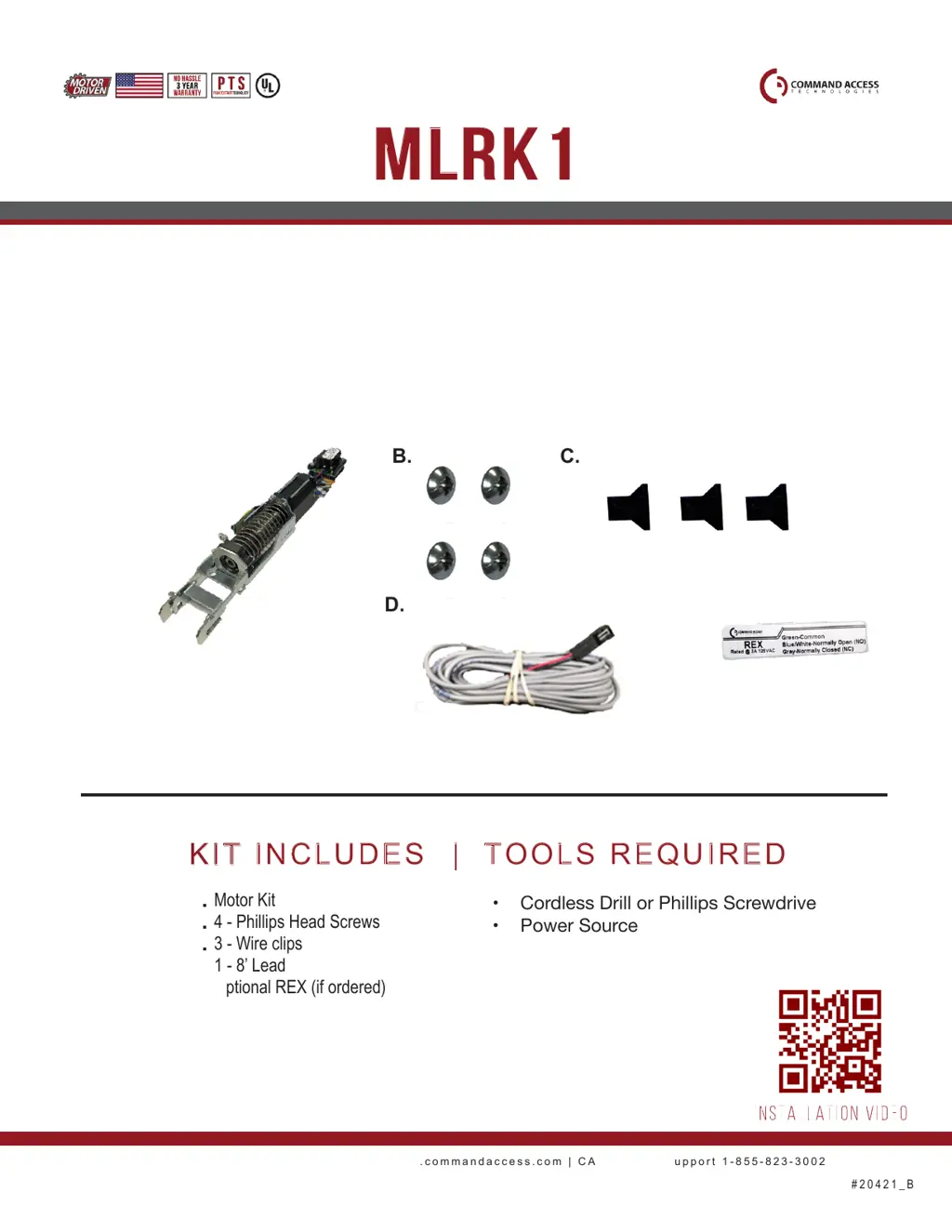
Motor Kit
4 - Phillips Head Screws
3 - Wire clips
1 - 8’ Lead
Optional REX (if ordered)
US customer support 1-888-622-2377 | www.commandaccess.com | CA customer support 1-855-823-3002
D.
E.
mlrk1
INSERT INSTRUCTIONS
The Command Access MLRK1 is a field installable motorized latch-retraction kit for:
• MLRK1-AREX - Adams Rite EX series devices
KIT INCLUDES | TOOLS REQUIRED
#20421_B
INSTALLATION VIDEO

Other manuals for Command access MLRK1

Questions and Answers

  • C
    Caleb GallowayAug 16, 2025
    What to do if Command access MLRK1 Door Opening System experiences retraction or dogging failure?
    • J
      Julie HernandezAug 16, 2025
      To reset the Command access Door Opening System after a retraction or dogging failure, depress the bar for 5 seconds at any time.
  • M
    Micheal PhamAug 19, 2025
    How to troubleshoot a failed sensor in Command access Door Opening System?
    • C
      Carrie SanchezAug 19, 2025
      If you are experiencing a failed sensor with your Command access Door Opening System, verify all 3 sensor wires are installed correctly. If the problem persists, replace the sensor.
  • C
    Courtney SwansonAug 22, 2025
    What to do if Command access MLRK1 shows over voltage?
    • U
      ulutzAug 22, 2025
      If the Command access Door Opening System unit shuts down due to over voltage ( > 30V), check the voltage and adjust it to 24V.
  • D
    Denise DominguezAug 25, 2025
    What does 'PUSH TO SET' mean on Command access Door Opening System?
    • I
      Ian PottsAug 26, 2025
      When the Command access Door Opening System displays 'PUSH TO SET', it means the device is recording its new position and power mode after the 6th beep.
  • M
    Marilyn BergerAug 28, 2025
    What to do if my Command access Door Opening System beeps 5 times?
    • L
      Lance WilliamsAug 28, 2025
      To reset your Command access Door Opening System after it beeps 5 times, depress the bar for 5 seconds at any time.
  • H
    Heidi LewisAug 31, 2025
    What to do if Command access MLRK1 Door Opening System makes 2 Beeps?
    • S
      Sharon VasquezAug 31, 2025
      If your Command access Door Opening System beeps twice, the unit will shut down if the voltage is greater than 30V. Check the voltage and adjust it to 24V.
  • D
    Damon RiceSep 3, 2025
    Why my Command access MLRK1 Door Opening System is beeping 3 times?
    • B
      Bob BurnsSep 3, 2025
      If your Command access Door Opening System beeps three times, the unit will shut down if the voltage is less than 20V. Check the voltage and adjust it to 24V.
  • M
    mmillerSep 6, 2025
    What to do if Command access Controller is beeping 4 times?
    • K
      Kelly GarzaSep 6, 2025
      If the Command access Controller beeps 4 times, it indicates a failed sensor. First, verify that all 3 sensor wires are installed correctly. If the problem persists, replace the sensor by contacting the office.
  • K
    kaylee21Sep 9, 2025
    Why is my Command access Controller beeping 2 times?
    • M
      Mrs. Judy MooreSep 9, 2025
      If the Command access Controller is beeping 2 times, it signifies an over voltage issue. This means the voltage is greater than 30V, causing the unit to shut down. Check the voltage and adjust it to 24V.
  • R
    Robin AndersonSep 12, 2025
    Why is my Command access Controller beeping 3 times?
    • R
      Ryan MarshallSep 12, 2025
      If the Command access Controller is beeping 3 times, it indicates an under voltage issue. This means the voltage is less than 20V, causing the unit to shut down. Check the voltage and adjust it to 24V.

Summary

INSERT INSTRUCTIONS

Kit Contents and Tools Required

Lists all components included in the MLRK1 kit and the necessary tools for installation.

Technical Information

Specifications and Configuration

Details power requirements, wire gauge, and Request to Exit (REX) configurations.

Setting the Push-to-Set (PTS) Feature

Step-by-step guide on how to set the torque mode and adjust the device's pushpad.

Electrified Exit Device Installation Example

Recommended Power Supplies

Advises on using Command Access power supplies for tested compatibility with exit devices and kits.

MLRK1 Installation Guide

Initial Device Preparation

Covers removing covers, push pads, and preparing the exit device for the motor kit.

Motor Kit Mounting

Details how to align and attach the motor kit to the exit device using screws and pins.

Cable Management and Routing

Instructions on attaching and routing cable guides within the device for a clean installation.

Final Assembly and Testing

Guides on re-installing components, securing cables, and performing initial power tests.

REX Connection and Strain Relief

Explains how to connect the REX sensor and apply strain relief using provided materials.

Command access MLRK1 Specifications

General IconGeneral
BrandCommand access
ModelMLRK1
CategoryDoor Opening System
LanguageEnglish

Related product manuals