EasyManua.ls Logo

Command access MLRK1-KAW17 - User Manual

Default Icon
7 pages
Print Icon
To Next Page IconTo Next Page
Loading...
E.
A.
F.D.
B. C.
G. H. I.
Cordless Drill
1/16” drill bit
File
#2 Phillips head screwdriver
PH-00 Screwdriver
KIT INCLUDEs TOOLS REQUIRED
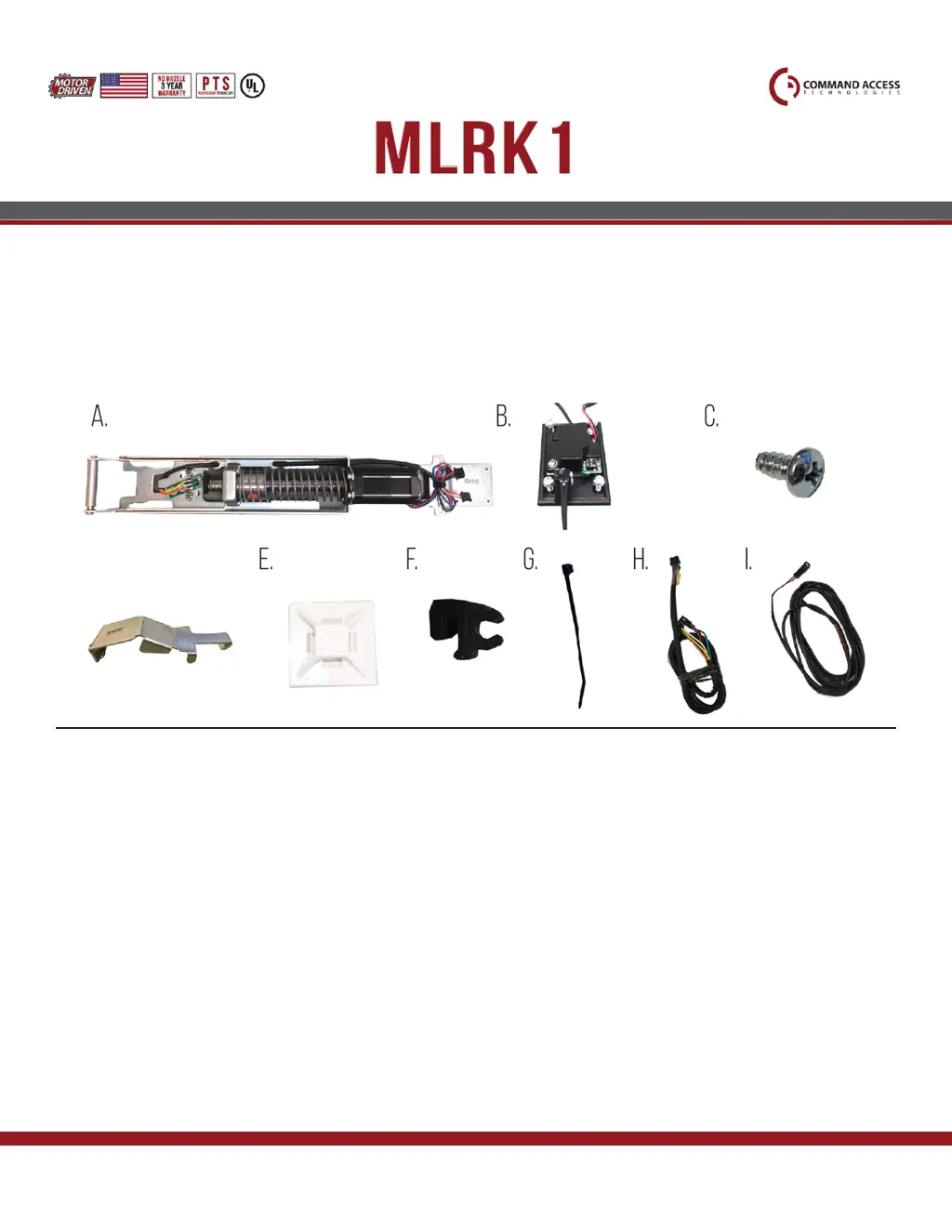
1 - 60241 Motor Mount
1 - 60264 MM4 RM series module (w/ optional REX)
2 - 40040 Phillips Screws
1 - 50453 Bracket
2 - 40059 Cable Mounting Pad
3 - 50636 Cable Guides
2 - 40060 Cable Ties
1 - 50741 MM4 RM Cable
1 - 50436 8’ Lead
A.
B.
C.
D.
E.
F.
G.
H.
I.
MLRK1
INSTRUCTIONS
The Command Access MLRK1-KAW17 is a eld installable motorized latch-retraction kit for:
#20379_K
US customer support 1-888-622-2377 | www.commandaccess.com | CA customer support 1-855-823-3002
• MLRK1-KAW17 - Kawneer 1686 & 1786 series devices
• MLRK1-JAC12 - Jackson 1285, 1286 & 1295 series devices
• MLRK1-AHT - AHT 8 & 9 series devices
Recommended Power Supplies:
All Command Access exit devices & eld installable kits have been thoroughly cycle tested with Command
Access power supplies at our factory. If you plan on using a non-Command power supply it must be a
ltered & regulated linear power supply.

Other manuals for Command access MLRK1-KAW17

Questions and Answers

  • S
    Spencer GarzaAug 14, 2025
    What to do if my Command access MLRK1-KAW17 beeps 5 times?
    • K
      kgarciaAug 14, 2025
      If your Command access Door Opening System beeps 5 times, it indicates a retraction or dogging failure. The system will attempt to retract again after the first failure. After the second failure, it will beep 5 times with a 30-second pause before attempting to retract again. After the third failure, it will beep 5 times every 7 minutes and will not attempt to retract. To reset, depress the bar for 5 seconds at any time.
  • D
    David GrantAug 17, 2025
    What does it mean when my Command access Door Opening System beeps 4 times?
    • J
      Jared MossAug 17, 2025
      Four beeps from your Command access Door Opening System indicates a failed sensor. Verify that all 3 sensor wires are installed correctly. If the problem persists, replace the sensor by contacting the office.
  • N
    Neil CollinsAug 21, 2025
    Why is my Command access MLRK1-KAW17 beeping 2 times?
    • C
      Corey EdwardsAug 21, 2025
      Two beeps from your Command access Door Opening System indicate an over voltage situation. If the voltage is greater than 30V, the unit will shut down. Check the voltage and adjust it to 24V.
  • Q
    qcoxAug 25, 2025
    Why is my Command access MLRK1-KAW17 beeping 3 times?
    • P
      penastevenAug 25, 2025
      Three beeps from your Command access Door Opening System indicate an under voltage situation. If the voltage is less than 20V, the unit will shut down. Check the voltage and adjust it to 24V.
  • D
    Danielle LeeAug 28, 2025
    What does 6 beeps mean on my Command access Door Opening System?
    • T
      tracy50Aug 28, 2025
      Six beeps from your Command access Door Opening System means that the device is recording its new position and power mode.
  • M
    Michael AndersonAug 31, 2025
    What to do if there is retraction or dogging failure on Command access Controller?
    • P
      Patricia AndersonAug 31, 2025
      To address retraction or dogging failure in your Command access Controller, depress the bar for 5 seconds to reset the system. This action can be performed at any time.
  • L
    leslie87Sep 3, 2025
    How to fix over voltage on Command access Controller?
    • M
      Mrs. Amber CollinsSep 3, 2025
      If your Command access Controller is showing an over voltage error, you should check the voltage and adjust it to 24V.
  • P
    perrycorySep 6, 2025
    How to fix under voltage on Command access Controller?
    • P
      Paul VillaSep 6, 2025
      If your Command access Controller is showing an under voltage error, you should check the voltage and adjust it to 24V.
  • I
    ibrownSep 10, 2025
    What to do if Command access Controller displays a failed sensor?
    • H
      Harold SinghSep 10, 2025
      If the Command access Controller displays a 'Failed Sensor' error, first verify that all three sensor wires are correctly installed. If the problem persists, contact the office to replace the sensor.

Summary

MLRK 1 Instructions and Components

Kit Components Included

Lists all parts included in the MLRK1 kit for installation.

Tools Required for Installation

Lists the necessary tools for installing the MLRK1 kit.

Recommended Power Supplies

Specifies the type of power supplies suitable for Command Access exit devices and kits.

Technical Information and Setup

Setting PTS (Push to Set)

Procedure to set the preferred torque mode and program the device.

Troubleshooting and Diagnostics

Guides for diagnosing and resolving issues based on beep codes and device behavior.

Exit Device Disassembly

Kit Installation Steps

Exit Device Reassembly

Final PTS Programming Steps

Command access MLRK1-KAW17 Specifications

General IconGeneral
BrandCommand access
ModelMLRK1-KAW17
CategoryDoor Opening System
LanguageEnglish

Related product manuals