Installation Instructions
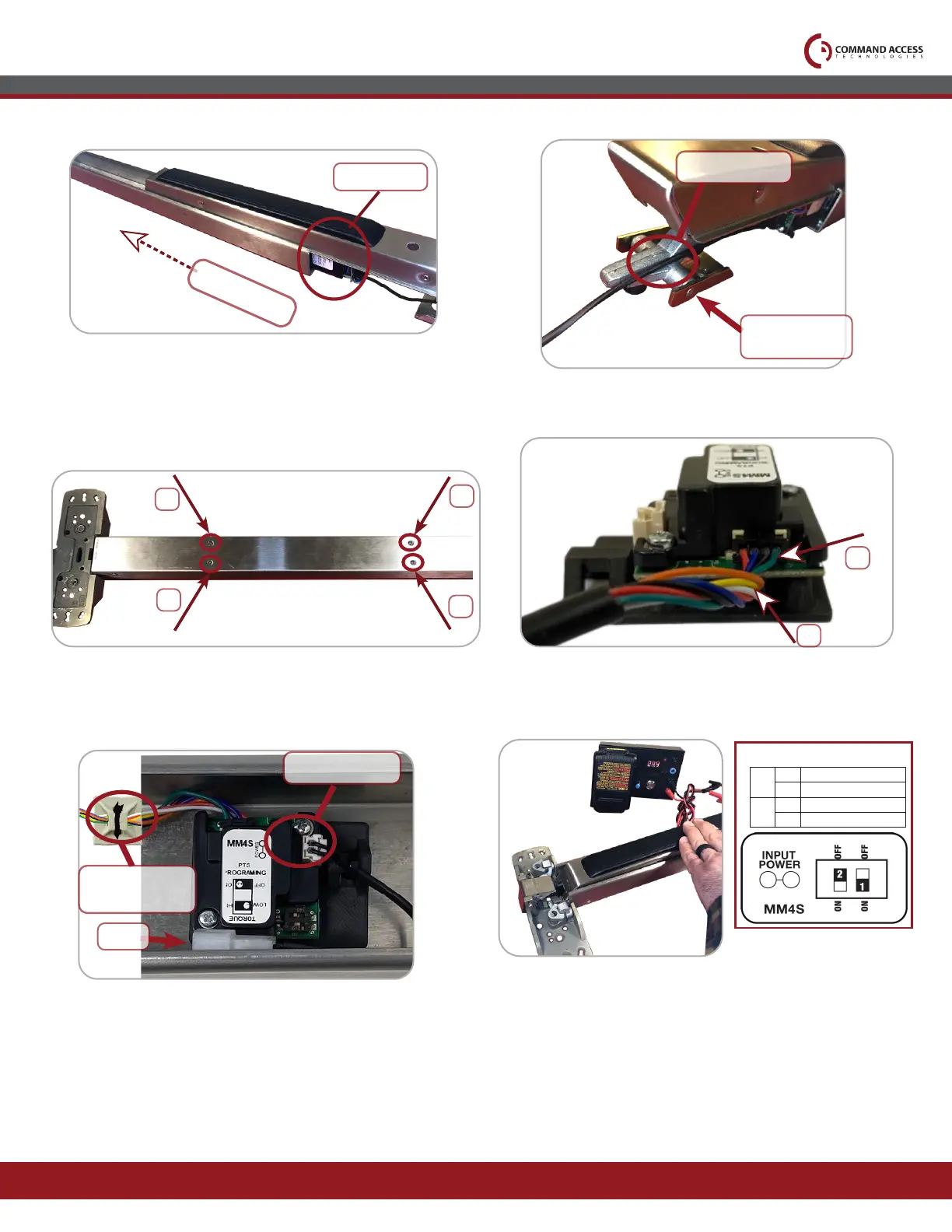
Once passed the back activating bracket,
ip device over & line up existing holes with
mounting bracket inside. Re-install (4) screws.
8.
11.
Connect to Power & Set the “Push to Set
Adjustment” following the steps below.
10.9.
Plug-in cable's (4) Pin TOP port & (3) Pin
BOTTOM port into MM4S ports.
Make Sure MM4S Cable is routed OVER the
back activating bracket.
7.
Visit our website for more details
www.commandaccess.com
Canada Customer Support
1-855-823-3002
U.S. Customer Support
1-888-622-2377
mm4s cable
Back activating
bracket
2
1
4
3
Slide Push Pad & Motor Kit back into housing.
Be cautious of MM4S cable wires.
MOTOR KIT
SLIDE
11.
Using double sided tape, secure MM4S to
inside of the back of exit device housing.
Connect Molex Pigtail. Add Mounting Pad &
cable tie to secure cable wires.
Select your preferred torque mode (ships in standard torque) Press the device push pad to the desired
setting. (Recommend to fully depress and release 5%, giving the device room for changing door conditions.)
Step 2-
While depressing the push pad, apply power. (i.e. presenting the credential to the reader).
Step 3-
Continue to keep pad depressed, the device will beep 6 times. After the beeps have stopped, release the pad
and now the adjustment is complete. If not to your liking repeat the 3 steps.
Step 4-
Once you found the correct location, turn PTS switch to OFF position.
Step 1-
MM4S SWITCHES
2
STANDARD TORQUE
HIGH TORQUE
PTS PROGRAMMING OFF
PTS PROGRAMMING ON
1
OFF
OFF
ON
ON
3
4
MOLEX PIGTAIL
POWER
Mounting Pad
& Tie



 To Previous Page