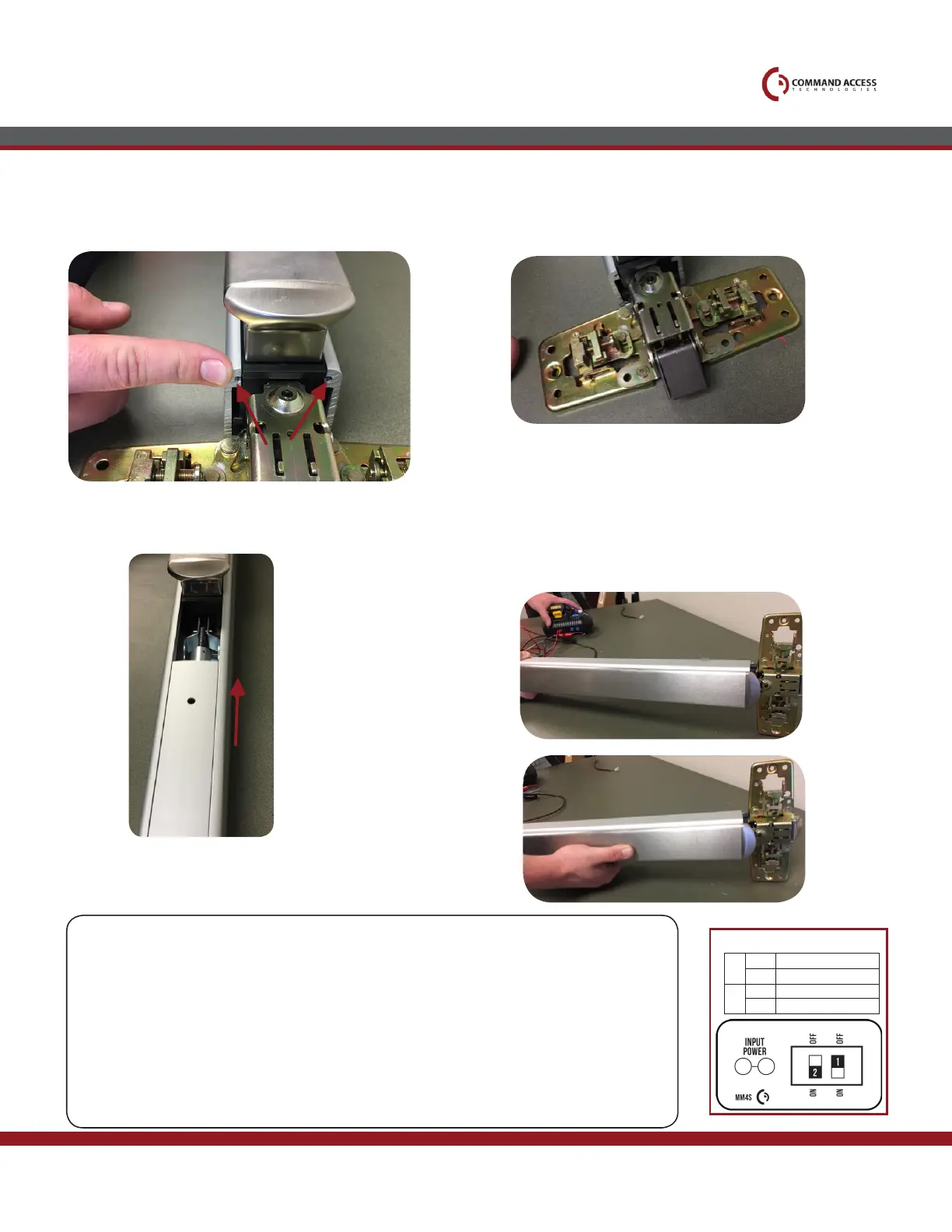
Replace head cover & re-install (4) screws.
Replace back mounting bracket & re-install (2)
screws with 5/16” nut driver.
Replace front mounting bracket.
Connect to power (1) and push down on bar (2).
Follow Push to Set instructions directions below,
remembering to turn the Programming Switch to the
off position when completed.
Finish sliding faceplate onto device.
18.
17.
21.
20.19.
ScrewS
1.
2.
US customer support 1-888-622-2377 | www.commandaccess.com | CA customer support 1-855-823-3002
Setting PTS
Step 1-
Select your preferred torque mode (ships in standard torque) Press the device push pad to the
desired setting. (Recommend to fully depress and release 5%, giving the device room for
changing door conditions.)
Step 2-
While depressing the push pad, apply power. (i.e. presenting the credential to the reader).
Step 3-
Continue to keep pad depressed, the device will beep 6 times. After the beeps have
stopped, release the pad and now the adjustment is complete. If not to your liking repeat the
three steps.
Step 4-
Once you found the correct location, ip the dip switches to off to lock programming.
Installation Instructions
MM4 SWITCHES
2
STANDARD TORQUE
HIGH TORQUE
pts programming off
pts programming on
1
OFF
OFF
ON
ON



 To Previous Page