13
※ If a sub unit is not installed, just press “#”(Paging button).
6) Press “#”(Paging button) and hang up to complete the registration.
To register LP (License Plate) number for a household unit (for a
parking control)
※ 2 LP numbers are allowed to register per each household unit.
If a LP number for a household is already known
1) Press “Speakerphone” button.
2) Enter the building number + “*”key and enter the household unit number
and then, press “Input 1” or “Input 2” button.
(display “Car1 xx-xxxxx” or “Car2 xx-xxxx”on LCD)
3) Enter the LP number.
4) To correct the entered LP number press (◀ or ▶).
5) press “Input 1” or “Input 2” button.
6) To complete the registration. After save LP number data
Registering LP number when a household unit calls the security
station
※※
Caution
If the call is made from a security station, the operator function will not be
functional.
1) Pick up a handset as paged by a household unit and press “Remote”
button.
2) Enter the designated parking lot number + “*”key and enter the LP
number.
3) To correct the entered LP number press (◀
, ▶) to make corrections.
4) Press “Input 1” or “Input 2”to store the LP number.
5) Place a handset back on a hook to complete the registration.
To indicate a household unit number by LP number
1) Press “Speakerphone” button.
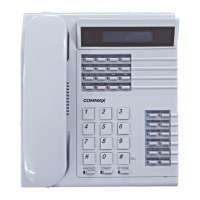
2) Press “Confirm” button located at the Speed dial buttons (Ref. Page 8).
(“car > - “ is displayed on the LCD)
3) Enter the LP number and then press “#”(Paging button).
4) The household unit number is displayed on the LCD.


 To Next Page