7
4. Household unit call
Paging a security station from a household unit
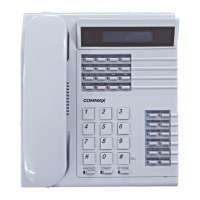
1) When paging a security station from a household unit, the household unit
number will be displayed on the LCD on the security station and the
security station rings.
2) Pick up the handset to talk.
To page a household unit
1) Pick up a handset and dial the number of household unit
(Press 9999 to page another security station).
2) Press “*”(Building button) key
(the number on the display will change to building location)
3) Dial the household unit number
(to page another security station, enter the ID number of the security
station).
4) Press “#”(Paging button) to page (paging sound will ring).
5) Talk as the household unit answers (when line is busy, please try again
later).
To call units who call during guard absence
1) “Select 1~4”button’s lamps turn on when units call during guard absence.
2) Household unit number is displayed on the LCD to press “Select” button
3) Press “#”(Paging button) key.
4) Talk as the household unit answers
To connect a unit-to-unit call
※ Caution
If the call is made from a security station, the operator function will not be
functional.
1) While talking to a unit, if the call is made from the unit to security station,
press the “Call operating” button (the lamp turns on).
2) Dial the building number and press “*”.
※※
Caution
1) Please place a handset on the hook.
(If it is placed unhooked, all calls and pages will not be received)
2) When unit numbers are being registered at the lobby phone, this security
station device must be off.
3) Some of the above functions are disabled depending on the security
station device.


 To Next Page