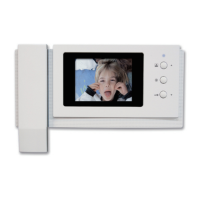
4. Monitoring :
function to see the image of visitor in the entrance.
(stand-by mode) Operation
-
By pressing the MONITOR button repeatedly, the monitor will work as following in order.
Camera1
→
Camera2
→
OFF ............
5. Settings
* Product settings need the following 4 buttons on the product.
* Start Menu / Exit : MENU button
* Select and in-put : SELECT button (INTERPHONE button)
* Move up / Move right: UP button (DOOR RELEASE button)
* Move down / Move left: DOWN button (MONITOR button)
You can adjust DOOR VIDEO SET, UTILITY and check INFORMATION (model
name &version) with (UP) / (DOWN) button after pressing MENU button on the right
of the product in video talk mode or stand-by mode.
5-1. Screen setting (Brightness/Contrast/Color adjustment function)
Press the MENU button and access to DOOR VIDEO SET and enter the setting
menu by pressing the SELECT button.
(1) BRIGHTNESS: Adjusting Brightness of Screen.
(2) CONTRAST: Adjusting Contrast of Screen.
(3) COLOR: Adjusting Color of Screen.
* How to adjust
① Move to Menu you want to adjust with UP/DOWN button on the list of
DOOR VIDEO SET
② Press the SELECT button to choose an icon.
③ Adjust the set value with UP/DOWN button
④ Press the select button, To complete.
(4) RESET : Initializing
* How to adjust
① Move to RESET menu in DOOR VIDEO SET menu.
② Press the SELECT button to enter the menu.
③ Select YES with UP/DOWN button.
④ Press the SELECT button.
(5) EXIT : Go back to setting mode
6


 To Next Page