8
is connected.
ྜ When you press a call-end button, the call is end. And the main screen will be shown.
* Calling of Interphone
ྙ In case of installing additional interphone, when a visitor calls from door camera, a calling
tone(sound) will be ringed in the interphone as well.
- Max 60 seconds for call and talk time
ྚ When you pick up the handset, it’s available to talk with door camera.
ྛ During a call, press the door open button to open the door.
(In case door camera is interlocked with door release function)
ྜ Put the handset back on and the call ends.
- The interphone call ends when the connected video phone call finished.
* PIP(Picture in Picture) function
If you touch the screen after a call comes from the individual door camera, CCTV screen is shown
as PIP in the upper left corner.(Same as Monitoring)
At this time, if you touch one of the screens, individual entrance and CCTV screen are switched
to each other.
4-3 CCTV
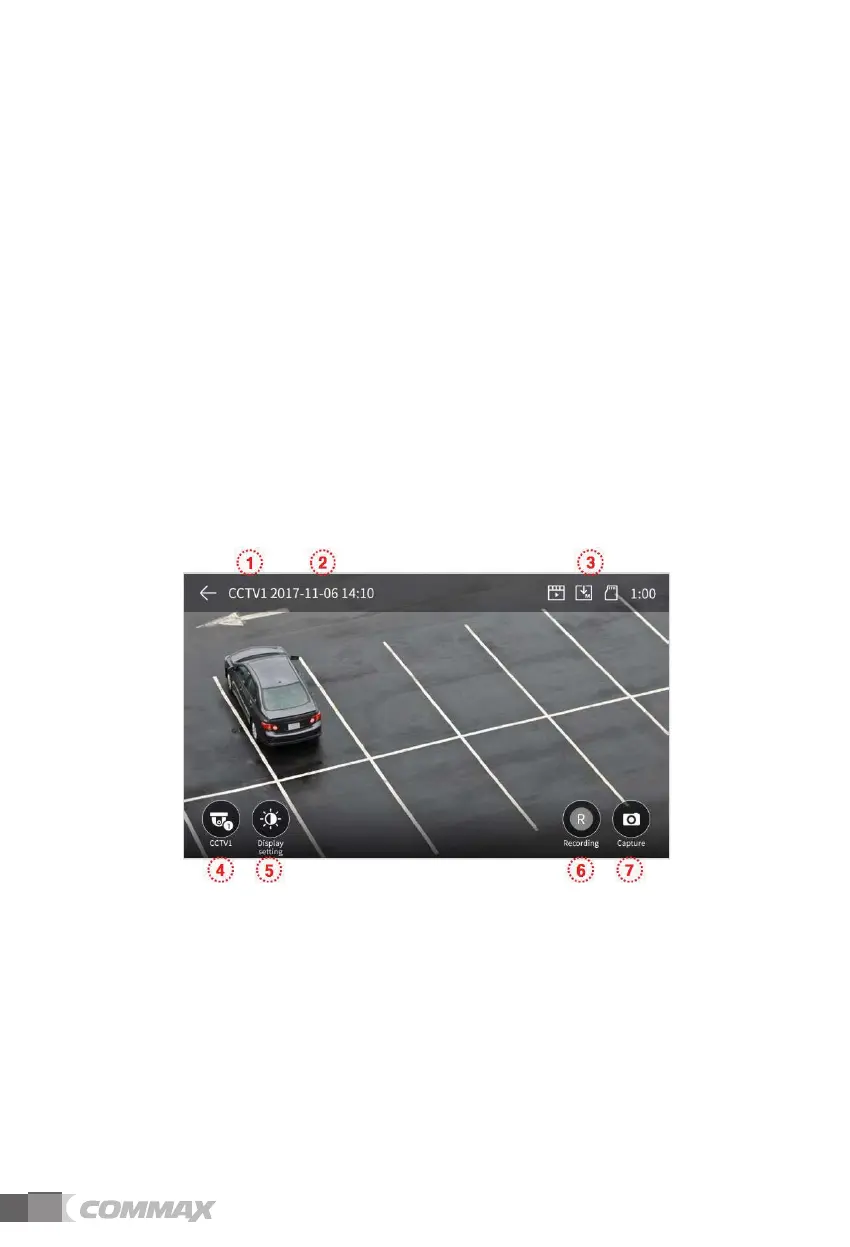
- When you touch a CCTV button, the below screen will be shown.
- Monitoring time is max. 60 seconds. The video-clip storage can be proceeded within
60 seconds.
- You cannot use CCTV functions if cameras are not installed.
◆G CCTV sign: To show the current working CCTV.
□G Date & Time: Current date and time will be indicated.
■G Icon set: To show motion detection and video storage. (Monitor section for more details)
△G CCTV screen change: To see CCTV 1 screen and CCTV 2 screen.
- You cannot use this function when only one camera is connected.
▲G Video quality adjustment: To change Brightness/Light & Shade/Chroma.
(Monitor section for more details)
ྞ Video storage: To store (save) a video-clip.
- When you touch a button, the storage will be started.
- The below icon will be shown during image storage. And the remaining time will be shown
on the right upper.



 To Next Page