- 12 -
6.Household PIN Confirmation
6-1. Household PIN Confirmation
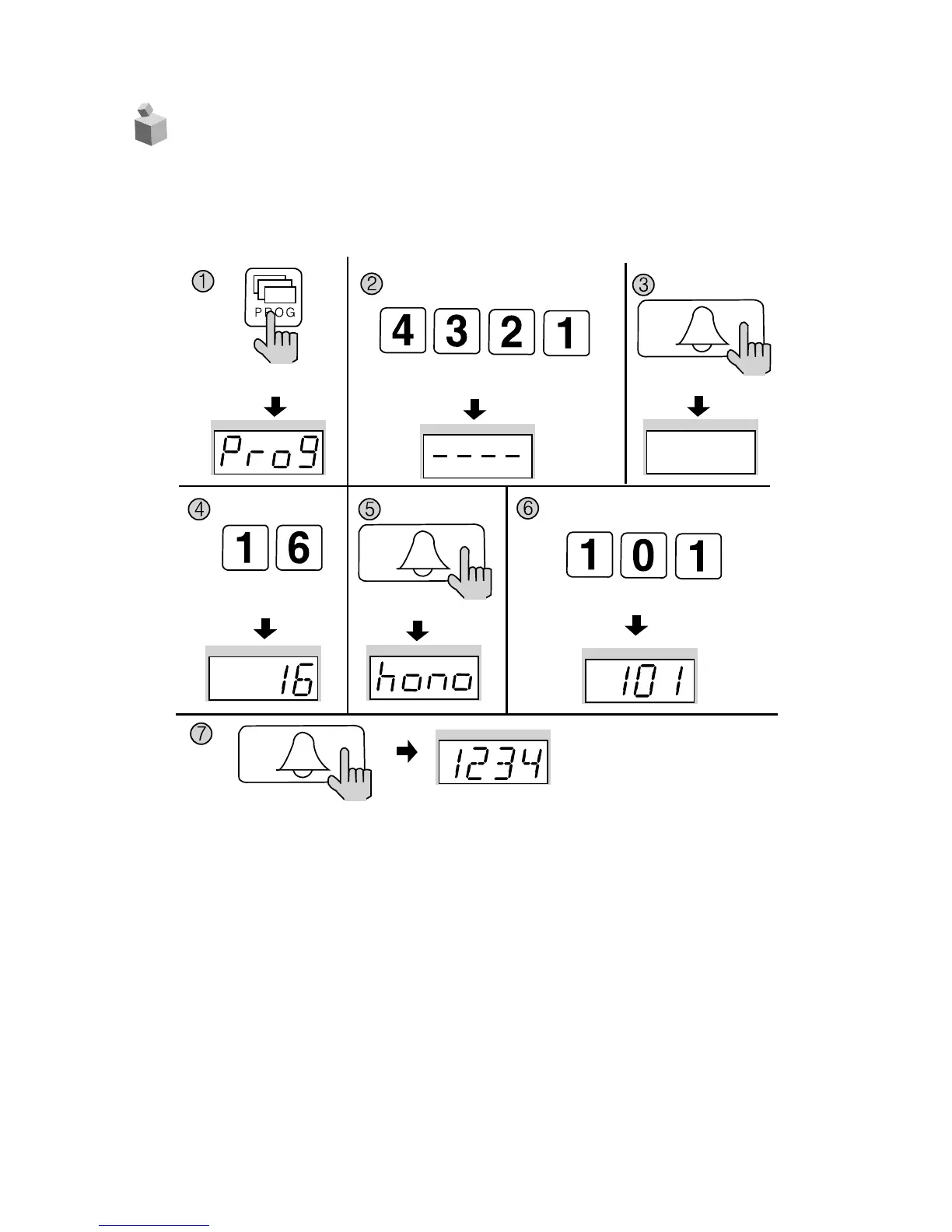
✽ P - Management PIN - E - Program Number - E - Household Number - E
① Press the Program button. (‘Prog’will appear)
② Enter the Management PIN.
③ Press the Call button (E).
④ Press the Program Number (16).
⑤ Press the Call button (E). (‘hono’will blink)
⑥ Enter the Household Number. (The Household Number will be indicated)
⑦ Press the Call button (E). (The Household PIN will be indicated)
Press the Program button (P).
Enter the Management PIN.
Press the
Call button (E).
Press the
Program Number (16).
Press the
Call button (E).
Press the Call button (E).
ex)1 2 3 4 for household 101
Household Number. ex) 101


 To Next Page