- 14-
8. Using Remote Cardkeys (RF/ID) - Optional
8-1. Testing Remote Cardkeys
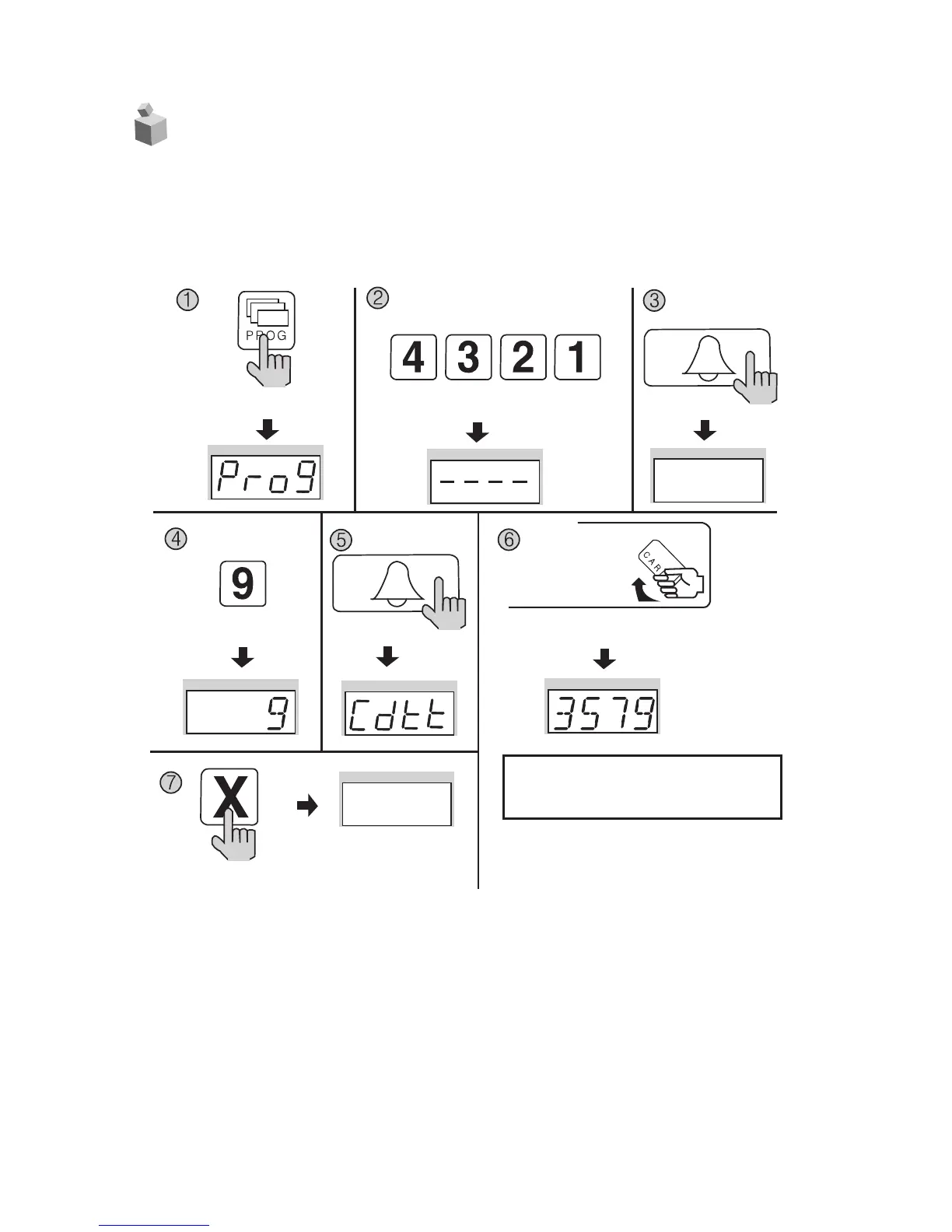
✽ P - Management PIN - E - 9 - E - Card Test - X (Cancel)
✽ This feature is used to test Remote Cardkeys.
① Press the Program button (P). (‘Prog’will appear)
② Enter the Management PIN.
③ Press the Call button (E).
④
Press number 9 (Remote Cardkey Test).
⑤
Press the Call button. (‘Cdtt’will blink)
⑥ Place the Remote Cardkey to the RF/ID Receptor, and the Card Number will appear on
the Display Window (FND).
⑦ Press the Cancel button (X) to end Remote Cardkey testing.
Press the Program button (P).
Enter the Management PIN.
Press the
Call button (E).
Press the
Program Number (9).
Press the
Call button (E).
Press the Cancel button
(X) to end Remote
Cardkey testing
Press the Card Here
ex) Card Number 3579
Place the Remote Cardkey to the RF/ID
Receptor, and the Card Number will appear on
the Display Window (FND).
✽
To confirm others cardkey, place continuedly the
Remote Cardkey to the RF/ID Recepter


 To Next Page