- 18-
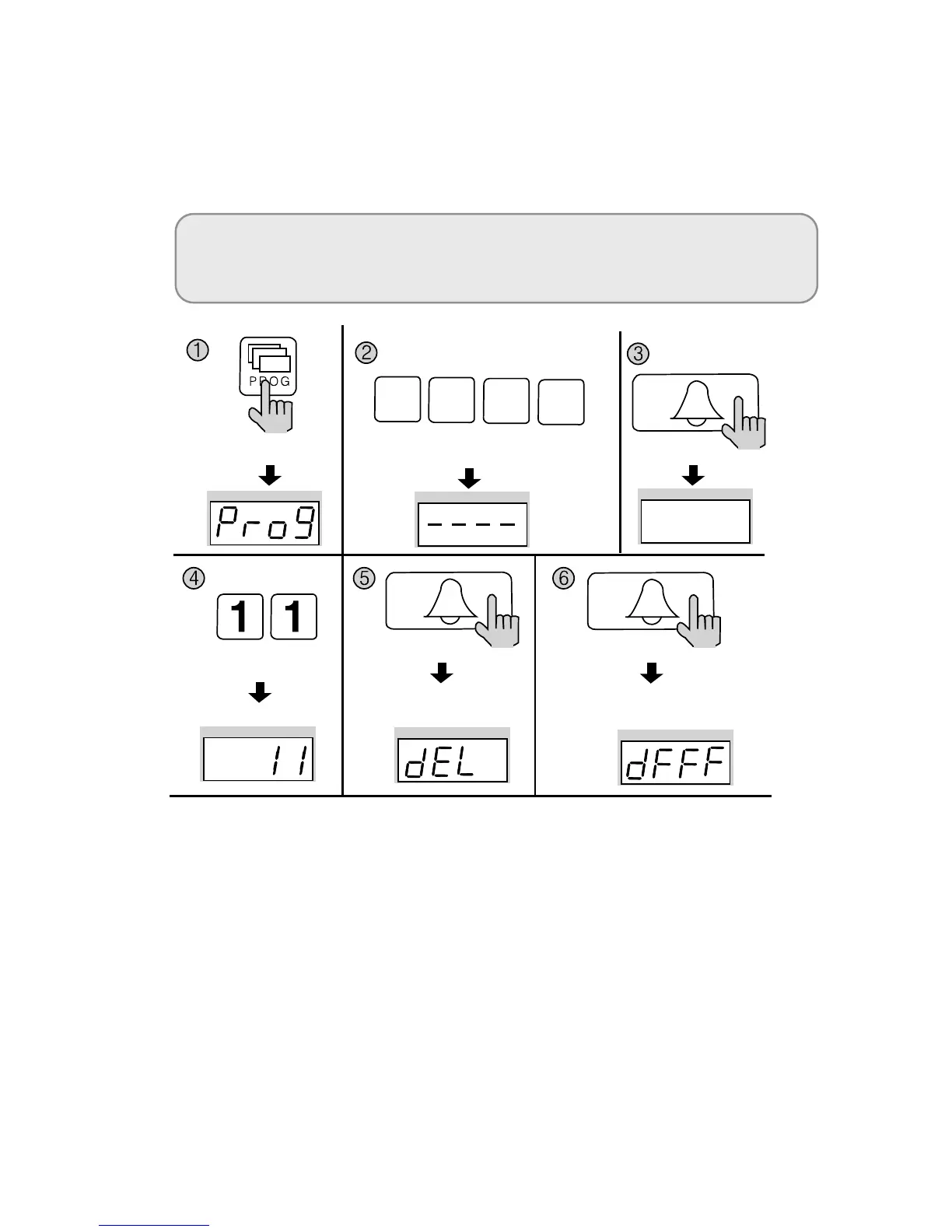
8-5. All Remote Cardkey deletion
✽ P - Management PIN - E - 11 - E - E
✽ Refrain from deleting all Remote Cardkeys, except for during installation.
① Press the Program button (P). (‘Prog’will appear)
② Enter the Management PIN.
③ Press the Call button (E).
④ Enter number 11 (All Remote Cardkey Delete Number).
⑤ Press the Call button (E). (‘dEL’will blink)
⑥
Press the Call button (E) again.
The number displayed on screen will change.
⑦
Press the Cancel button (X) to terminate the feature.
Press the Program button (P).
Enter the Management PIN.
Press the
Call button (E).
Press the
Call button (E).
All Remote Cardkey mode All Remote Cardkey mode
Press the
Call button (E).
Press the
Program Number (11).
<Note>
In order to delete all registered RF cards, Move to "Program 23" ⇒ "Mode 1"
and execute "Delete all registered RF cards" with in 30 seconds.
4 3 2
1


 To Next Page