EasyManua.ls Logo

Commend C-WS201VICA - User Manual

Commend C-WS201VICA
4 pages
Print Icon
To Next Page IconTo Next Page
Loading...
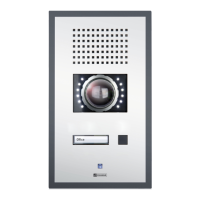
IP Stations WS 201VICA/WS 211VICA
Connection diagram
160 (6.3)
140 (5.5)
275 (10.84)
255 (10.05)
4x Ø
7
(0.28)
approx. 1.65 m (5.4 ft)
Finished floor
Dimensions and recommended mounting height
Measurements in mm (in), not scale! Front panel thickness: 3 mm (0.12 in)
OUT 2
OUT 2
OUT 2
OUT 2
OUT 1
OUT 1
EP+
EP–
EM+
EM–
MUTE
GND
LINE–
LINE+
IN 1
IN 2
IN 3
GND
external
loudspeaker
module
IP downlink
(Axis camera
+ PoE)
expansion bus
IP uplink
+ PoE
LED brightness
+
handset:
microphone
loudspeaker
slot for inserting
button label
The camera illuminator and heating control are connected to the main board of the subscriber
via the expansion bus. In CCT800, the device is shown with an additional EB2E2A device.
Use OUT 1 on the EB2E2A to switch the camera illuminator on and off.
It is also possible to use OUT 1 as attendant contact, e.g. to switch on the camera illuminator
at call setup.
To dim the camera illuminator, use the potentiometer
2
on the camera board.
Use OUT 2 on the EB2E2A to switch the camera heating on and off.
Camera illumination and heating control
1
1
2
Extent of supply
Station
Mounting screws (4 x Torx TR 25 security countersunk screws, M5 x 10)
Snap-on ferrite (to be attached to IP uplink Ethernet cable)
Short reference
Cleaning instructions
Safety instructions
The device may only be cleaned with cleaning agents for stainless steel. Do not use cleaning agents
containing chlorine or isopropanol.
This device shall be installed or replaced by trained and qualied personnel only.
Do not install the device on unstable walls or on surfaces which cannot support the devices weight.
Only use recommended tools when installing the device.
Only accessories that comply with the devices technical specications shall be used.
All connected circuits shall full the requirements for Safety Extra Low Voltage (SELV) and Limited
Power Source (LPS) according to IEC/EN 60950-1.
Use shielded Ethernet cables only.
Before using the device, ensure all cables are correctly connected and not damaged.
Disconnect the power supply (PoE or DC) for any maintenance of the device.
Allow the device to cool down completely before touching parts inside.
Do not make any unauthorised modications to the device.
Question and Answer IconNeed help?

Do you have a question about the Commend C-WS201VICA and is the answer not in the manual?

Summary

Dimensions and Recommended Mounting Height

Connection Diagram

Installation and Safety Information

Extent of Supply

Lists the components included with the IP station, such as mounting screws and ferrite.

Cleaning Instructions

Provides guidelines for cleaning the device using only approved agents suitable for stainless steel.

Safety Instructions

Details essential safety precautions for installation, handling, and electrical connections.

Camera Illumination and Heating Control

Axis Electronic Module: Camera Angle;Web Interface Login

Adjusting the Camera

Step-by-step guide to adjust the camera's angle using specific screws and the electronic module.

First Connection

Information on initial IP address assignment via DHCP and accessing the web interface.

Login for Axis Web Interface

Specifies default credentials and post-reset password configuration for web access.

Warning

Caution regarding cable placement to prevent damage to the camera or housing.

Axis Electronic Module: Control Button

Control Button

Instructions for operating the control button and resetting the camera to factory defaults.

Attention

Note on reconfiguring the camera after a reset to prevent upside-down images.

Handling, Disposal, and Manufacturer Reference

Handling

Recommendations for safe transport and handling of electrostatic sensitive devices.

Disposal and Recycling

Information on proper disposal of the equipment according to WEEE directive.

Manufacturers Reference

Details compliance with European directives and location of technical specifications.

Commend C-WS201VICA Specifications

General IconGeneral
CategoryIntercom System
Protection ClassIP65
MaterialStainless Steel
Operating Voltage24 V DC
Housing MaterialStainless Steel
Connection TypeScrew terminals
MountingSurface
Weight1.5 kg

Related product manuals