EasyManua.ls Logo

Commodore 1940 - Page 11

Commodore 1940
98 pages
Print Icon
To Next Page IconTo Next Page
To Previous Page IconTo Previous Page
Loading...
Monitor
1940/1942
GB-y
You
can
connect
headphones
to
your
monitor
so
that
stereo
sounds
generated
by your
Amiga
computer
can
only be
heard
through
the
headset.
To
do
this,
simply
insert
the
plug
on
the
end
of
a
standard
headphone
cable
into
the
small
port
on
the
left
side of
the
monitor.
Headphones
are
not
included
with your
monitor
but
should be
read
ily
available
at
most
computer
and
electronics
stores.
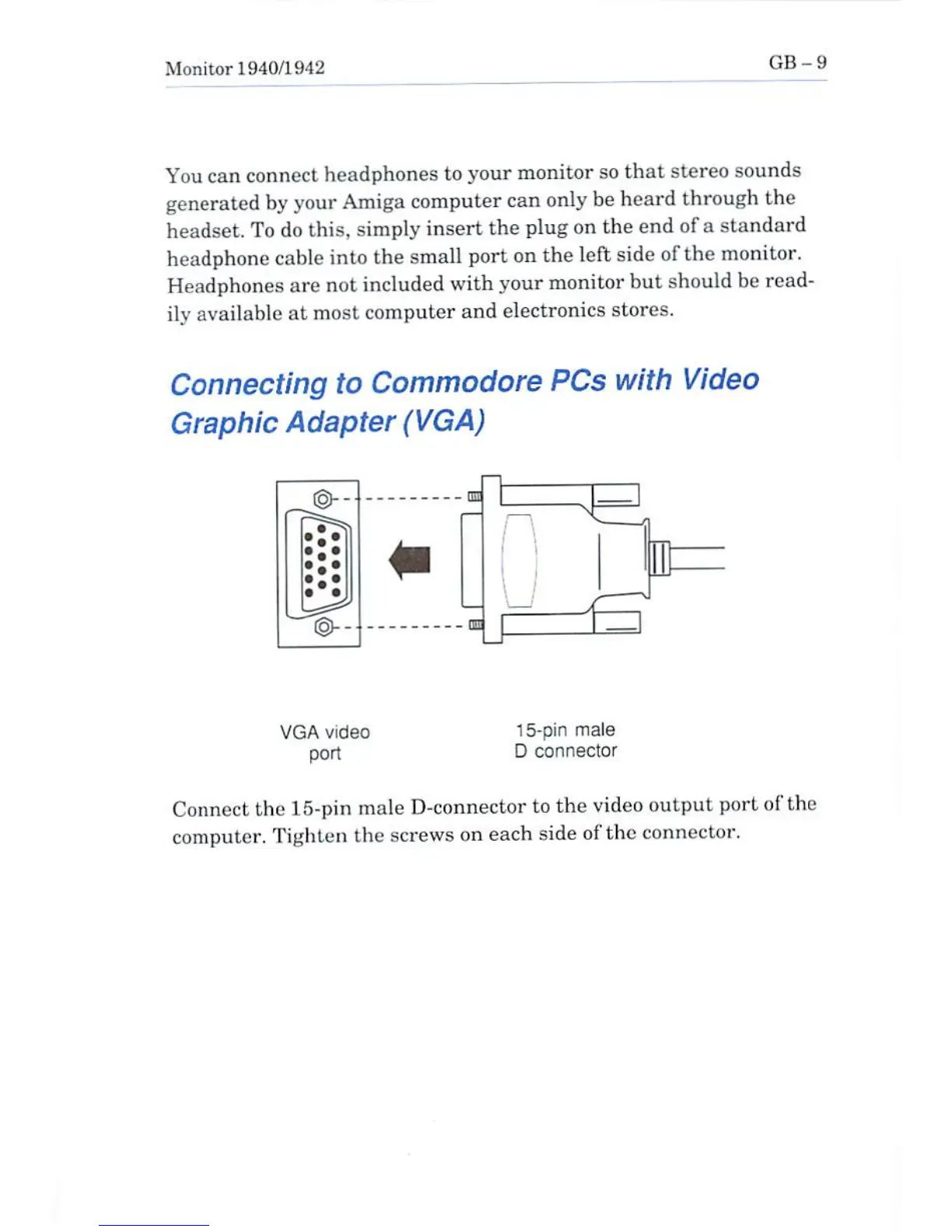
Connecting
to
Commodore
PCs
with
Video
Graphic
Adapter
(VGA)
ED
VGA
video
port
15-pin
male
D
connector
Connect
the
15-pin
male
D-connector
to
the
video
output
port of
the
computer.
Tighten
the
screws
on
each
side of
the
connector.

Other manuals for Commodore 1940

Related product manuals