B
Rev
RE
Status
Model Version
04
01
Version
01
A
Status
Rev
4 of 14
page
Bulletin
AE01B-A0599-001
Installation Instructions
MT050C
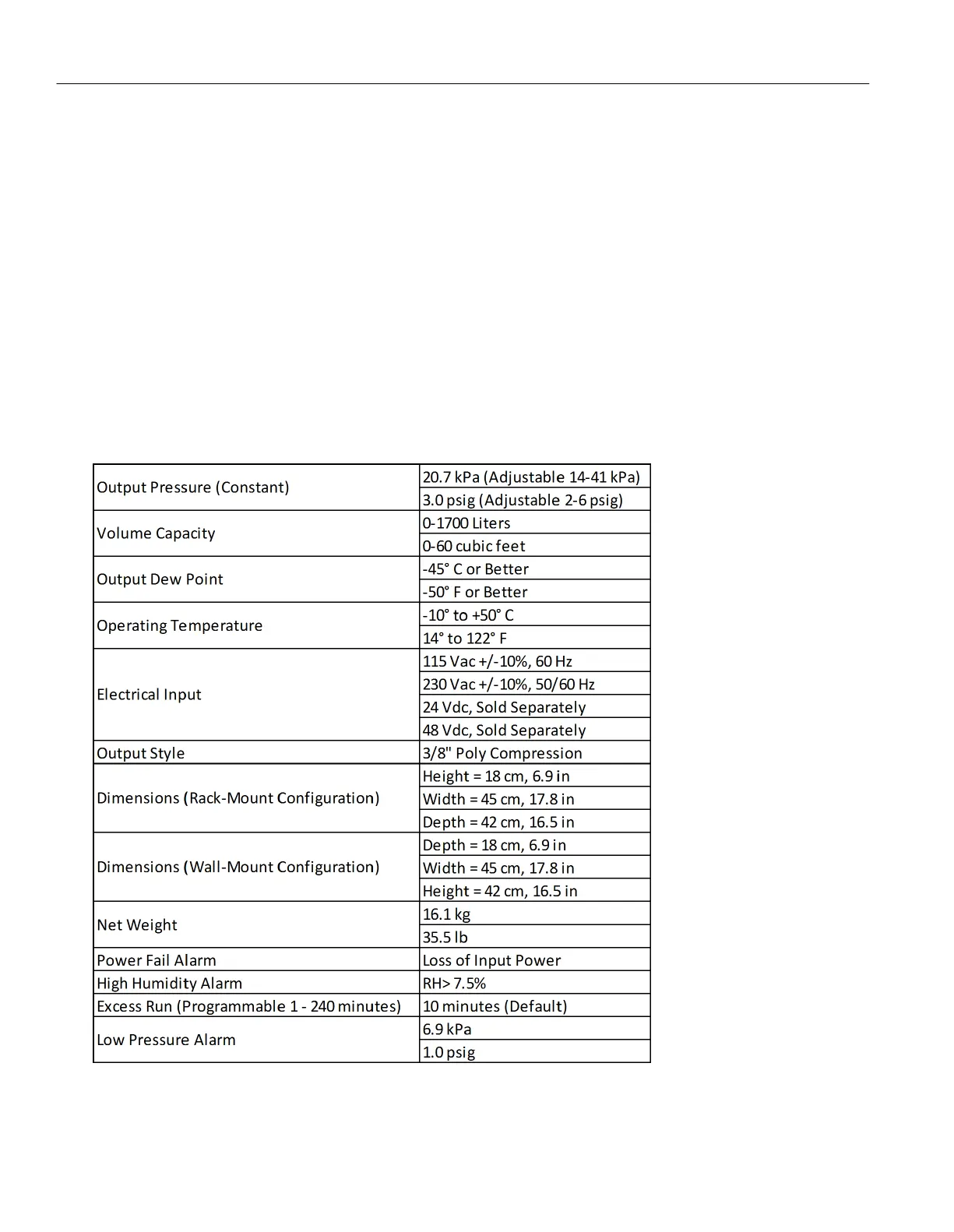
Excess Run: Factory strapped run time set in accordance with the normal run time for the dehydrator application.
Selectable times are 1, 10, 30, 120 and 240 minutes, with the 10 minute selection used on the MT050C as the
default setting.
Low Pressure: If system pressure falls below the low-pressure trigger point (1.0 psig on the MT050C), the low-
pressure alarm sensor will activate an alarm contact. This alarm is an indication of a significant system leak or a
dehydrator failure.
Note: All of the alarms clear and reset automatically, but can be manually reset in the display menus. However, if the
alarm condition still exists, the alarm will return immediately after being reset.
1.5 - Specifications


 To Next Page