EasyManua.ls Logo

CommScope PowerShift V1 - User Manual

CommScope PowerShift V1
25 pages
Print Icon
To Next Page IconTo Next Page
Loading...
User Manual
PowerShift
®
V1
Document #7761739
Version B
Question and Answer IconNeed help?

Do you have a question about the CommScope PowerShift V1 and is the answer not in the manual?

Summary

1. General

About CommScope

CommScope is the foremost supplier of one-stop, end-to-end radio frequency (RF) solutions.

4. Introduction

Introduction Purpose

The PowerShift system continuously regulates the supply output voltage at the remote radio.

PowerShift System Benefits

Lists advantages like lower operating costs, capital costs, and increased battery uptime.

PowerShift System Components

Details the components that make up the PowerShift System, including the Base Unit and Capacitive Jumper.

Graphical User Interface (GUI)

Describes the GUI software used for the PowerShift system.

5. System Operation

General Operating Description

Provides a basic operating description of an installed PowerShift system.

LED Status Indicators

Describes the four LED status indicators (1, 2, 3, and X) on each PowerShift Module.

Form C Alarm Dry Contacts

Explains how alarm status is accessible via terminal block at the rear of the unit.

DIP Switch and Data Interface

Details the DIP switch and RJ45 interface ports on the base unit.

Operating Faults and Alarms

Lists LED states, alarm conditions, and troubleshooting for faults.

6. Installation Planning

Reference Schematic for Installation

Provides a general reference schematic for PowerShift installation planning.

PowerShift Web Site for Planning

Check CommScope website for installation kits and options.

Perform a Site Walk

Evaluate and plan the installation of the PowerShift system.

Base Unit Installation Planning

Details rack unit height, mounting, depth, and clearance for the Base Unit.

Capacitive Jumper Installation Planning

Plans for mounting hardware, cable terminations for jumpers or SPD/OVP boxes.

7. Installation Guidelines

Test Tools for Installation

Lists useful additional tools for PowerShift installation testing.

General Installation Approach

Provides a general approach to performing the installation, starting with one Remote.

Overview

The CommScope PowerShift V1 is a patented and revolutionary product designed for DC power management in cellular networks and distributed antenna systems. Its primary function is to continuously regulate the supply output voltage to maintain a consistent input voltage at the remote radio, ensuring optimal performance and efficiency of the connected equipment.

Function Description

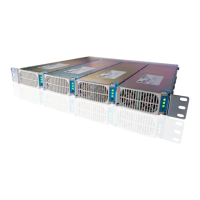
The PowerShift system operates by actively monitoring and adjusting the output voltage to deliver a stable set-point voltage at the remote radio's input. Each PowerShift Base Unit module contains three independent DC input and output circuits, each capable of powering a single remote radio. This modular design allows for flexible deployment and independent operation of each circuit.

When input power is applied to a circuit, the module initiates a startup calibration mode. During this approximately 30-second period, the module measures the round-trip resistance between its output and a corresponding Capacitive Jumper installed at the far end of the cable near the remote radio. This calibration is crucial for the system to accurately determine the power cable impedance and compensate for DC inductance, which helps in reducing power loss. During calibration, the module outputs a varying low voltage (around 10 volts) to prevent the remote radio from powering on prematurely. Once calibration is complete and successful, the module outputs the full nominal operating voltage, powering on the remote radio.

In nominal operation, the PowerShift module continuously monitors the load current demanded by the remote radio. Based on this, it dynamically adjusts its output voltage to maintain the programmed set-point voltage at the remote radio's input. If the input voltage to a module circuit falls below a certain threshold (approximately 30V), the affected circuit will re-run the initialization sequence and re-calculate the cable's round-trip resistance. This ensures that the system adapts to any changes in the power supply or cable conditions. It's important to note that if input power is removed from a normally operating circuit, the Capacitive Jumper must discharge to a low voltage before the initialization sequence can restart. This discharge typically takes a few seconds, but without a remote radio connected (no load), it can take a minute or two.

The PowerShift Base Unit requires the use of Capacitive Jumpers, which are inline devices installed between the trunk cable power conductor pair and the input to the remote radio. These jumpers are essential for the Base Unit to determine cable impedance and compensate for DC inductance, further minimizing power loss. The PowerShift Base Unit will not operate without its corresponding Capacitive Jumper. Each remote radio requires one Capacitive Jumper, which can be a standalone device or integrated into a Surge Protection Device/Over Voltage Protection (SPD/OVP) package.

Usage Features

The PowerShift system offers several benefits that enhance its usability and operational efficiency:

  • Lower Operating Costs: By precisely regulating the radio input voltage closer to the maximum, the system reduces the radio load current demand and minimizes power loss in trunk cables, leading to significant energy savings.
  • Lower Capital Equipment Costs: The efficient power delivery allows for the use of smaller gauge cables for the same radio power requirements, reducing initial infrastructure costs.
  • Increased Backup Battery Uptime: Higher radio input voltage and lower current demand optimize battery capacity utilization, extending the runtime of backup power systems during outages.
  • Future Proofing: The system's design can accommodate increases in radio power requirements without necessarily needing larger or additional power cables, offering scalability and adaptability for future network upgrades.
  • Plug-and-Play Modules: The PowerShift modules are designed for easy plug-and-play installation and site maintenance, simplifying deployment and replacement procedures.
  • Remote Alarm Monitoring: The Base Unit shelf includes dry-contacts (Form C) for remote alarm monitoring, allowing for integration into existing site alarm infrastructure and providing timely notifications of critical or major alarm conditions.
  • Graphical User Interface (GUI): The PowerShift V1 GUI, an executable Windows PC application, connects to the PowerShift shelf via a custom RS485 interface cable. This GUI provides detailed status information, allows for configuration, and helps in troubleshooting, offering a comprehensive management tool for the system.

Maintenance Features

The PowerShift system incorporates several features to aid in maintenance and troubleshooting:

  • LED Status Indicators: Each PowerShift Module is equipped with four LED status indicators: "1," "2," "3" for individual circuit status, and "X" for overall module status. These LEDs provide immediate visual feedback on the operational state of the module and its circuits.
    • A solid green "X" LED indicates input power is active to at least one circuit.
    • A blinking green circuit LED (1, 2, or 3) during calibration indicates line resistance measurement is in progress.
    • Solid green circuit LEDs indicate nominal operation with the remote radio powered on.
    • Red or yellow LEDs indicate fault conditions at either the module or circuit level, prompting further investigation.
  • Alarm Dry Contacts: The Form C alarm dry contacts at the rear of the unit provide external accessibility to the alarm status, allowing site technicians to connect to a central monitoring system for critical and major alarm notifications.
  • Troubleshooting Guidance: The manual provides a detailed table of LED states and corresponding alarm conditions (Critical, Major, None), along with descriptions and possible causes. This guidance helps technicians understand and resolve issues such as:
    • No input power.
    • Unsuccessful line resistance measurement (e.g., due to a disconnected or failed Capacitive Jumper).
    • Module-level faults (e.g., fan failure).
    • Overload or short-circuit conditions on a circuit.
    • Module over-temperature.
    • Input voltage out of range.
    • Internal module hardware failure.
  • Fault Reset Mechanisms: For certain fault conditions, the system allows for resolution through actions like clearing the fault via the GUI "clear" button or cycling the input power for the affected circuit. This helps in restoring operation after a temporary issue has been addressed.
  • Capacitive Jumper Discharge: When powering off a circuit for troubleshooting or reconnection, a waiting period of 2-3 minutes is recommended for the Capacitive Jumper to discharge. This minimizes any negligible spark that might occur upon reconnection, ensuring safety and smooth operation.
  • Installation Guidelines: The manual emphasizes a methodical installation approach, starting with a single remote for testing. This "sanity check" helps confirm proper voltage polarity and successful cable resistance calibration early in the process, preventing larger issues during full deployment.
  • Test Tools: Recommendations for useful test tools, such as a DC voltmeter/multi-meter and a DC inductive (clamp-on) current meter, are provided to assist technicians in verifying voltage, polarity, and current measurements during installation and troubleshooting.

CommScope PowerShift V1 Specifications

General IconGeneral
Input Voltage100-240 VAC
Input Frequency50/60 Hz
Humidity5% to 95% non-condensing
Storage Temperature-40°C to 70°C
Safety StandardsUL