INS_CNFE3TX2CXMS(U,E)_REV– Rev. 7.11.18 PAGE 26
QUICK START GUIDE CNFE3TX2CXMS(U,E)
TECH SUPPORT: 1.888.678.9427
NAT Setting
Virtual Server
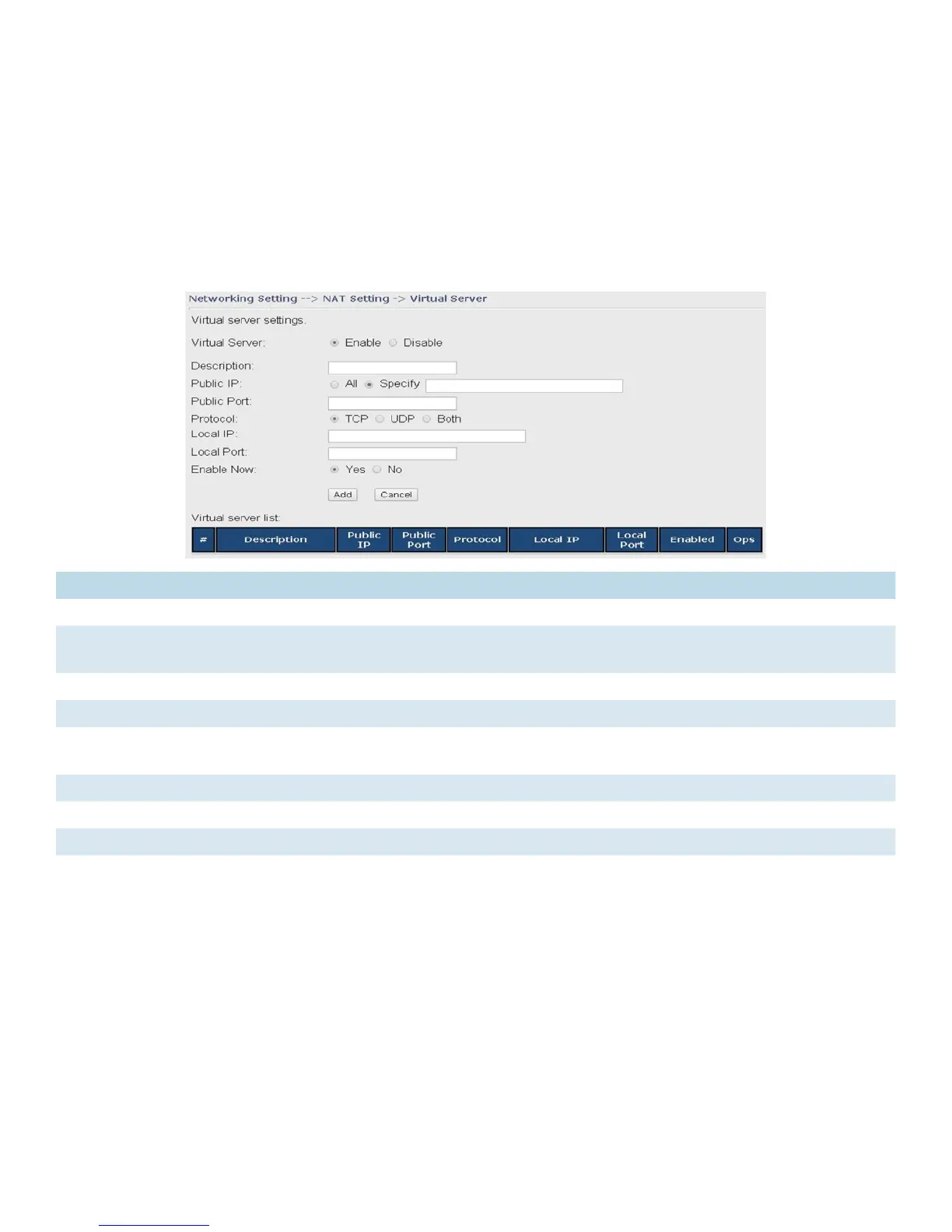
This page allows you to set up virtual server setting. A virtual server allows Internet users to
access services on your LAN. This is a useful function if you host services online such as FTP, Web
or game servers. A public port must be defined for the virtual server on your router in order to
redirect traffic to an internal LAN IP address and LAN port. Any PC used as a virtual server must
have a static or reserved IP address.
Label Description
Virtual Server Select Enabled or Disabled to activate or deactivate virtual server
Description Enter the description of the entry. Acceptable characters are 0-9, a-z, and A-Z. A null
value is allowed.
Public IP Enter a public IP allowed to access the virtual service. If not specified, choose All.
Public Port The port number to be used to access the virtual service on the
WAN (Wide Area
Network) Protocol
The protocol used for the virtual service
Local IP The IP address of the computer that will provide virtual service
Local Port The port number of the service used by the private IP computer
Enable Now Enables the virtual server entry after adding it
Virtual server list Click Edit to edit the virtual service entry and Del to delete the entry.


 To Next Page